
November 19, 2025
Add Products to Your TikTok Shop Showcase Guide
November 19, 2025
Add Products to Your TikTok Shop Showcase Guide
Learn how to add products to your TikTok Shop Showcase using URLs, videos, and FYP tools to boost sales, commissions, and creator success.
Add Products to TikTok Shop Showcase
Learn how to add products to your TikTok Shop Showcase. Boost sales, grow commissions, and optimize your creator storefront easily.
1. Add Products Using a TikTok Shop Product URL
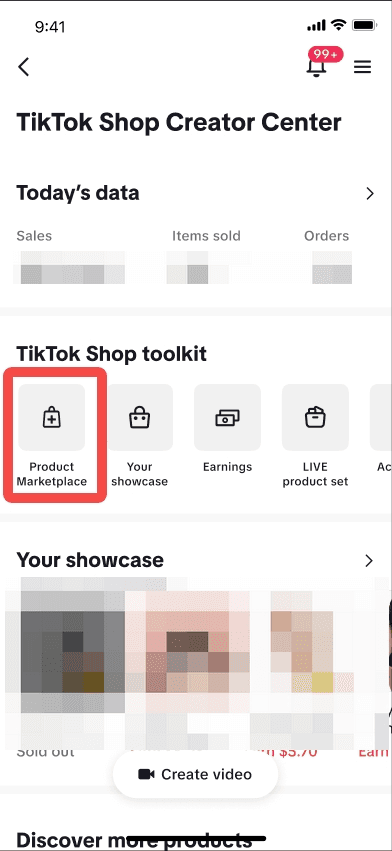
Got a direct product link from a seller or campaign? Here’s how to use it:
Step-by-step:
Go to your TikTok Shop Creator Center and click Product Marketplace.
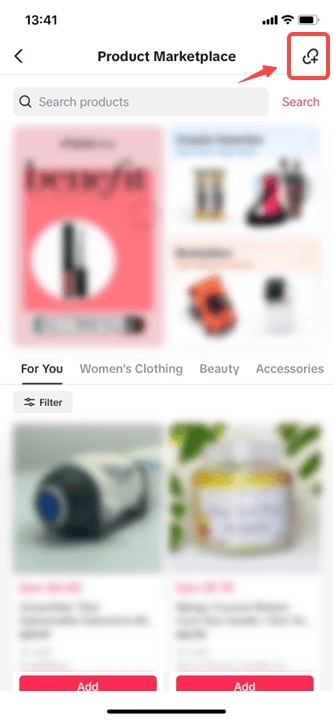
Tap the URL icon in the top-right corner.
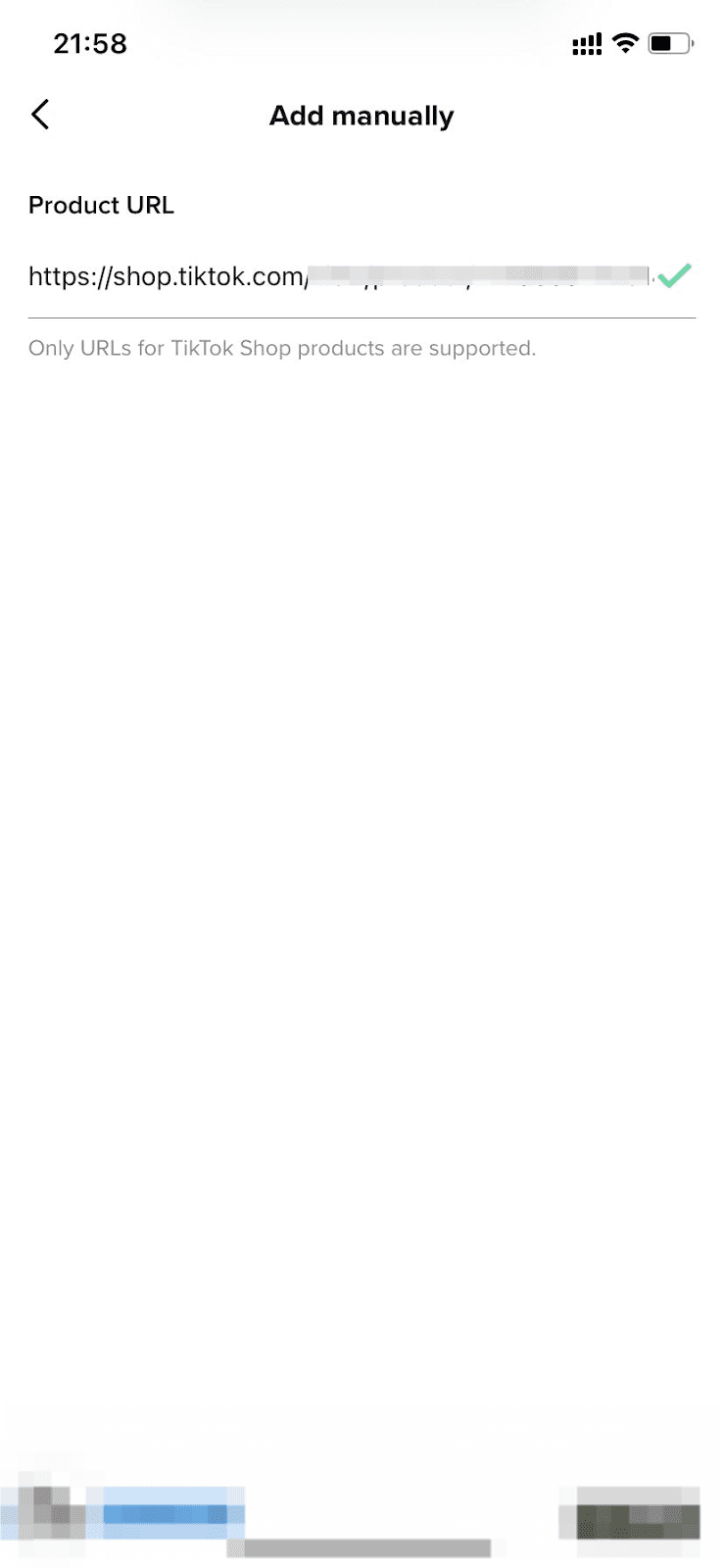
Paste the TikTok Shop product URL into the field.
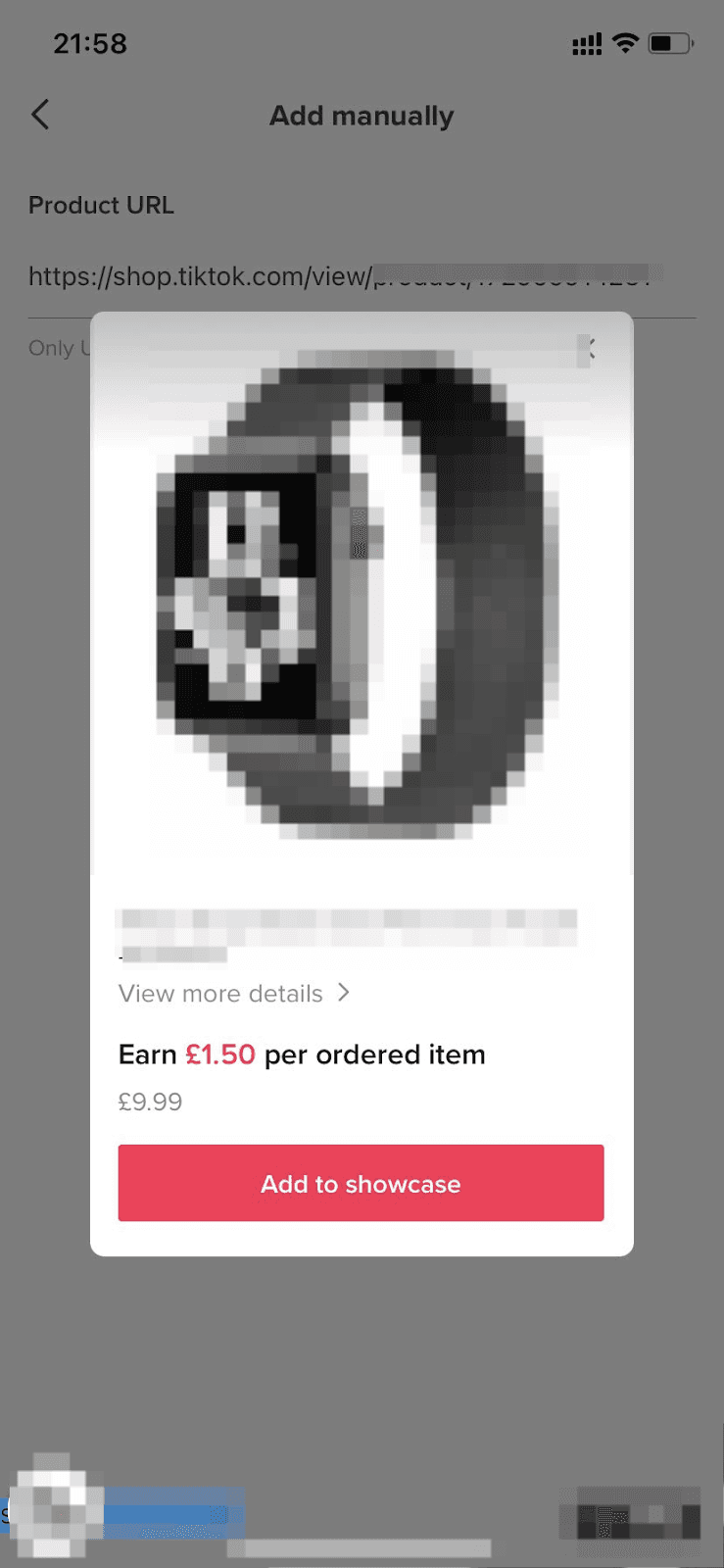
A preview of the product will appear—click Add This Product to include it in your showcase.
🎯 Pro Tip: This method is ideal when working with sellers who share specific product links or when you're part of a managed affiliate campaign.
2. Add Products from a Creator’s Video or LIVE
Ever seen another creator promoting a product you want to try too? You can add that item directly from the content.
Here’s how:
Tap the product link featured in a short video or LIVE.
On the product detail page, click the three dots in the top right corner.
Select Promote This Product.
You’ll see a confirmation once it’s added to your showcase. It’s that simple.
3. Add Products From Your FYP (Yes, Really)
Scrolling the For You Page and spot a trending product? TikTok now makes it easy to add it right from your feed.
You may see an Add-Product Card appear below a creator’s video. Tap Add to place the item in your Showcase instantly, or tap More Products to browse similar options in the Product Marketplace.
This is a great way to jump on trending products in real time—especially if your audience aligns with viral finds.
4. Agree to Global Brand Terms Before Adding
Some major global brands (think Estée Lauder, L’Oréal, etc.) require creators to accept their Terms & Conditions before you can promote their products.
If this applies, a pop-up will appear when you try to add their item. Simply review the terms and tap Add—you’re then all set to start creating and earning.
Why Your Showcase Matters
The more intentional you are with what you add, the better your chances of conversion. Consider:
Does the product align with your niche?
Is it trending or evergreen?
Can you speak to it authentically?
At Zorilla Marketing, we help creators and brands find that perfect match—whether it’s optimizing your showcase, discovering affiliate bestsellers, or crafting a full TikTok Shop strategy.
✅ Final Thoughts
Adding products to your TikTok Shop Showcase is no longer just about searching. With multiple paths—URLs, videos, and even your feed—you can stock your shop smartly, stay relevant, and drive consistent commissions.
Also read:


Learn how to add products to your TikTok Shop Showcase using URLs, videos, and FYP tools to boost sales, commissions, and creator success.
Add Products to TikTok Shop Showcase
Learn how to add products to your TikTok Shop Showcase. Boost sales, grow commissions, and optimize your creator storefront easily.
1. Add Products Using a TikTok Shop Product URL
Got a direct product link from a seller or campaign? Here’s how to use it:
Step-by-step:
Go to your TikTok Shop Creator Center and click Product Marketplace.
Tap the URL icon in the top-right corner.
Paste the TikTok Shop product URL into the field.
A preview of the product will appear—click Add This Product to include it in your showcase.
🎯 Pro Tip: This method is ideal when working with sellers who share specific product links or when you're part of a managed affiliate campaign.
2. Add Products from a Creator’s Video or LIVE
Ever seen another creator promoting a product you want to try too? You can add that item directly from the content.
Here’s how:
Tap the product link featured in a short video or LIVE.
On the product detail page, click the three dots in the top right corner.
Select Promote This Product.
You’ll see a confirmation once it’s added to your showcase. It’s that simple.
3. Add Products From Your FYP (Yes, Really)
Scrolling the For You Page and spot a trending product? TikTok now makes it easy to add it right from your feed.
You may see an Add-Product Card appear below a creator’s video. Tap Add to place the item in your Showcase instantly, or tap More Products to browse similar options in the Product Marketplace.
This is a great way to jump on trending products in real time—especially if your audience aligns with viral finds.
4. Agree to Global Brand Terms Before Adding
Some major global brands (think Estée Lauder, L’Oréal, etc.) require creators to accept their Terms & Conditions before you can promote their products.
If this applies, a pop-up will appear when you try to add their item. Simply review the terms and tap Add—you’re then all set to start creating and earning.
Why Your Showcase Matters
The more intentional you are with what you add, the better your chances of conversion. Consider:
Does the product align with your niche?
Is it trending or evergreen?
Can you speak to it authentically?
At Zorilla Marketing, we help creators and brands find that perfect match—whether it’s optimizing your showcase, discovering affiliate bestsellers, or crafting a full TikTok Shop strategy.
✅ Final Thoughts
Adding products to your TikTok Shop Showcase is no longer just about searching. With multiple paths—URLs, videos, and even your feed—you can stock your shop smartly, stay relevant, and drive consistent commissions.
Also read:
Other Blogs
Other Blogs
Check our other project Blogs with useful insight and information for your businesses



Other Blogs
Other Blogs
Check our other project Blogs with useful insight and information for your businesses