October 16, 2025
How to Use LIVE Product Sets on TikTok Shop
October 16, 2025
How to Use LIVE Product Sets on TikTok Shop
Streamline your TikTok Shop livestreams with LIVE Product Sets — the easiest way to plan, organize, and boost conversions.
How to Use LIVE Product Sets on TikTok Shop to Streamline Your Livestreams
If you’re running regular TikTok Shop livestreams — whether as a creator, brand, or affiliate — you’ve probably found yourself scrambling to manually add products mid-session. It’s not ideal.
Enter: LIVE Product Sets. This underrated feature is designed to help you pre-organize your product lineup, making it easier to go live with confidence, speed, and strategy.
In this guide, we’ll break down what LIVE Product Sets are, how to use them, and how Zorilla Marketing LLP helps creators and sellers get the most out of them.
What Is a LIVE Product Set?
A LIVE Product Set is a curated list of products that you can instantly load into a livestream with one click. Think of it as your preset shopping bag — one that can be used, reused, and quickly tweaked for different sessions.
Each account can create up to 50 product sets, and each set can hold up to 100 products.
Why Should Creators Use Product Sets?
If you regularly go live with similar products — your bestsellers, bundles, or trending promos — manually adding them every time wastes valuable prep time. LIVE Product Sets allow you to:
🔄 Save time by reusing preset product collections
🧹 Stay organized with clearly sorted product lists
⚡ Move faster during LIVE by adding multiple products in one click
🎯 Plan with intent by prepping the right offers for the right event
At Zorilla, we work with creators to build strategic product sets for launches, promotions, and seasonal drops — all aimed at increasing conversions.
How to Create and Manage a LIVE Product Set
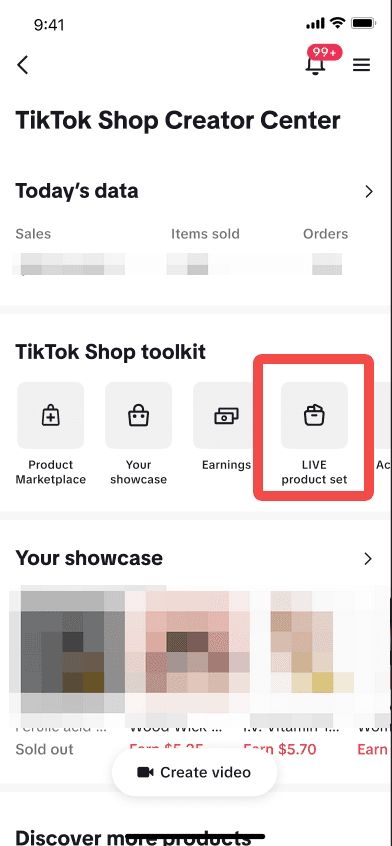
You can create LIVE Product Sets either via the TikTok Shop mobile app or the LIVE Manager on desktop.
▶ On Mobile (In-App Creator Center)
Navigate to LIVE Product Sets
Tap TikTok Shop on your profile, then go to Tools > LIVE Product Set.
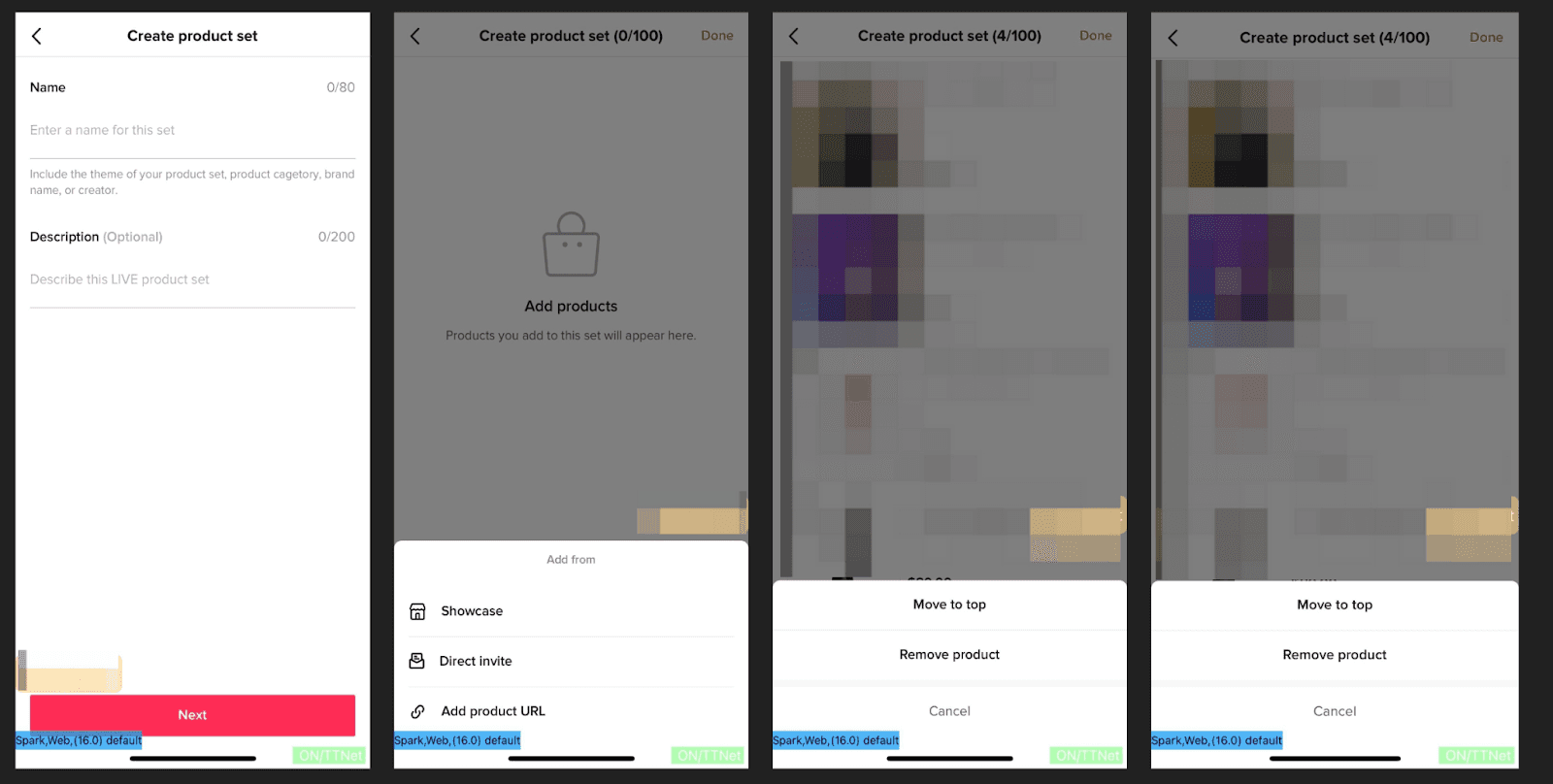
Create a New Set
Enter a name and (optionally) a description.
Tap Next to move on.
Add Products
Add from various sources:
Your Showcase
Direct Invites
Product URLs
TikTok Shop (for sellers)
Manage the Set
Add or remove products via “Edit Set”
Reorder items using the drag handle
Swipe left to copy or delete a full set
💻 On Desktop (LIVE Manager)
Access LIVE Product Sets
Go to LIVE Manager > Livestreams > LIVE Product Sets.
Click “Create Product Set”
Enter the set name and description.
Add Products
Pull from:
Showcase
Direct Invite
Product URLs
TikTok Shop (sellers only)
Manage Your Sets
Click the pencil icon to edit
Use the six-dot icon to reorder products
Duplicate or delete with one click
How to Use a Product Set During a Livestream
Whether you're live already or prepping to go live, here’s how to instantly load your product set:
✅ On Mobile:
Tap the shopping cart icon
Select Products > Product Set
Tap Add All — done!
✅ On Desktop (LIVE Console):
Go to Livestream Panel > Add New Products
Choose your Product Set
Tap Add All to push the products into your stream
You’ll see a confirmation that the products were added successfully — they’ll now be available to pin and feature during the session.
Troubleshooting Tips
If you're having trouble adding products to a LIVE Product Set, check for:
❌ Network issues — retry once stable
🔁 Product already included in your list
🛑 Affiliate product is inactive or expired
🆘 Product is out of stock or removed from TikTok Shop
TikTok will typically display a system message to guide you when something goes wrong.
How Zorilla Helps You Optimize for LIVE Success
At Zorilla Marketing, we help creators and brands not only understand how to use tools like LIVE Product Sets — we help strategize them:
💼 Curated sets for high-converting bundles
📊 Data-driven product prioritization
📅 Campaign-based LIVE prep calendars
🎥 Scripting guidance to align product flow with content
We believe TikTok LIVE is more than just tech — it's a sales experience. And we’re here to help you nail it.
Ready to Level Up Your LIVE Strategy?
If you're tired of disorganized LIVEs and scrambling to add products, let’s fix that. Whether you’re a creator or a brand, Zorilla can help you build out a repeatable LIVE content engine that sells.
👉 Talk to our team to set up your LIVE system the right way.
Also read:-
How to Use LIVE Product Sets on TikTok Shop to Streamline Your Livestreams
If you’re running regular TikTok Shop livestreams — whether as a creator, brand, or affiliate — you’ve probably found yourself scrambling to manually add products mid-session. It’s not ideal.
Enter: LIVE Product Sets. This underrated feature is designed to help you pre-organize your product lineup, making it easier to go live with confidence, speed, and strategy.
In this guide, we’ll break down what LIVE Product Sets are, how to use them, and how Zorilla Marketing LLP helps creators and sellers get the most out of them.
What Is a LIVE Product Set?
A LIVE Product Set is a curated list of products that you can instantly load into a livestream with one click. Think of it as your preset shopping bag — one that can be used, reused, and quickly tweaked for different sessions.
Each account can create up to 50 product sets, and each set can hold up to 100 products.
Why Should Creators Use Product Sets?
If you regularly go live with similar products — your bestsellers, bundles, or trending promos — manually adding them every time wastes valuable prep time. LIVE Product Sets allow you to:
🔄 Save time by reusing preset product collections
🧹 Stay organized with clearly sorted product lists
⚡ Move faster during LIVE by adding multiple products in one click
🎯 Plan with intent by prepping the right offers for the right event
At Zorilla, we work with creators to build strategic product sets for launches, promotions, and seasonal drops — all aimed at increasing conversions.
How to Create and Manage a LIVE Product Set
You can create LIVE Product Sets either via the TikTok Shop mobile app or the LIVE Manager on desktop.
▶ On Mobile (In-App Creator Center)
Navigate to LIVE Product Sets
Tap TikTok Shop on your profile, then go to Tools > LIVE Product Set.
Create a New Set
Enter a name and (optionally) a description.
Tap Next to move on.
Add Products
Add from various sources:
Your Showcase
Direct Invites
Product URLs
TikTok Shop (for sellers)
Manage the Set
Add or remove products via “Edit Set”
Reorder items using the drag handle
Swipe left to copy or delete a full set
💻 On Desktop (LIVE Manager)
Access LIVE Product Sets
Go to LIVE Manager > Livestreams > LIVE Product Sets.
Click “Create Product Set”
Enter the set name and description.
Add Products
Pull from:
Showcase
Direct Invite
Product URLs
TikTok Shop (sellers only)
Manage Your Sets
Click the pencil icon to edit
Use the six-dot icon to reorder products
Duplicate or delete with one click
How to Use a Product Set During a Livestream
Whether you're live already or prepping to go live, here’s how to instantly load your product set:
✅ On Mobile:
Tap the shopping cart icon
Select Products > Product Set
Tap Add All — done!
✅ On Desktop (LIVE Console):
Go to Livestream Panel > Add New Products
Choose your Product Set
Tap Add All to push the products into your stream
You’ll see a confirmation that the products were added successfully — they’ll now be available to pin and feature during the session.
Troubleshooting Tips
If you're having trouble adding products to a LIVE Product Set, check for:
❌ Network issues — retry once stable
🔁 Product already included in your list
🛑 Affiliate product is inactive or expired
🆘 Product is out of stock or removed from TikTok Shop
TikTok will typically display a system message to guide you when something goes wrong.
How Zorilla Helps You Optimize for LIVE Success
At Zorilla Marketing, we help creators and brands not only understand how to use tools like LIVE Product Sets — we help strategize them:
💼 Curated sets for high-converting bundles
📊 Data-driven product prioritization
📅 Campaign-based LIVE prep calendars
🎥 Scripting guidance to align product flow with content
We believe TikTok LIVE is more than just tech — it's a sales experience. And we’re here to help you nail it.
Ready to Level Up Your LIVE Strategy?
If you're tired of disorganized LIVEs and scrambling to add products, let’s fix that. Whether you’re a creator or a brand, Zorilla can help you build out a repeatable LIVE content engine that sells.
👉 Talk to our team to set up your LIVE system the right way.
Also read:-
Streamline your TikTok Shop livestreams with LIVE Product Sets — the easiest way to plan, organize, and boost conversions.
How to Use LIVE Product Sets on TikTok Shop to Streamline Your Livestreams
If you’re running regular TikTok Shop livestreams — whether as a creator, brand, or affiliate — you’ve probably found yourself scrambling to manually add products mid-session. It’s not ideal.
Enter: LIVE Product Sets. This underrated feature is designed to help you pre-organize your product lineup, making it easier to go live with confidence, speed, and strategy.
In this guide, we’ll break down what LIVE Product Sets are, how to use them, and how Zorilla Marketing LLP helps creators and sellers get the most out of them.
What Is a LIVE Product Set?
A LIVE Product Set is a curated list of products that you can instantly load into a livestream with one click. Think of it as your preset shopping bag — one that can be used, reused, and quickly tweaked for different sessions.
Each account can create up to 50 product sets, and each set can hold up to 100 products.
Why Should Creators Use Product Sets?
If you regularly go live with similar products — your bestsellers, bundles, or trending promos — manually adding them every time wastes valuable prep time. LIVE Product Sets allow you to:
🔄 Save time by reusing preset product collections
🧹 Stay organized with clearly sorted product lists
⚡ Move faster during LIVE by adding multiple products in one click
🎯 Plan with intent by prepping the right offers for the right event
At Zorilla, we work with creators to build strategic product sets for launches, promotions, and seasonal drops — all aimed at increasing conversions.
How to Create and Manage a LIVE Product Set
You can create LIVE Product Sets either via the TikTok Shop mobile app or the LIVE Manager on desktop.
▶ On Mobile (In-App Creator Center)
Navigate to LIVE Product Sets
Tap TikTok Shop on your profile, then go to Tools > LIVE Product Set.
Create a New Set
Enter a name and (optionally) a description.
Tap Next to move on.
Add Products
Add from various sources:
Your Showcase
Direct Invites
Product URLs
TikTok Shop (for sellers)
Manage the Set
Add or remove products via “Edit Set”
Reorder items using the drag handle
Swipe left to copy or delete a full set
💻 On Desktop (LIVE Manager)
Access LIVE Product Sets
Go to LIVE Manager > Livestreams > LIVE Product Sets.
Click “Create Product Set”
Enter the set name and description.
Add Products
Pull from:
Showcase
Direct Invite
Product URLs
TikTok Shop (sellers only)
Manage Your Sets
Click the pencil icon to edit
Use the six-dot icon to reorder products
Duplicate or delete with one click
How to Use a Product Set During a Livestream
Whether you're live already or prepping to go live, here’s how to instantly load your product set:
✅ On Mobile:
Tap the shopping cart icon
Select Products > Product Set
Tap Add All — done!
✅ On Desktop (LIVE Console):
Go to Livestream Panel > Add New Products
Choose your Product Set
Tap Add All to push the products into your stream
You’ll see a confirmation that the products were added successfully — they’ll now be available to pin and feature during the session.
Troubleshooting Tips
If you're having trouble adding products to a LIVE Product Set, check for:
❌ Network issues — retry once stable
🔁 Product already included in your list
🛑 Affiliate product is inactive or expired
🆘 Product is out of stock or removed from TikTok Shop
TikTok will typically display a system message to guide you when something goes wrong.
How Zorilla Helps You Optimize for LIVE Success
At Zorilla Marketing, we help creators and brands not only understand how to use tools like LIVE Product Sets — we help strategize them:
💼 Curated sets for high-converting bundles
📊 Data-driven product prioritization
📅 Campaign-based LIVE prep calendars
🎥 Scripting guidance to align product flow with content
We believe TikTok LIVE is more than just tech — it's a sales experience. And we’re here to help you nail it.
Ready to Level Up Your LIVE Strategy?
If you're tired of disorganized LIVEs and scrambling to add products, let’s fix that. Whether you’re a creator or a brand, Zorilla can help you build out a repeatable LIVE content engine that sells.
👉 Talk to our team to set up your LIVE system the right way.
Also read:-
Other Blogs
Other Blogs
Check our other project Blogs with useful insight and information for your businesses



Other Blogs
Other Blogs
Check our other project Blogs with useful insight and information for your businesses