
February 25, 2026
The Complete TikTok Shop Account Settings Guide for Sellers
February 25, 2026
The Complete TikTok Shop Account Settings Guide for Sellers
A practical guide to mastering TikTok Shop account settings for secure, scalable e-commerce growth.
The Ultimate Guide to TikTok Shop Account Settings for Serious Sellers
When people talk about scaling on TikTok Shop, they usually focus on creators, viral videos, and conversion hacks.
But here’s the truth most sellers learn the hard way:
If your backend isn’t set up properly, growth becomes chaos.
Missed violation notices.
Delayed payouts.
Rejected brand verifications.
Team members with the wrong permissions.
It’s not glamorous, but your account settings are the foundation of everything you build.
This guide walks you through how to manage TikTok Shop settings properly — so you can scale confidently, not reactively.
Why Account Settings Matter More Than You Think
Think of your Seller Center as your business control room.
Every order, every payout, every warning, every brand approval flows through here.
If you’re:
Launching your brand on TikTok Shop
Scaling with influencers
Managing a growing internal team
Working with an agency
Running paid Shop Ads
Then your account structure needs to be clean, secure, and intentional.
Sellers who ignore this part usually end up fixing preventable problems later.
Step 1: Lock Down Your Account Security
Start with the basics.
Inside Seller Center → My Account → My Profile, review:
Login email
Phone number
Password
Linked TikTok account
Turn On Two-Step Verification
This is not optional once you start scaling.
Two-step verification means no one can log in without both a password and a verification code. It protects you from:
Internal access mistakes
Compromised credentials
Unauthorized logins
If you’re running campaigns with creators or giving access to agencies, this becomes critical.
You can also review and remove trusted devices. If someone leaves your team, remove their device immediately.
A secure foundation saves you from expensive disruptions later.
Step 2: Clean Up Your Seller Information
Your Seller Information section includes:
Shop name
Shop logo
Business type
Seller type
Contact information
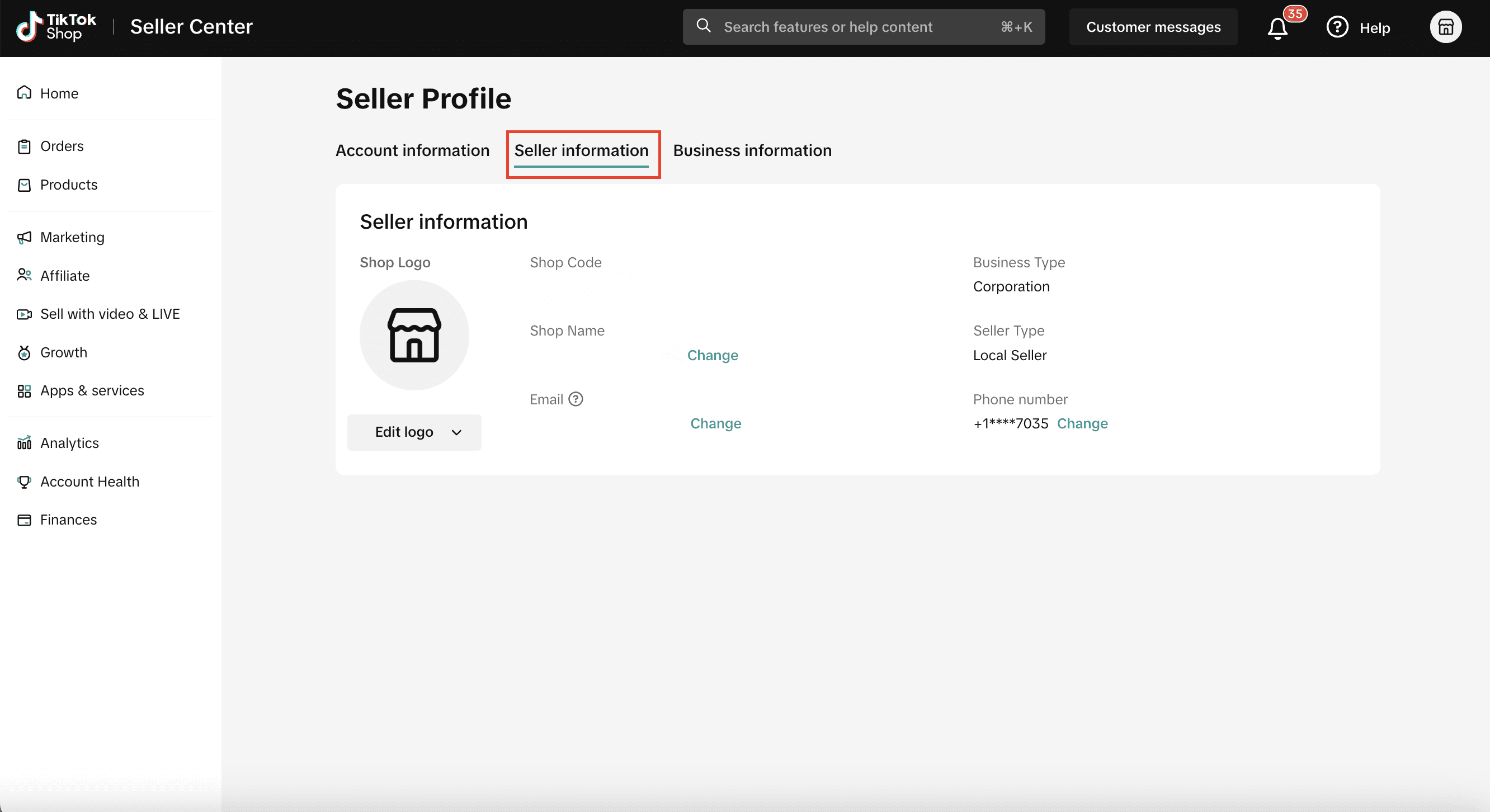
This isn’t just paperwork. It impacts:
How customers perceive your brand
How creators present your shop
Platform review approvals
If your shop name doesn’t match your brand identity, fix it early. Consistency builds trust, especially when your products appear in livestreams and affiliate videos.
Step 3: Get Brand Authorization Right
This is one of the biggest friction points for sellers.
If you sell branded products, you must verify brand qualification properly.
Go to:
My Account → Account Settings → Qualification Center → Brand Qualification
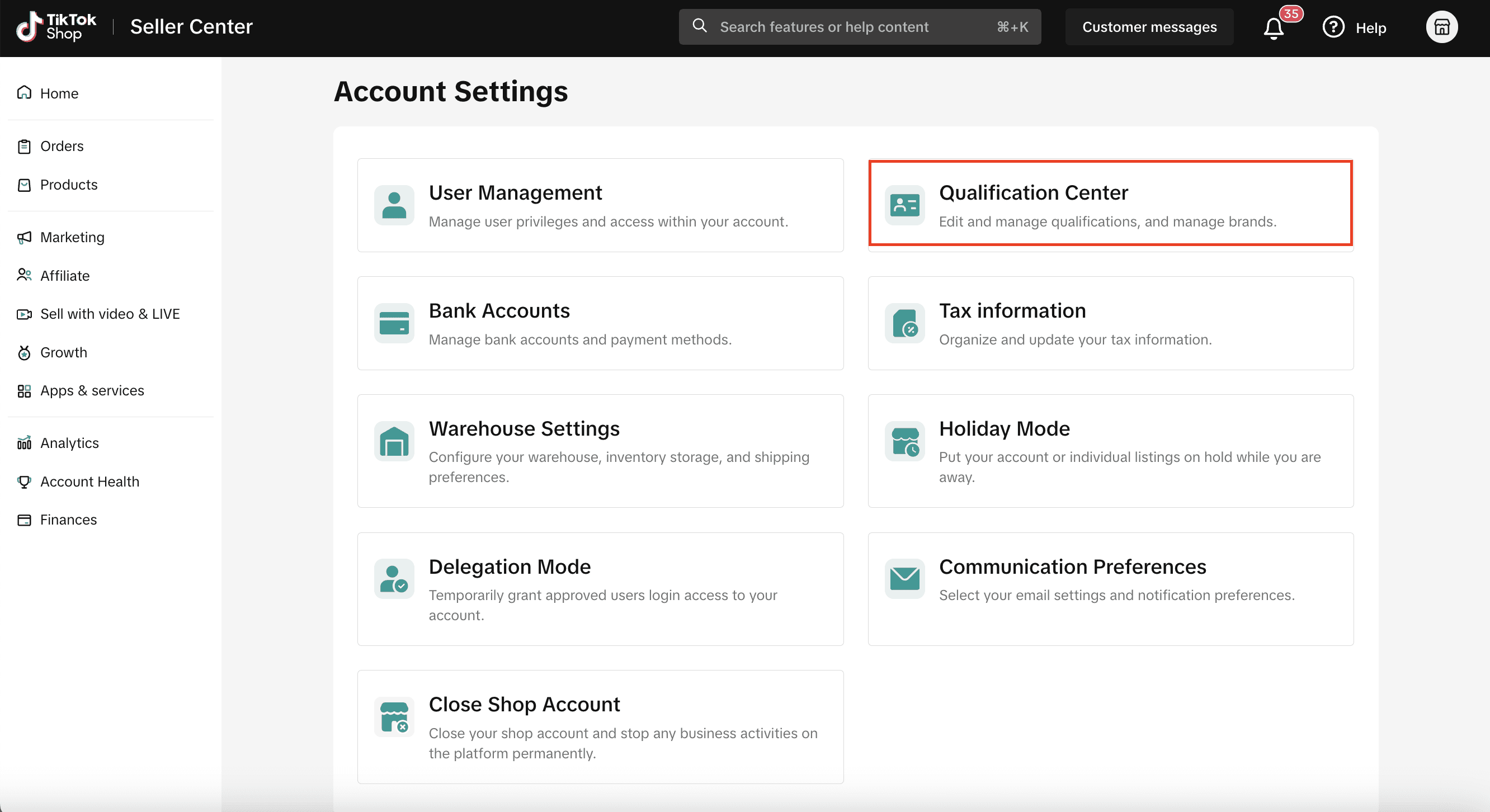
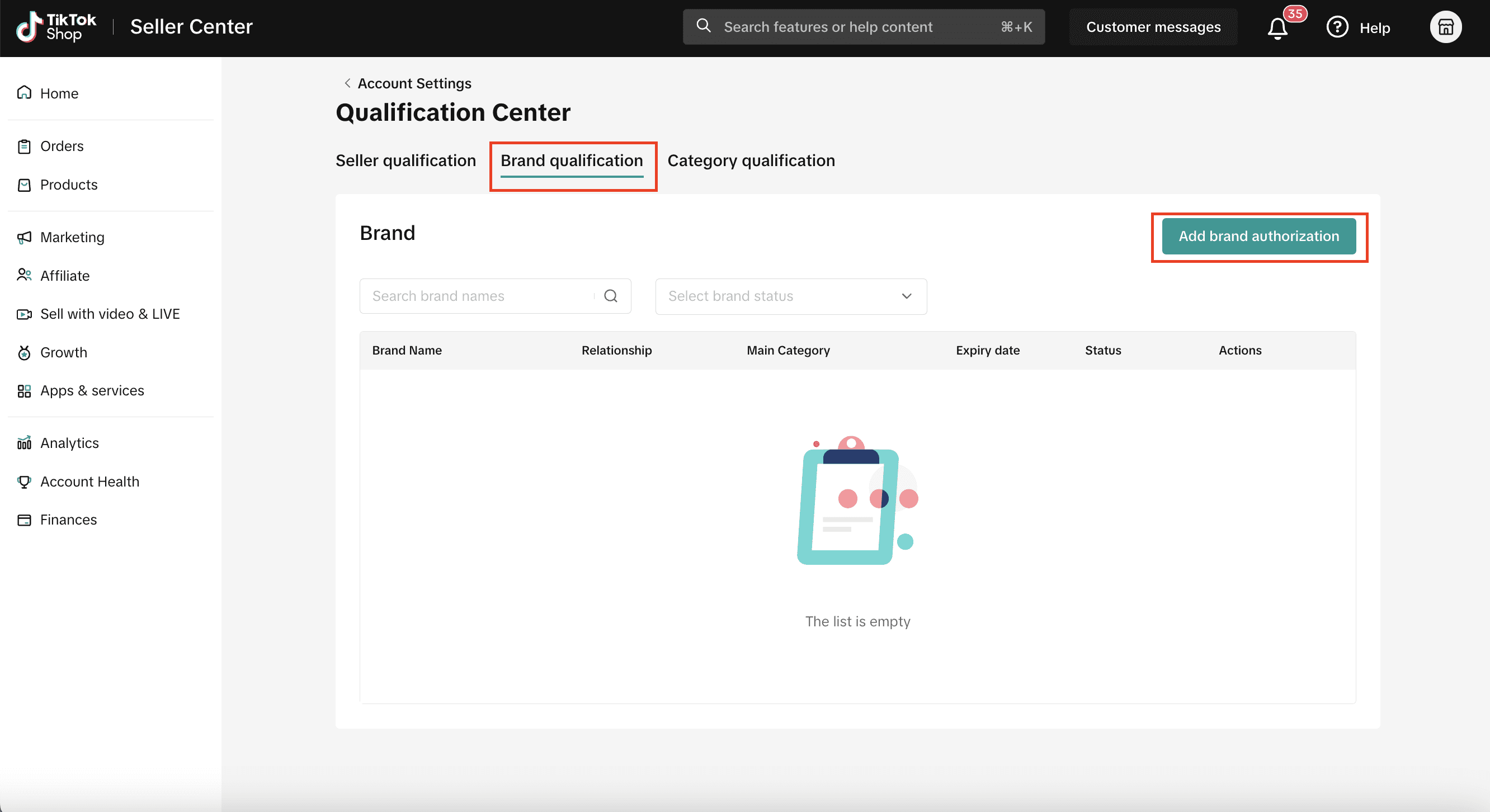
You’ll choose one of three paths:
Trademark Owner
If you own the trademark directly.
You’ll need:
Valid trademark number
Email verification
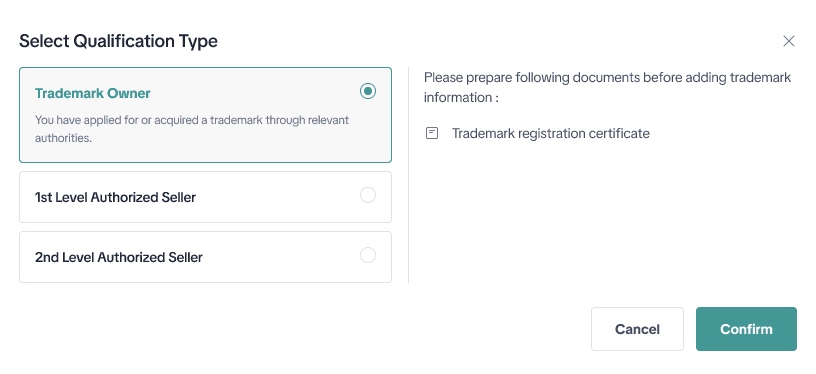
First-Level Authorized Seller
If the brand authorized you directly.
You’ll need:
Official authorization letter
Expiry date
Brand contact email
Second-Level Authorized Seller
If you’re authorized through another distributor.
You’ll need:
Both level 1 and level 2 authorization documents
Important: If you delay verification, you have 10 days to complete it. Miss that window and you’ll need to resubmit.
Many sellers rush into creator campaigns before brand verification is finalized. That’s risky. Always secure your brand status first.
Step 4: Structure User Roles Properly
If you’re sharing your main login with multiple people, stop.
Instead, use User Management inside Account Settings.
You can:
Create separate user accounts
Assign roles and permissions
Limit access to financial data
Control who can respond to violations
For example:
Your content team doesn’t need bank access.
Your finance team doesn’t need ad permissions.
Your agency shouldn’t control compliance settings.
Structured access prevents internal mistakes.
When Zorilla Marketing helps sellers onboard, this is one of the first systems we put in place. Clean permissions make scaling smoother.
Step 5: Make Sure Your Money Flows Smoothly
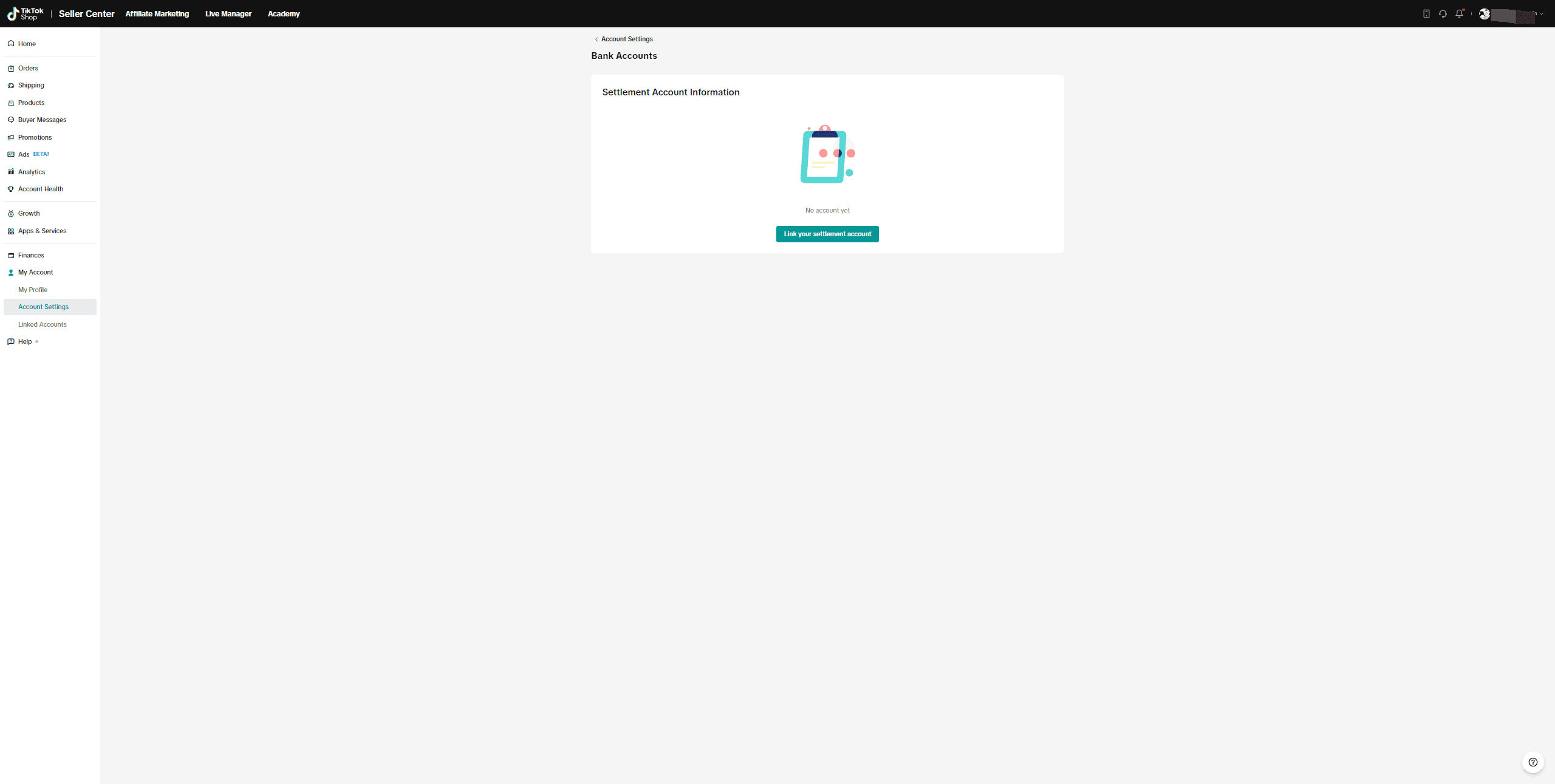
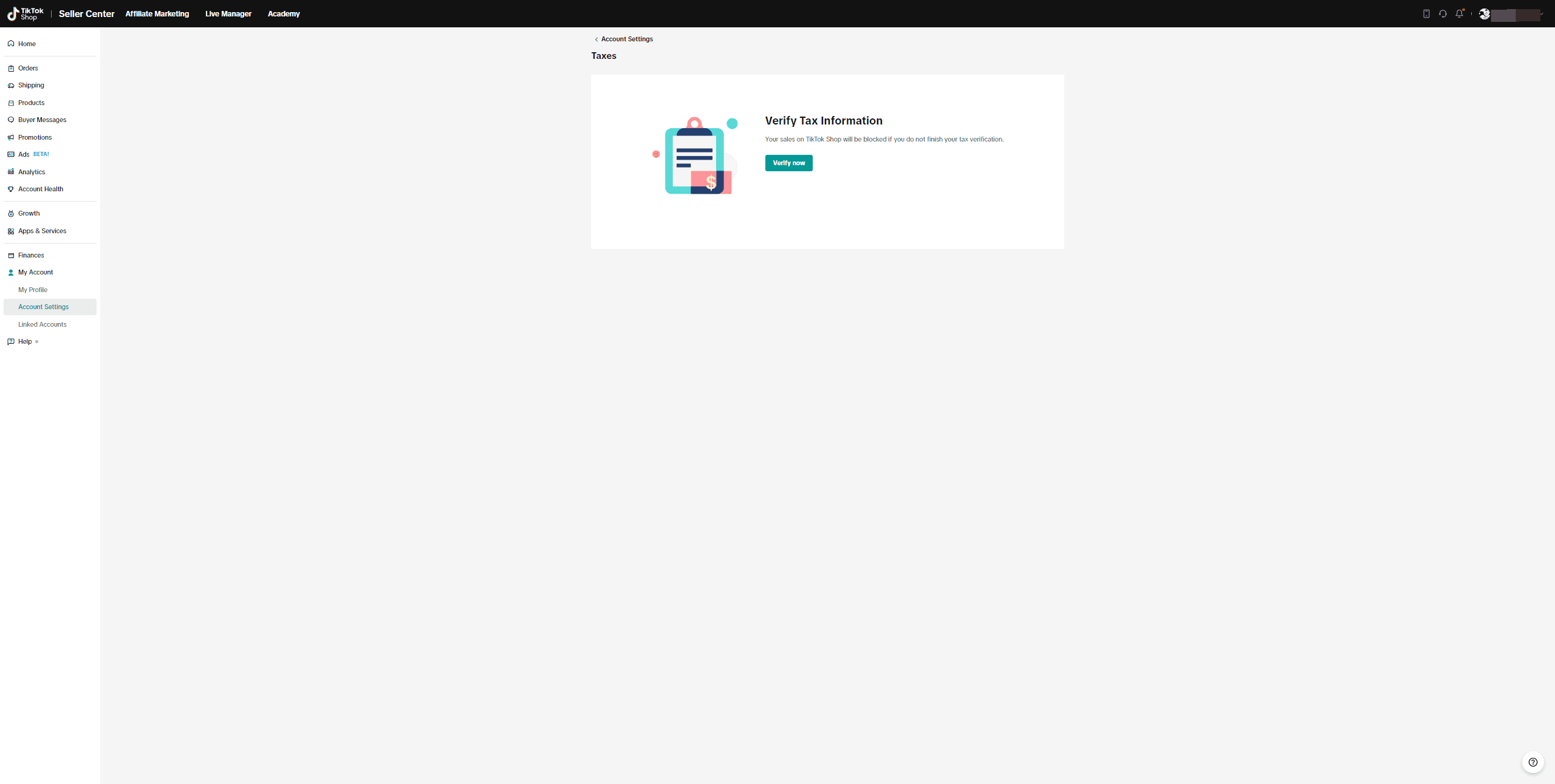
Inside your account settings, you can manage:
Settlement bank accounts
Tax information
Withdrawal setup
Before launching major campaigns, double-check:
Bank details are accurate
Business name matches registration
Tax documentation is complete
Nothing slows momentum like payout issues.
If you’re running high-volume influencer campaigns, cash flow timing matters.
Step 6: Optimize Warehouse & Fulfillment Settings
Your fulfillment setup directly affects:
Delivery times
Return handling
Shop Performance Score
Customer satisfaction
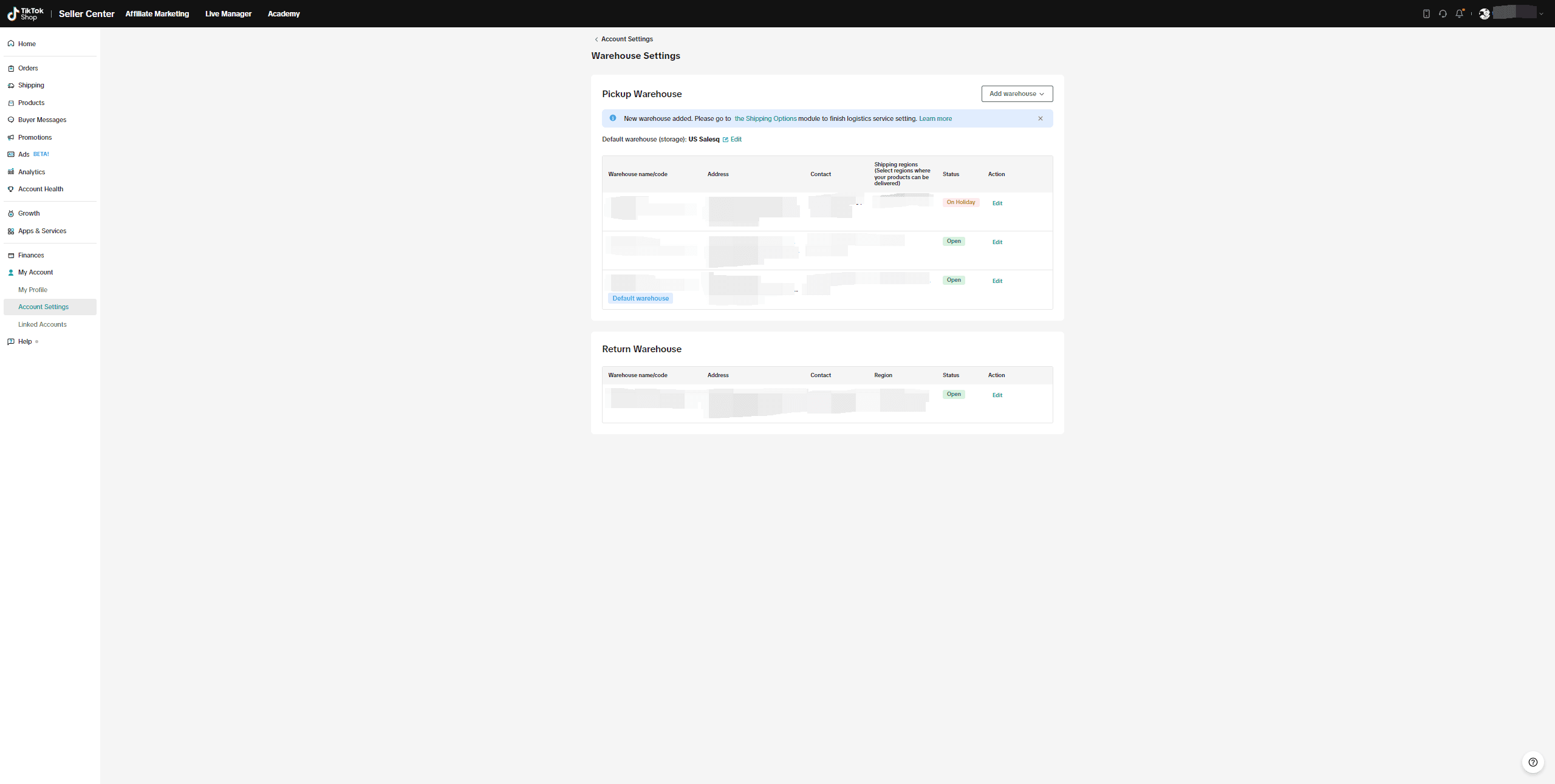
Inside Warehouse Settings, you can:
Add pickup addresses
Manage return locations
Update fulfillment configurations
If you operate multiple warehouses, ensure all are updated properly.
You can also enable Holiday Mode when operations pause. This protects your metrics instead of letting late shipments damage performance scores.
Step 7: Don’t Ignore Communication Preferences
This is one of the most underrated settings in Seller Center.
Go to:
My Account → Account Settings → Communication Preferences
You can control which accounts receive which messages.
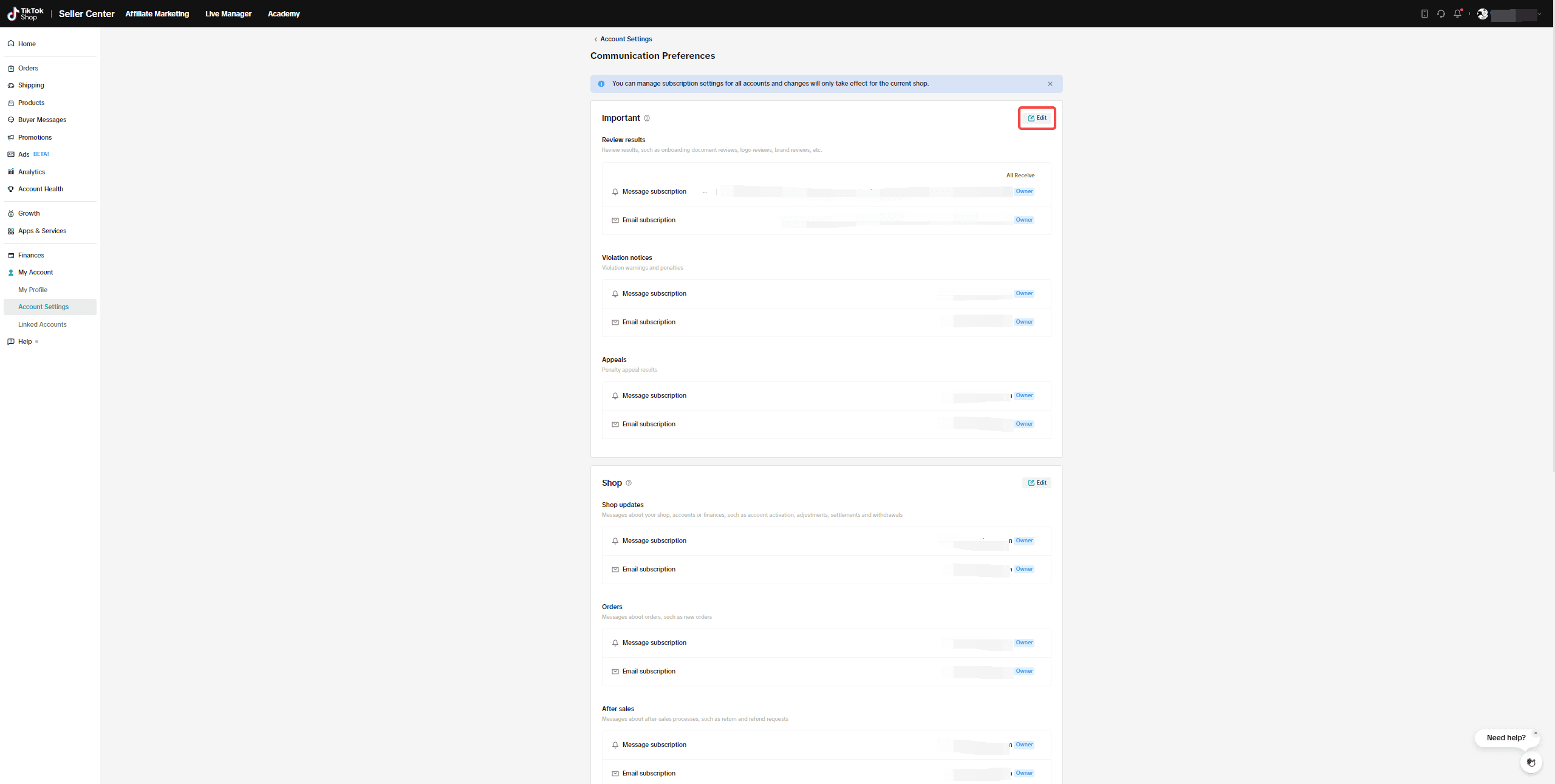
There are three categories:
Important (Cannot Be Turned Off)
Review results
Violation notices
Appeal decisions
These protect your account. Someone on your team must monitor these daily.
Shop-Related
Orders
Returns and refunds
Settlement updates
Operational notifications.
Announcements (Optional)
New feature updates
Campaign invitations
Seller growth resources
These can be customized.
Smart sellers assign one person to oversee compliance notifications full-time.
Missing violation messages can result in restricted visibility or removed e-commerce permissions.
Step 8: Use Delegation Mode When Needed
Delegation mode allows temporary control transfer.
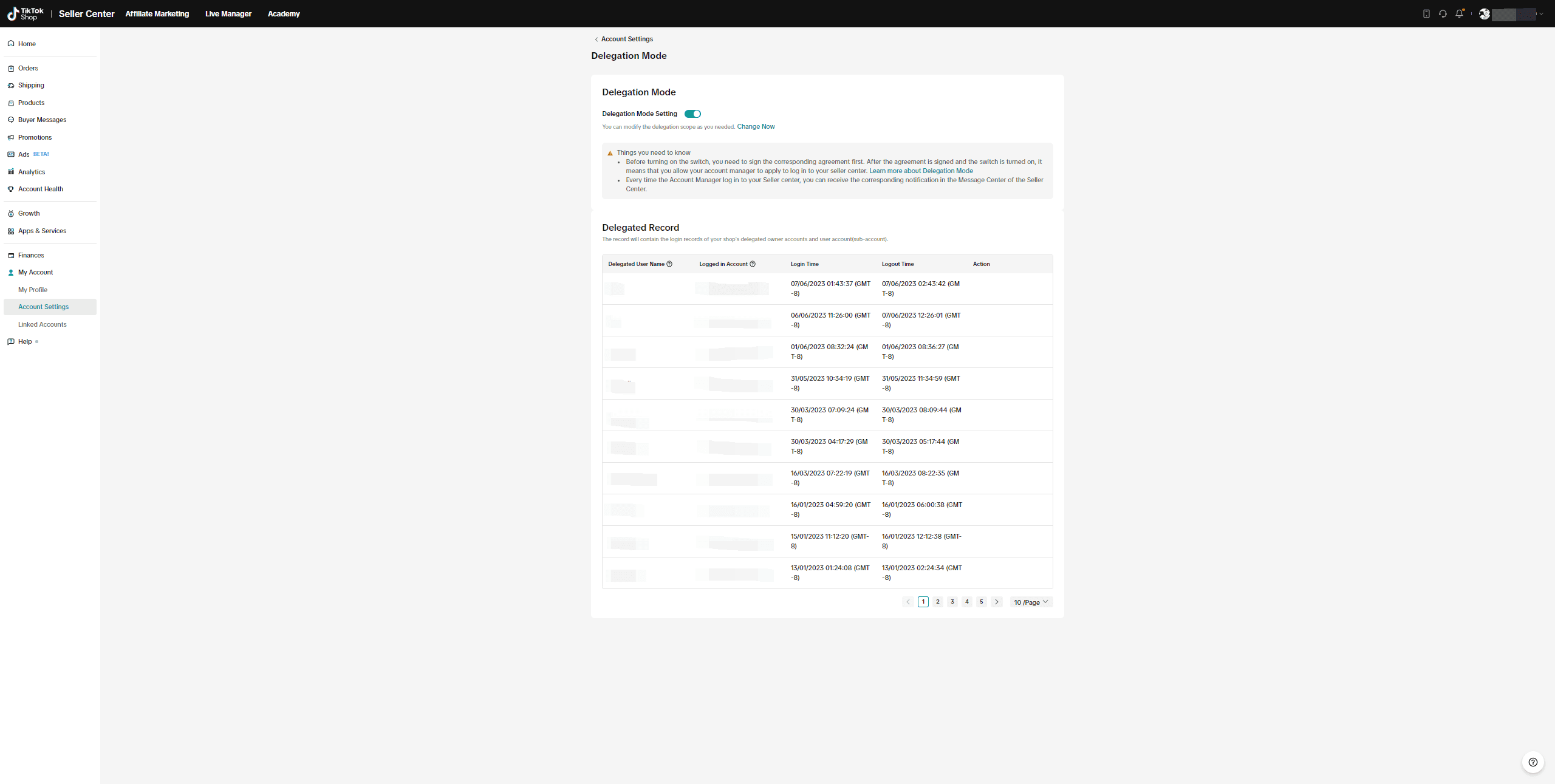
This is useful when:
Leadership is traveling
Teams are restructuring
Agencies are managing campaigns
It keeps your shop active while maintaining accountability.
The Real Impact of Getting This Right
Most sellers think growth comes from one viral video.
In reality, sustainable growth comes from:
Clean brand verification
Structured team access
Strong financial setup
Organized communication
Secure login systems
When backend systems are solid, you can focus fully on:
Creator partnerships
Shop Ads
Conversion optimization
Scaling affiliate programs
Operations support marketing. They are not separate.
How Zorilla Marketing Supports Sellers
We don’t just focus on content. We look at the entire growth ecosystem.
That includes:
TikTok Shop onboarding and technical setup
Brand qualification guidance
Account structure and permissions
Influencer campaign strategy
Performance-based creator programs
Because scaling TikTok Shop isn’t about one tactic. It’s about alignment across systems.
Final Thoughts
TikTok Shop is powerful. But it rewards structured sellers.
If you want to grow seriously in 2026:
Treat Seller Center like your operations headquarters.
Secure it.
Organize it.
Structure it.
Then scale.
If you’re building or expanding on TikTok Shop and want support aligning operations with creator-driven growth, explore how Zorilla Marketing helps brands build sustainable revenue systems.
Book a free strategy call with our team today and let us help you make your Shop Tab presence your strongest sales channel.
Also read :
The Ultimate Guide to TikTok Shop Account Settings for Serious Sellers
When people talk about scaling on TikTok Shop, they usually focus on creators, viral videos, and conversion hacks.
But here’s the truth most sellers learn the hard way:
If your backend isn’t set up properly, growth becomes chaos.
Missed violation notices.
Delayed payouts.
Rejected brand verifications.
Team members with the wrong permissions.
It’s not glamorous, but your account settings are the foundation of everything you build.
This guide walks you through how to manage TikTok Shop settings properly — so you can scale confidently, not reactively.
Why Account Settings Matter More Than You Think
Think of your Seller Center as your business control room.
Every order, every payout, every warning, every brand approval flows through here.
If you’re:
Launching your brand on TikTok Shop
Scaling with influencers
Managing a growing internal team
Working with an agency
Running paid Shop Ads
Then your account structure needs to be clean, secure, and intentional.
Sellers who ignore this part usually end up fixing preventable problems later.
Step 1: Lock Down Your Account Security
Start with the basics.
Inside Seller Center → My Account → My Profile, review:
Login email
Phone number
Password
Linked TikTok account
Turn On Two-Step Verification
This is not optional once you start scaling.
Two-step verification means no one can log in without both a password and a verification code. It protects you from:
Internal access mistakes
Compromised credentials
Unauthorized logins
If you’re running campaigns with creators or giving access to agencies, this becomes critical.
You can also review and remove trusted devices. If someone leaves your team, remove their device immediately.
A secure foundation saves you from expensive disruptions later.
Step 2: Clean Up Your Seller Information
Your Seller Information section includes:
Shop name
Shop logo
Business type
Seller type
Contact information
This isn’t just paperwork. It impacts:
How customers perceive your brand
How creators present your shop
Platform review approvals
If your shop name doesn’t match your brand identity, fix it early. Consistency builds trust, especially when your products appear in livestreams and affiliate videos.
Step 3: Get Brand Authorization Right
This is one of the biggest friction points for sellers.
If you sell branded products, you must verify brand qualification properly.
Go to:
My Account → Account Settings → Qualification Center → Brand Qualification
You’ll choose one of three paths:
Trademark Owner
If you own the trademark directly.
You’ll need:
Valid trademark number
Email verification
First-Level Authorized Seller
If the brand authorized you directly.
You’ll need:
Official authorization letter
Expiry date
Brand contact email
Second-Level Authorized Seller
If you’re authorized through another distributor.
You’ll need:
Both level 1 and level 2 authorization documents
Important: If you delay verification, you have 10 days to complete it. Miss that window and you’ll need to resubmit.
Many sellers rush into creator campaigns before brand verification is finalized. That’s risky. Always secure your brand status first.
Step 4: Structure User Roles Properly
If you’re sharing your main login with multiple people, stop.
Instead, use User Management inside Account Settings.
You can:
Create separate user accounts
Assign roles and permissions
Limit access to financial data
Control who can respond to violations
For example:
Your content team doesn’t need bank access.
Your finance team doesn’t need ad permissions.
Your agency shouldn’t control compliance settings.
Structured access prevents internal mistakes.
When Zorilla Marketing helps sellers onboard, this is one of the first systems we put in place. Clean permissions make scaling smoother.
Step 5: Make Sure Your Money Flows Smoothly
Inside your account settings, you can manage:
Settlement bank accounts
Tax information
Withdrawal setup
Before launching major campaigns, double-check:
Bank details are accurate
Business name matches registration
Tax documentation is complete
Nothing slows momentum like payout issues.
If you’re running high-volume influencer campaigns, cash flow timing matters.
Step 6: Optimize Warehouse & Fulfillment Settings
Your fulfillment setup directly affects:
Delivery times
Return handling
Shop Performance Score
Customer satisfaction
Inside Warehouse Settings, you can:
Add pickup addresses
Manage return locations
Update fulfillment configurations
If you operate multiple warehouses, ensure all are updated properly.
You can also enable Holiday Mode when operations pause. This protects your metrics instead of letting late shipments damage performance scores.
Step 7: Don’t Ignore Communication Preferences
This is one of the most underrated settings in Seller Center.
Go to:
My Account → Account Settings → Communication Preferences
You can control which accounts receive which messages.
There are three categories:
Important (Cannot Be Turned Off)
Review results
Violation notices
Appeal decisions
These protect your account. Someone on your team must monitor these daily.
Shop-Related
Orders
Returns and refunds
Settlement updates
Operational notifications.
Announcements (Optional)
New feature updates
Campaign invitations
Seller growth resources
These can be customized.
Smart sellers assign one person to oversee compliance notifications full-time.
Missing violation messages can result in restricted visibility or removed e-commerce permissions.
Step 8: Use Delegation Mode When Needed
Delegation mode allows temporary control transfer.
This is useful when:
Leadership is traveling
Teams are restructuring
Agencies are managing campaigns
It keeps your shop active while maintaining accountability.
The Real Impact of Getting This Right
Most sellers think growth comes from one viral video.
In reality, sustainable growth comes from:
Clean brand verification
Structured team access
Strong financial setup
Organized communication
Secure login systems
When backend systems are solid, you can focus fully on:
Creator partnerships
Shop Ads
Conversion optimization
Scaling affiliate programs
Operations support marketing. They are not separate.
How Zorilla Marketing Supports Sellers
We don’t just focus on content. We look at the entire growth ecosystem.
That includes:
TikTok Shop onboarding and technical setup
Brand qualification guidance
Account structure and permissions
Influencer campaign strategy
Performance-based creator programs
Because scaling TikTok Shop isn’t about one tactic. It’s about alignment across systems.
Final Thoughts
TikTok Shop is powerful. But it rewards structured sellers.
If you want to grow seriously in 2026:
Treat Seller Center like your operations headquarters.
Secure it.
Organize it.
Structure it.
Then scale.
If you’re building or expanding on TikTok Shop and want support aligning operations with creator-driven growth, explore how Zorilla Marketing helps brands build sustainable revenue systems.
Book a free strategy call with our team today and let us help you make your Shop Tab presence your strongest sales channel.
Also read :

A practical guide to mastering TikTok Shop account settings for secure, scalable e-commerce growth.
The Ultimate Guide to TikTok Shop Account Settings for Serious Sellers
When people talk about scaling on TikTok Shop, they usually focus on creators, viral videos, and conversion hacks.
But here’s the truth most sellers learn the hard way:
If your backend isn’t set up properly, growth becomes chaos.
Missed violation notices.
Delayed payouts.
Rejected brand verifications.
Team members with the wrong permissions.
It’s not glamorous, but your account settings are the foundation of everything you build.
This guide walks you through how to manage TikTok Shop settings properly — so you can scale confidently, not reactively.
Why Account Settings Matter More Than You Think
Think of your Seller Center as your business control room.
Every order, every payout, every warning, every brand approval flows through here.
If you’re:
Launching your brand on TikTok Shop
Scaling with influencers
Managing a growing internal team
Working with an agency
Running paid Shop Ads
Then your account structure needs to be clean, secure, and intentional.
Sellers who ignore this part usually end up fixing preventable problems later.
Step 1: Lock Down Your Account Security
Start with the basics.
Inside Seller Center → My Account → My Profile, review:
Login email
Phone number
Password
Linked TikTok account
Turn On Two-Step Verification
This is not optional once you start scaling.
Two-step verification means no one can log in without both a password and a verification code. It protects you from:
Internal access mistakes
Compromised credentials
Unauthorized logins
If you’re running campaigns with creators or giving access to agencies, this becomes critical.
You can also review and remove trusted devices. If someone leaves your team, remove their device immediately.
A secure foundation saves you from expensive disruptions later.
Step 2: Clean Up Your Seller Information
Your Seller Information section includes:
Shop name
Shop logo
Business type
Seller type
Contact information
This isn’t just paperwork. It impacts:
How customers perceive your brand
How creators present your shop
Platform review approvals
If your shop name doesn’t match your brand identity, fix it early. Consistency builds trust, especially when your products appear in livestreams and affiliate videos.
Step 3: Get Brand Authorization Right
This is one of the biggest friction points for sellers.
If you sell branded products, you must verify brand qualification properly.
Go to:
My Account → Account Settings → Qualification Center → Brand Qualification
You’ll choose one of three paths:
Trademark Owner
If you own the trademark directly.
You’ll need:
Valid trademark number
Email verification
First-Level Authorized Seller
If the brand authorized you directly.
You’ll need:
Official authorization letter
Expiry date
Brand contact email
Second-Level Authorized Seller
If you’re authorized through another distributor.
You’ll need:
Both level 1 and level 2 authorization documents
Important: If you delay verification, you have 10 days to complete it. Miss that window and you’ll need to resubmit.
Many sellers rush into creator campaigns before brand verification is finalized. That’s risky. Always secure your brand status first.
Step 4: Structure User Roles Properly
If you’re sharing your main login with multiple people, stop.
Instead, use User Management inside Account Settings.
You can:
Create separate user accounts
Assign roles and permissions
Limit access to financial data
Control who can respond to violations
For example:
Your content team doesn’t need bank access.
Your finance team doesn’t need ad permissions.
Your agency shouldn’t control compliance settings.
Structured access prevents internal mistakes.
When Zorilla Marketing helps sellers onboard, this is one of the first systems we put in place. Clean permissions make scaling smoother.
Step 5: Make Sure Your Money Flows Smoothly
Inside your account settings, you can manage:
Settlement bank accounts
Tax information
Withdrawal setup
Before launching major campaigns, double-check:
Bank details are accurate
Business name matches registration
Tax documentation is complete
Nothing slows momentum like payout issues.
If you’re running high-volume influencer campaigns, cash flow timing matters.
Step 6: Optimize Warehouse & Fulfillment Settings
Your fulfillment setup directly affects:
Delivery times
Return handling
Shop Performance Score
Customer satisfaction
Inside Warehouse Settings, you can:
Add pickup addresses
Manage return locations
Update fulfillment configurations
If you operate multiple warehouses, ensure all are updated properly.
You can also enable Holiday Mode when operations pause. This protects your metrics instead of letting late shipments damage performance scores.
Step 7: Don’t Ignore Communication Preferences
This is one of the most underrated settings in Seller Center.
Go to:
My Account → Account Settings → Communication Preferences
You can control which accounts receive which messages.
There are three categories:
Important (Cannot Be Turned Off)
Review results
Violation notices
Appeal decisions
These protect your account. Someone on your team must monitor these daily.
Shop-Related
Orders
Returns and refunds
Settlement updates
Operational notifications.
Announcements (Optional)
New feature updates
Campaign invitations
Seller growth resources
These can be customized.
Smart sellers assign one person to oversee compliance notifications full-time.
Missing violation messages can result in restricted visibility or removed e-commerce permissions.
Step 8: Use Delegation Mode When Needed
Delegation mode allows temporary control transfer.
This is useful when:
Leadership is traveling
Teams are restructuring
Agencies are managing campaigns
It keeps your shop active while maintaining accountability.
The Real Impact of Getting This Right
Most sellers think growth comes from one viral video.
In reality, sustainable growth comes from:
Clean brand verification
Structured team access
Strong financial setup
Organized communication
Secure login systems
When backend systems are solid, you can focus fully on:
Creator partnerships
Shop Ads
Conversion optimization
Scaling affiliate programs
Operations support marketing. They are not separate.
How Zorilla Marketing Supports Sellers
We don’t just focus on content. We look at the entire growth ecosystem.
That includes:
TikTok Shop onboarding and technical setup
Brand qualification guidance
Account structure and permissions
Influencer campaign strategy
Performance-based creator programs
Because scaling TikTok Shop isn’t about one tactic. It’s about alignment across systems.
Final Thoughts
TikTok Shop is powerful. But it rewards structured sellers.
If you want to grow seriously in 2026:
Treat Seller Center like your operations headquarters.
Secure it.
Organize it.
Structure it.
Then scale.
If you’re building or expanding on TikTok Shop and want support aligning operations with creator-driven growth, explore how Zorilla Marketing helps brands build sustainable revenue systems.
Book a free strategy call with our team today and let us help you make your Shop Tab presence your strongest sales channel.
Also read :
Other Blogs
Other Blogs
Check our other project Blogs with useful insight and information for your businesses



Other Blogs
Other Blogs
Check our other project Blogs with useful insight and information for your businesses