
October 23, 2025
TikTok Shop OVL Explained: How to Increase Your Order Limit
October 23, 2025
TikTok Shop OVL Explained: How to Increase Your Order Limit
Hitting your TikTok Shop OVL? This guide explains what the Order Volume Limit is, why you have one, and how to increase it to grow your sales.
You’re doing everything right. Your videos are hitting, your influencer collaborations are landing, and the orders on your TikTok Shop are finally rolling in. Then, suddenly... everything stops.
Your products are listed as “Sold Out,” but you’re staring at a warehouse full of inventory. What’s going on?
You may have just met the Order Volume Limit (OVL).
It’s a frustrating moment, but don’t panic. This isn't a permanent roadblock. It’s a temporary cap put in place by TikTok, and understanding it is the first step to removing it. Let’s break down what it is, why it happens, and how you can get back to growing.
What Exactly is the TikTok Shop Order Volume Limit?
Think of the OVL as a daily cap on the total number of orders your shop is allowed to receive. It’s a quality-control measure.
TikTok’s primary goal is to protect the customer experience. They want to ensure that every seller can actually fulfill the orders they receive. The OVL is their way of preventing a shop from getting overwhelmed, leading to late shipping, low-quality service, or mass cancellations.
Once you hit your daily limit (whether it’s 10, 50, or 200), the platform automatically shows your products as “out of stock” to customers. You won’t be able to receive any more orders until the limit resets the following day (at midnight).
“Why Me?” — The Two Main Reasons for an OVL
Okay, so it’s a safety net. But why is it on your shop? It almost always boils down to one of two reasons:
You’re in the New Shop Probation Program
If your shop is new, you're likely in a probation period. This is standard practice and not a punishment. TikTok is essentially giving you “training wheels.” They want to see you successfully manage and fulfill a smaller number of orders (e.g., 50 per day) before they trust you with 500. It’s a test you have to pass to prove your operational chops.You Have Policy Violations
This one is more serious. If your shop has racked up violations—like shipping orders late, high cancellation rates, or policy strikes—TikTok will impose an OVL to limit the potential “damage” to customers.
You can check your status anytime in the Seller Center under the “Shop Health” tab.
A crucial note: If you have multiple OVLs (e.g., a probation limit of 200 and a violation limit of 10), the lower limit always applies. This is why maintaining excellent Shop Health is critical, even when you're new.
How to Check Your Daily Order Limit
Don’t guess what your limit is. You can find the exact number in your Seller Center in a couple of places:
On the Probation Program Page
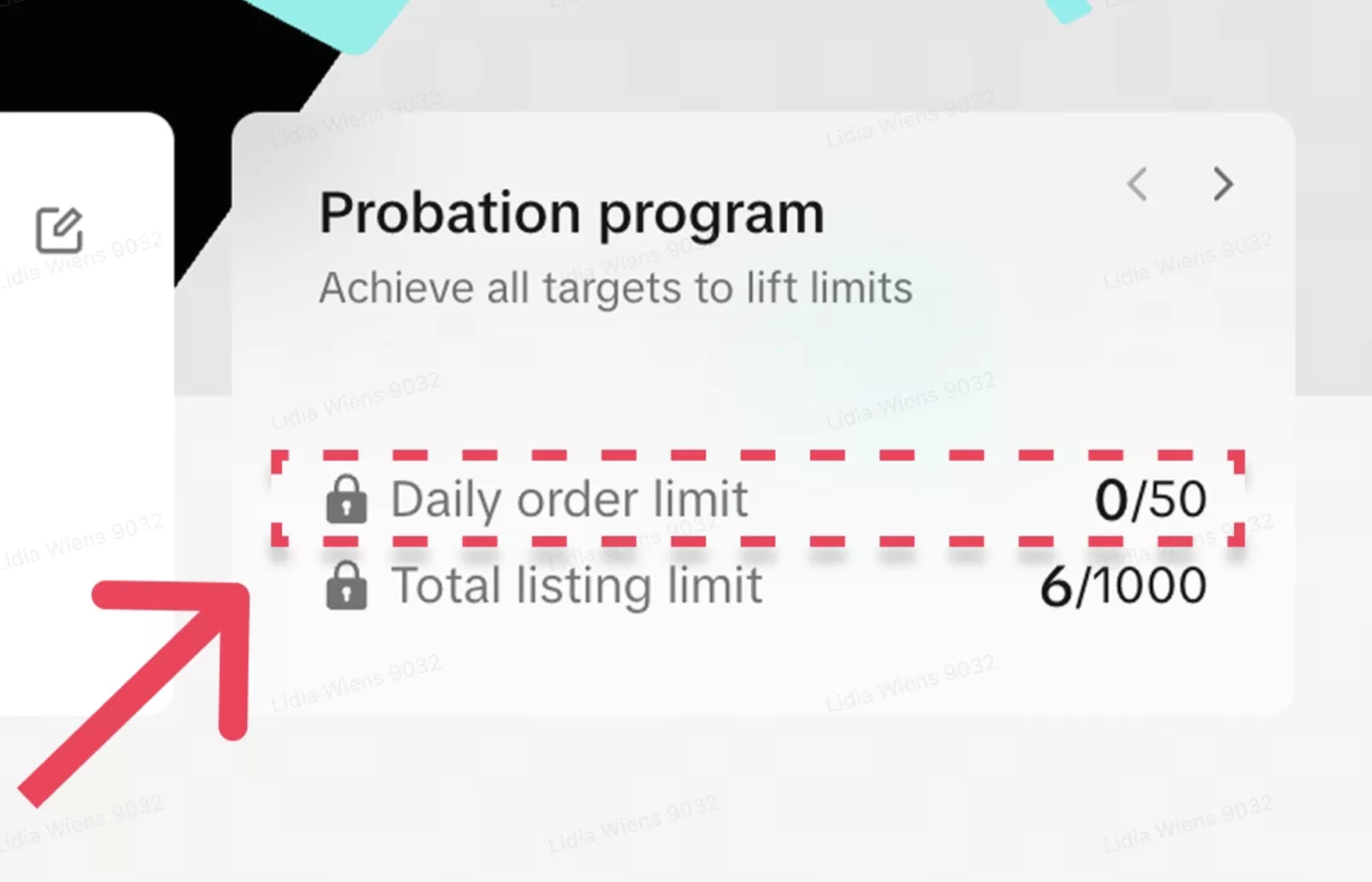
In a banner at the top of the Manage Orders page
You’ll see a tracker, something like “12 / 50”. This means you’ve received 12 orders so far today and have 38 left before your shop is “sold out” for the day.
The Game Plan: How to Increase Your OVL
Your path forward depends on why you have the OVL.
If you’re on probation:
The solution is straightforward. Navigate to the “Probation Program” page in your Seller Center. TikTok will give you a clear set of tasks to complete. Finish this “checklist” to graduate from probation and get your limits raised or removed.
If you have violations:
Your priority is to fix the underlying issues. Visit your “Shop Health” page, review the violations, and appeal any you believe are incorrect. More importantly, identify the root cause. Are you shipping late? Are your product descriptions misleading? Fix the problem to prevent future strikes.
This is often where brands feel the strain. Managing the nitty-gritty of Shop Health, customer service, and fulfillment logistics can feel like a full-time job, pulling you away from the creative marketing that drives sales in the first place.
Best Practices to Stay in TikTok’s Good Graces
Whether you’re trying to increase your OVL or just want to avoid one, the strategy is the same: Be a seller TikTok can trust.
Be a Fulfillment All-Star: Ship your orders on time, every time. Use valid tracking numbers. This is the single most important signal you can send.
Master Customer Service: Respond to customer inquiries quickly and professionally. A happy customer is less likely to cancel or leave a bad review.
Keep Your Operations Tight: A high order cancellation rate (by you) or a high return rate (from customers) signals a problem. Make sure your inventory is accurate and your product listings are clear.
Be Consistent: Avoid sketchy behavior like frequently changing your prices or product details. This can look spammy to the algorithm.
From Capped to Uncapped Growth
An Order Volume Limit isn't a dead end. It’s a signal from TikTok that you need to tighten up your operations. By focusing on strong fulfillment and excellent customer service, you’ll prove you’re a reliable partner, graduate from probation, and get those limits lifted.
We get it. Juggling creator partnerships, shoppable video content, and the technical backend of the Seller Center is a lot. At Zorilla Marketing, we believe in building sustainable, healthy TikTok Shop ecosystems for our clients—not just chasing viral moments.
If you’re feeling stuck on probation or overwhelmed by Shop Health, it might be time for a partner who understands the whole picture.
Ready to scale your TikTok Shop past its limits? Let’s chat about your strategy.
Also Read:
Hitting your TikTok Shop OVL? This guide explains what the Order Volume Limit is, why you have one, and how to increase it to grow your sales.
You’re doing everything right. Your videos are hitting, your influencer collaborations are landing, and the orders on your TikTok Shop are finally rolling in. Then, suddenly... everything stops.
Your products are listed as “Sold Out,” but you’re staring at a warehouse full of inventory. What’s going on?
You may have just met the Order Volume Limit (OVL).
It’s a frustrating moment, but don’t panic. This isn't a permanent roadblock. It’s a temporary cap put in place by TikTok, and understanding it is the first step to removing it. Let’s break down what it is, why it happens, and how you can get back to growing.
What Exactly is the TikTok Shop Order Volume Limit?
Think of the OVL as a daily cap on the total number of orders your shop is allowed to receive. It’s a quality-control measure.
TikTok’s primary goal is to protect the customer experience. They want to ensure that every seller can actually fulfill the orders they receive. The OVL is their way of preventing a shop from getting overwhelmed, leading to late shipping, low-quality service, or mass cancellations.
Once you hit your daily limit (whether it’s 10, 50, or 200), the platform automatically shows your products as “out of stock” to customers. You won’t be able to receive any more orders until the limit resets the following day (at midnight).
“Why Me?” — The Two Main Reasons for an OVL
Okay, so it’s a safety net. But why is it on your shop? It almost always boils down to one of two reasons:
You’re in the New Shop Probation Program
If your shop is new, you're likely in a probation period. This is standard practice and not a punishment. TikTok is essentially giving you “training wheels.” They want to see you successfully manage and fulfill a smaller number of orders (e.g., 50 per day) before they trust you with 500. It’s a test you have to pass to prove your operational chops.You Have Policy Violations
This one is more serious. If your shop has racked up violations—like shipping orders late, high cancellation rates, or policy strikes—TikTok will impose an OVL to limit the potential “damage” to customers.
You can check your status anytime in the Seller Center under the “Shop Health” tab.
A crucial note: If you have multiple OVLs (e.g., a probation limit of 200 and a violation limit of 10), the lower limit always applies. This is why maintaining excellent Shop Health is critical, even when you're new.
How to Check Your Daily Order Limit
Don’t guess what your limit is. You can find the exact number in your Seller Center in a couple of places:
On the Probation Program Page
In a banner at the top of the Manage Orders page
You’ll see a tracker, something like “12 / 50”. This means you’ve received 12 orders so far today and have 38 left before your shop is “sold out” for the day.
The Game Plan: How to Increase Your OVL
Your path forward depends on why you have the OVL.
If you’re on probation:
The solution is straightforward. Navigate to the “Probation Program” page in your Seller Center. TikTok will give you a clear set of tasks to complete. Finish this “checklist” to graduate from probation and get your limits raised or removed.
If you have violations:
Your priority is to fix the underlying issues. Visit your “Shop Health” page, review the violations, and appeal any you believe are incorrect. More importantly, identify the root cause. Are you shipping late? Are your product descriptions misleading? Fix the problem to prevent future strikes.
This is often where brands feel the strain. Managing the nitty-gritty of Shop Health, customer service, and fulfillment logistics can feel like a full-time job, pulling you away from the creative marketing that drives sales in the first place.
Best Practices to Stay in TikTok’s Good Graces
Whether you’re trying to increase your OVL or just want to avoid one, the strategy is the same: Be a seller TikTok can trust.
Be a Fulfillment All-Star: Ship your orders on time, every time. Use valid tracking numbers. This is the single most important signal you can send.
Master Customer Service: Respond to customer inquiries quickly and professionally. A happy customer is less likely to cancel or leave a bad review.
Keep Your Operations Tight: A high order cancellation rate (by you) or a high return rate (from customers) signals a problem. Make sure your inventory is accurate and your product listings are clear.
Be Consistent: Avoid sketchy behavior like frequently changing your prices or product details. This can look spammy to the algorithm.
From Capped to Uncapped Growth
An Order Volume Limit isn't a dead end. It’s a signal from TikTok that you need to tighten up your operations. By focusing on strong fulfillment and excellent customer service, you’ll prove you’re a reliable partner, graduate from probation, and get those limits lifted.
We get it. Juggling creator partnerships, shoppable video content, and the technical backend of the Seller Center is a lot. At Zorilla Marketing, we believe in building sustainable, healthy TikTok Shop ecosystems for our clients—not just chasing viral moments.
If you’re feeling stuck on probation or overwhelmed by Shop Health, it might be time for a partner who understands the whole picture.
Ready to scale your TikTok Shop past its limits? Let’s chat about your strategy.
Also Read:
Other Blogs
Other Blogs
Check our other project Blogs with useful insight and information for your businesses



Other Blogs
Other Blogs
Check our other project Blogs with useful insight and information for your businesses