November 20, 2025
Track TikTok Shop Samples with Manage Samples
November 20, 2025
Track TikTok Shop Samples with Manage Samples
Easily track TikTok Shop samples, deadlines, and content tasks with the Manage Samples tool to boost efficiency and creator earnings.
Track TikTok Shop Samples Easily
Learn how to track TikTok Shop samples with the Manage Samples tool. Stay on top of deadlines, boost affiliate earnings, and streamline workflow.
🧾 What Is “Manage Samples”?
Manage Samples is TikTok Shop’s all-in-one dashboard where creators can:
Monitor sample requests (both free and paid)
Track content deadlines and commission potential
Post directly from the dashboar
View TikTok Shop promotional offers
It’s your backstage pass to sample success — helping you stay organized and compliant while maximizing your creator earnings.
🧭 How to Access Manage Samples
You can access the dashboard in a few ways:
Via Creator Center: Tap “Manage Samples” from the main TikTok Shop Creator Center.
From Notifications: If you receive a content reminder or sample update via pop-up, email, or inbox — tapping it will open the Manage Samples view.
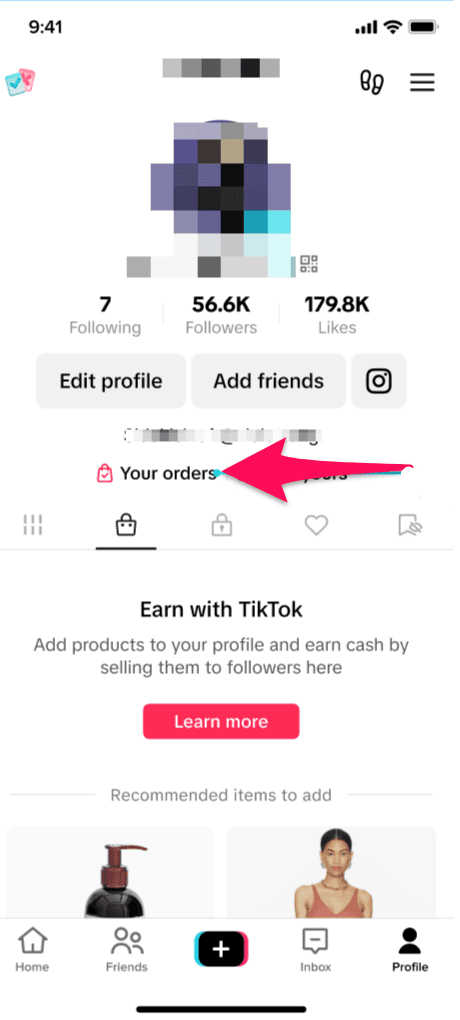
Through Order Center: Want to view sample order status? Head to your Order Center, and you’ll find Manage Samples linked there.
From Product Marketplace: Requested or purchased a sample? That product automatically shows up in your Manage Samples.
📌 What You’ll Find Inside
The Manage Samples page is divided into three main sections, each designed to help you keep your TikTok Shop workflow on track:
1. Sample Orders Section
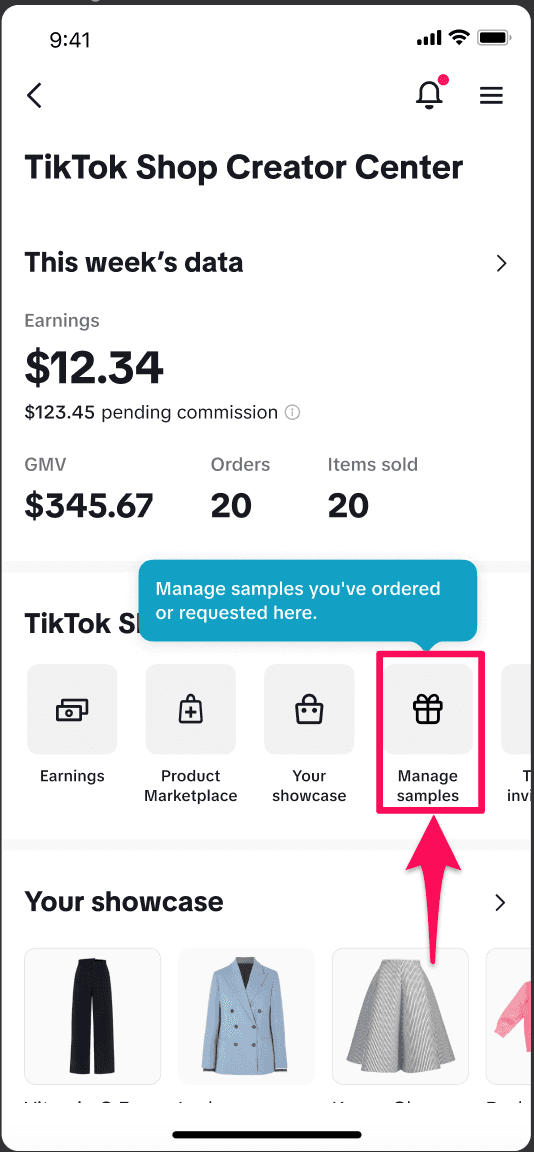
Split into two tabs — Free Samples and Refundable Samples — this is where you track shipping status, request history, and content requirements.
Free Sample Order Statuses:
Awaiting Shipment: You’ve requested a sample, but the seller hasn’t shipped yet.
Needs Content: Sample delivered — now it’s time to post content.
Post in Review: You’ve submitted content and it’s being reviewed.
Content Criteria Met: Congrats! Your post met TikTok’s criteria.
Other Status Tags:
Denied, Withdrawn, Expired, or Canceled: These help you track rejected, canceled, or missed requests.
Refundable Sample Order Statuses:
Order Submitted / In Transit
Pending Sales: You need to generate more sales to qualify for a refund.
Refund Successful / Failed / Unsuccessful / Paused
💡 Tip: Paused progress usually means the product is temporarily out of stock.
2. Create Videos to Promote Section
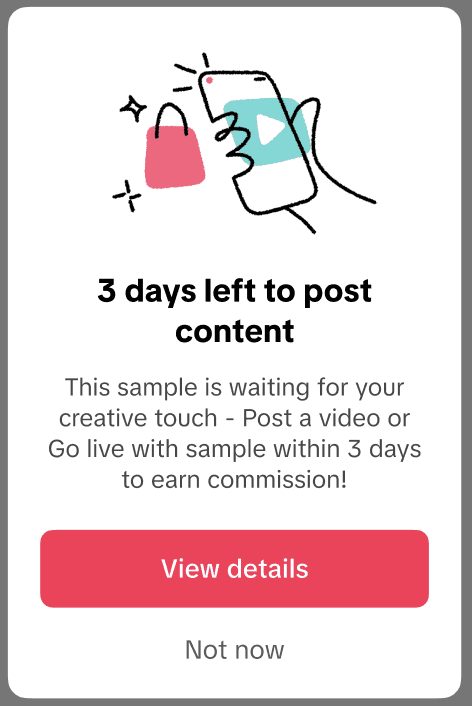
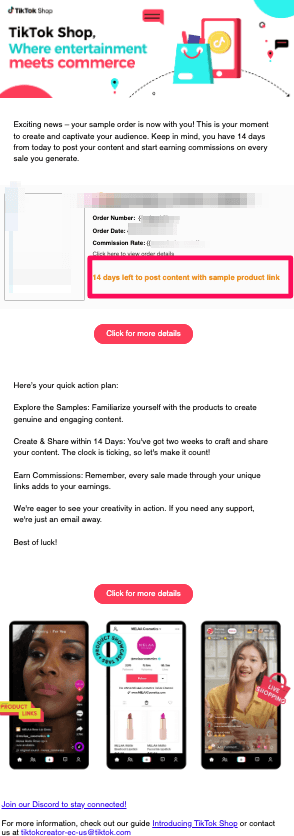
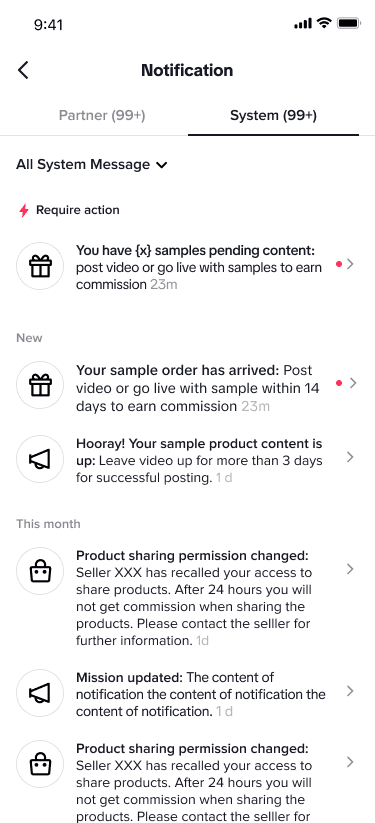
This is your to-do list: a real-time countdown showing how many days are left to post your required content. It also shows the commission potential for each sample.
Post Requirements:
Videos: Must include a product link and stay public for at least 3 days.
LIVE: Product must be pinned during a 10+ minute livestream.
✅ Pinning a product during LIVE? Tap the shopping bag → select item → click “Pin” → update with “Stick to Top”.
3. Special Offers Just for You
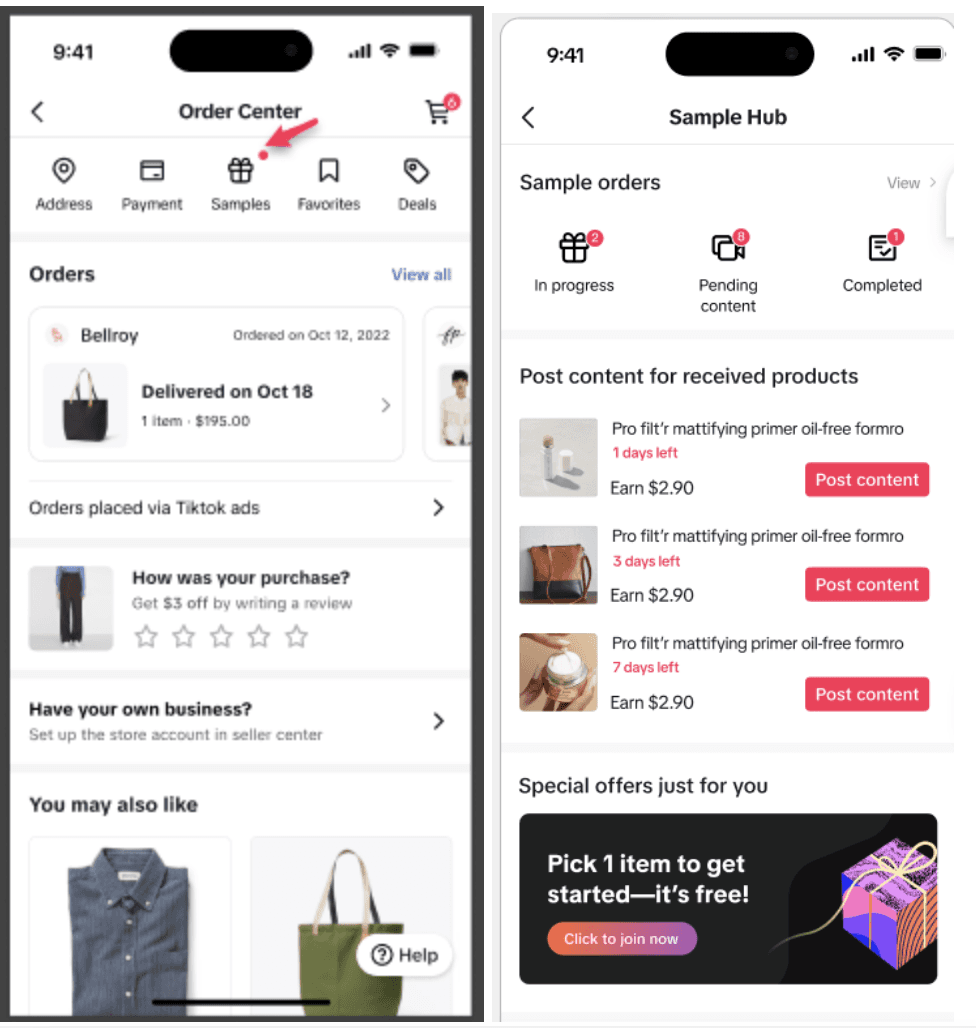
Eligible creators may see bonus promotions here — like coupon campaigns or exclusive sample deals. If you don’t see it yet, you’re just not in a promo cycle at the moment.
🧠 Common Questions — Answered
What if I don’t have any active samples?
No worries. You’ll still see the dashboard — and it’ll direct you to the Product Marketplace so you can start exploring.
Can I view withdrawn or rejected requests?
Yes. Click “All” in your sample order tabs to see your full request history — even expired or denied ones.
Why can’t I see Special Offers?
Only eligible creators see this tab. Check back regularly or focus on building content performance to unlock promotions.
🎯 Why This Matters for TikTok Creators
Between sample campaigns, seller requests, and refundable purchases, it’s easy to lose track of what's due — and when. “Manage Samples” solves that. It helps you:
Avoid missing deadlines (and risking sample access)
Stay compliant with TikTok’s shoppable content rules
Maximize your refund eligibility and affiliate earnings
Find exclusive offers from TikTok Shop
💼 How Zorilla Marketing Helps Creators Succeed
At Zorilla Marketing, we help creators simplify and scale their TikTok Shop success — from sourcing high-performing samples to managing content posting timelines and optimizing for commissions.
Whether you're a solo creator or a brand-led creator team, Zorilla ensures you’re not just posting — you're growing strategically.
👋 Want expert help navigating samples, sales, and strategy?
Let’s chat about your goals and how we can support your TikTok Shop journey.
Reach out to Zorilla Marketing today.
Also read:
Track TikTok Shop Samples Easily
Learn how to track TikTok Shop samples with the Manage Samples tool. Stay on top of deadlines, boost affiliate earnings, and streamline workflow.
🧾 What Is “Manage Samples”?
Manage Samples is TikTok Shop’s all-in-one dashboard where creators can:
Monitor sample requests (both free and paid)
Track content deadlines and commission potential
Post directly from the dashboar
View TikTok Shop promotional offers
It’s your backstage pass to sample success — helping you stay organized and compliant while maximizing your creator earnings.
🧭 How to Access Manage Samples
You can access the dashboard in a few ways:
Via Creator Center: Tap “Manage Samples” from the main TikTok Shop Creator Center.
From Notifications: If you receive a content reminder or sample update via pop-up, email, or inbox — tapping it will open the Manage Samples view.
Through Order Center: Want to view sample order status? Head to your Order Center, and you’ll find Manage Samples linked there.
From Product Marketplace: Requested or purchased a sample? That product automatically shows up in your Manage Samples.
📌 What You’ll Find Inside
The Manage Samples page is divided into three main sections, each designed to help you keep your TikTok Shop workflow on track:
1. Sample Orders Section
Split into two tabs — Free Samples and Refundable Samples — this is where you track shipping status, request history, and content requirements.
Free Sample Order Statuses:
Awaiting Shipment: You’ve requested a sample, but the seller hasn’t shipped yet.
Needs Content: Sample delivered — now it’s time to post content.
Post in Review: You’ve submitted content and it’s being reviewed.
Content Criteria Met: Congrats! Your post met TikTok’s criteria.
Other Status Tags:
Denied, Withdrawn, Expired, or Canceled: These help you track rejected, canceled, or missed requests.
Refundable Sample Order Statuses:
Order Submitted / In Transit
Pending Sales: You need to generate more sales to qualify for a refund.
Refund Successful / Failed / Unsuccessful / Paused
💡 Tip: Paused progress usually means the product is temporarily out of stock.
2. Create Videos to Promote Section
This is your to-do list: a real-time countdown showing how many days are left to post your required content. It also shows the commission potential for each sample.
Post Requirements:
Videos: Must include a product link and stay public for at least 3 days.
LIVE: Product must be pinned during a 10+ minute livestream.
✅ Pinning a product during LIVE? Tap the shopping bag → select item → click “Pin” → update with “Stick to Top”.
3. Special Offers Just for You
Eligible creators may see bonus promotions here — like coupon campaigns or exclusive sample deals. If you don’t see it yet, you’re just not in a promo cycle at the moment.
🧠 Common Questions — Answered
What if I don’t have any active samples?
No worries. You’ll still see the dashboard — and it’ll direct you to the Product Marketplace so you can start exploring.
Can I view withdrawn or rejected requests?
Yes. Click “All” in your sample order tabs to see your full request history — even expired or denied ones.
Why can’t I see Special Offers?
Only eligible creators see this tab. Check back regularly or focus on building content performance to unlock promotions.
🎯 Why This Matters for TikTok Creators
Between sample campaigns, seller requests, and refundable purchases, it’s easy to lose track of what's due — and when. “Manage Samples” solves that. It helps you:
Avoid missing deadlines (and risking sample access)
Stay compliant with TikTok’s shoppable content rules
Maximize your refund eligibility and affiliate earnings
Find exclusive offers from TikTok Shop
💼 How Zorilla Marketing Helps Creators Succeed
At Zorilla Marketing, we help creators simplify and scale their TikTok Shop success — from sourcing high-performing samples to managing content posting timelines and optimizing for commissions.
Whether you're a solo creator or a brand-led creator team, Zorilla ensures you’re not just posting — you're growing strategically.
👋 Want expert help navigating samples, sales, and strategy?
Let’s chat about your goals and how we can support your TikTok Shop journey.
Reach out to Zorilla Marketing today.
Also read:

Easily track TikTok Shop samples, deadlines, and content tasks with the Manage Samples tool to boost efficiency and creator earnings.
Track TikTok Shop Samples Easily
Learn how to track TikTok Shop samples with the Manage Samples tool. Stay on top of deadlines, boost affiliate earnings, and streamline workflow.
🧾 What Is “Manage Samples”?
Manage Samples is TikTok Shop’s all-in-one dashboard where creators can:
Monitor sample requests (both free and paid)
Track content deadlines and commission potential
Post directly from the dashboar
View TikTok Shop promotional offers
It’s your backstage pass to sample success — helping you stay organized and compliant while maximizing your creator earnings.
🧭 How to Access Manage Samples
You can access the dashboard in a few ways:
Via Creator Center: Tap “Manage Samples” from the main TikTok Shop Creator Center.
From Notifications: If you receive a content reminder or sample update via pop-up, email, or inbox — tapping it will open the Manage Samples view.
Through Order Center: Want to view sample order status? Head to your Order Center, and you’ll find Manage Samples linked there.
From Product Marketplace: Requested or purchased a sample? That product automatically shows up in your Manage Samples.
📌 What You’ll Find Inside
The Manage Samples page is divided into three main sections, each designed to help you keep your TikTok Shop workflow on track:
1. Sample Orders Section
Split into two tabs — Free Samples and Refundable Samples — this is where you track shipping status, request history, and content requirements.
Free Sample Order Statuses:
Awaiting Shipment: You’ve requested a sample, but the seller hasn’t shipped yet.
Needs Content: Sample delivered — now it’s time to post content.
Post in Review: You’ve submitted content and it’s being reviewed.
Content Criteria Met: Congrats! Your post met TikTok’s criteria.
Other Status Tags:
Denied, Withdrawn, Expired, or Canceled: These help you track rejected, canceled, or missed requests.
Refundable Sample Order Statuses:
Order Submitted / In Transit
Pending Sales: You need to generate more sales to qualify for a refund.
Refund Successful / Failed / Unsuccessful / Paused
💡 Tip: Paused progress usually means the product is temporarily out of stock.
2. Create Videos to Promote Section
This is your to-do list: a real-time countdown showing how many days are left to post your required content. It also shows the commission potential for each sample.
Post Requirements:
Videos: Must include a product link and stay public for at least 3 days.
LIVE: Product must be pinned during a 10+ minute livestream.
✅ Pinning a product during LIVE? Tap the shopping bag → select item → click “Pin” → update with “Stick to Top”.
3. Special Offers Just for You
Eligible creators may see bonus promotions here — like coupon campaigns or exclusive sample deals. If you don’t see it yet, you’re just not in a promo cycle at the moment.
🧠 Common Questions — Answered
What if I don’t have any active samples?
No worries. You’ll still see the dashboard — and it’ll direct you to the Product Marketplace so you can start exploring.
Can I view withdrawn or rejected requests?
Yes. Click “All” in your sample order tabs to see your full request history — even expired or denied ones.
Why can’t I see Special Offers?
Only eligible creators see this tab. Check back regularly or focus on building content performance to unlock promotions.
🎯 Why This Matters for TikTok Creators
Between sample campaigns, seller requests, and refundable purchases, it’s easy to lose track of what's due — and when. “Manage Samples” solves that. It helps you:
Avoid missing deadlines (and risking sample access)
Stay compliant with TikTok’s shoppable content rules
Maximize your refund eligibility and affiliate earnings
Find exclusive offers from TikTok Shop
💼 How Zorilla Marketing Helps Creators Succeed
At Zorilla Marketing, we help creators simplify and scale their TikTok Shop success — from sourcing high-performing samples to managing content posting timelines and optimizing for commissions.
Whether you're a solo creator or a brand-led creator team, Zorilla ensures you’re not just posting — you're growing strategically.
👋 Want expert help navigating samples, sales, and strategy?
Let’s chat about your goals and how we can support your TikTok Shop journey.
Reach out to Zorilla Marketing today.
Also read:
Other Blogs
Other Blogs
Check our other project Blogs with useful insight and information for your businesses



Other Blogs
Other Blogs
Check our other project Blogs with useful insight and information for your businesses