
October 14, 2025
Master TikTok LIVE Events Like a Pro
October 14, 2025
Master TikTok LIVE Events Like a Pro
Plan, promote, and convert smarter on TikTok LIVE. Learn expert strategies with Zorilla Marketing LLP to boost sales and audience engagement.
Mastering TikTok LIVE Events: How to Plan, Promote & Convert Like a Pro
TikTok LIVE isn’t just a flashy add-on to your content strategy — it’s a powerful e-commerce engine. But like any great sales moment, it works best with a plan.
If you’ve been treating LIVE shopping as a last-minute hustle, it’s time to rethink your approach. With TikTok LIVE Events, sellers and creators can turn one-off streams into well-timed, high-converting campaigns.
Here’s everything you need to know to go from “winging it” to “winning it” — and how Zorilla Marketing LLP helps brands streamline every step of the process.
Why Plan a TikTok LIVE Event?
When you schedule a LIVE Event instead of going live on impulse, three big things happen:
🗓️ You create a plan — with product selection, team prep, and strategic timing.
📢 You can promote ahead of time — driving more viewers to your session.
🛒 You can integrate key sales tools like Giveaways, Flash Sales, and Billboards directly into your setup.
Whether you're an emerging creator or a growing DTC brand, LIVE Events let you work smarter, not harder.
Your Pre-LIVE Checklist
Before you hit "Go LIVE," here’s your preparation game plan:
✅ Schedule Your LIVE
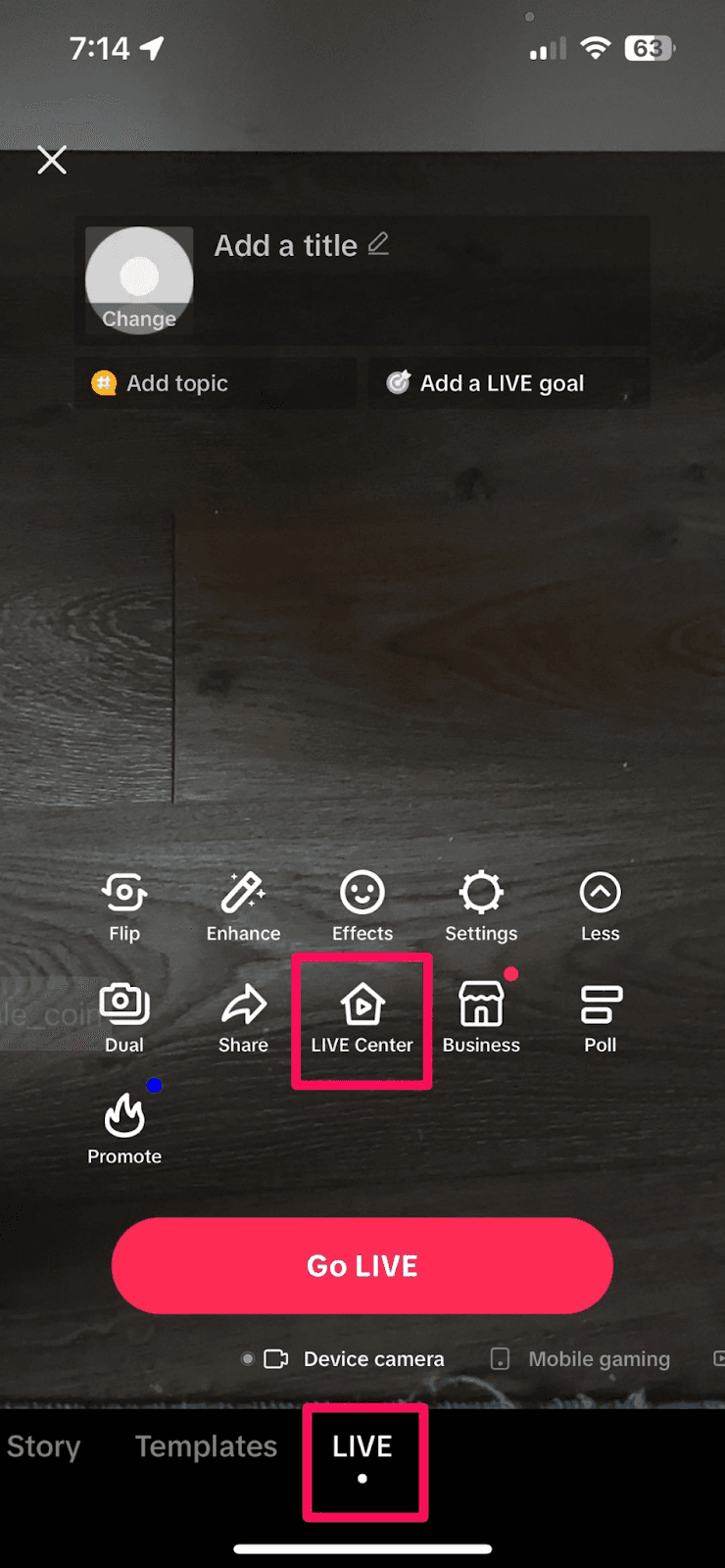
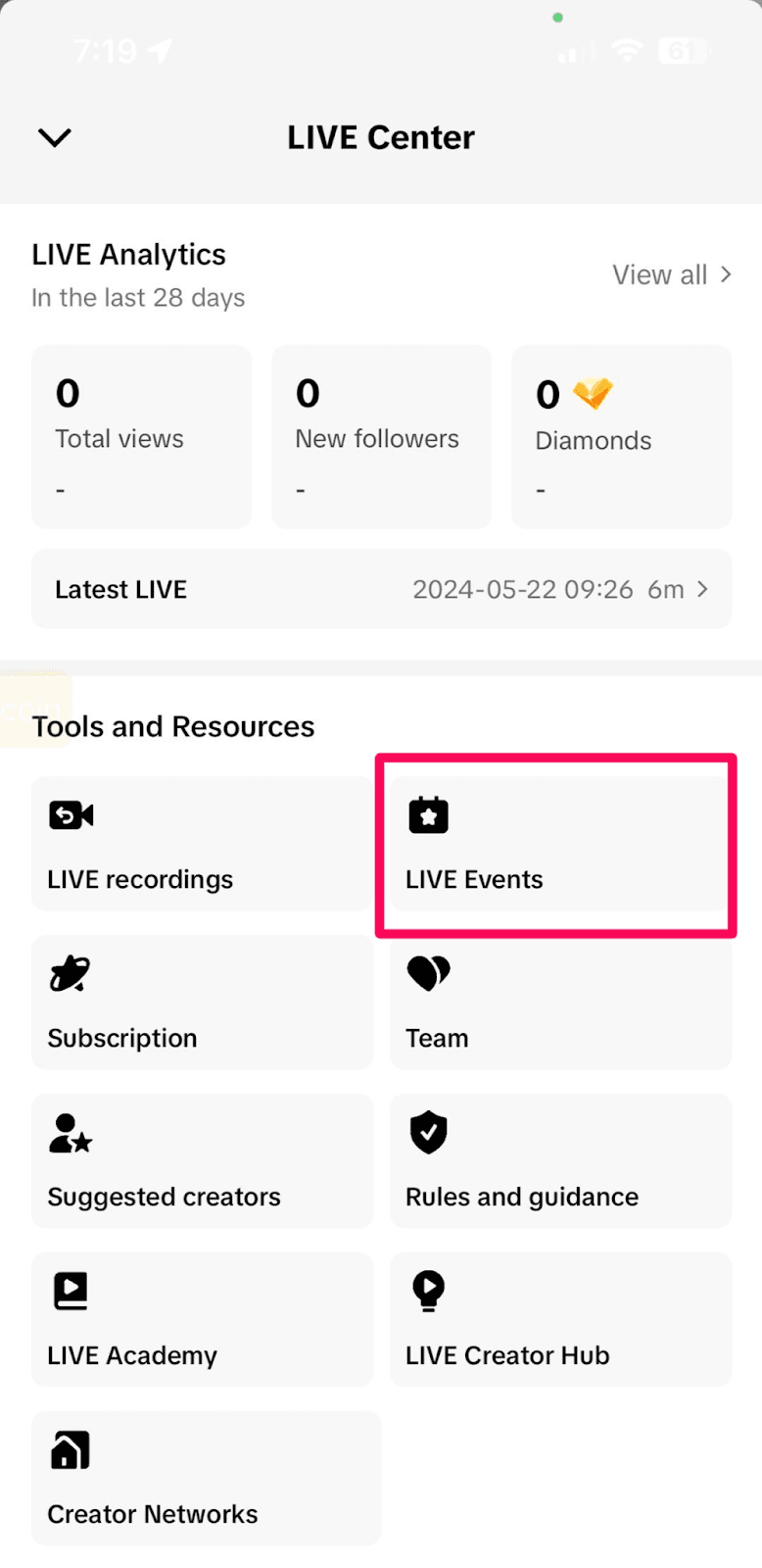
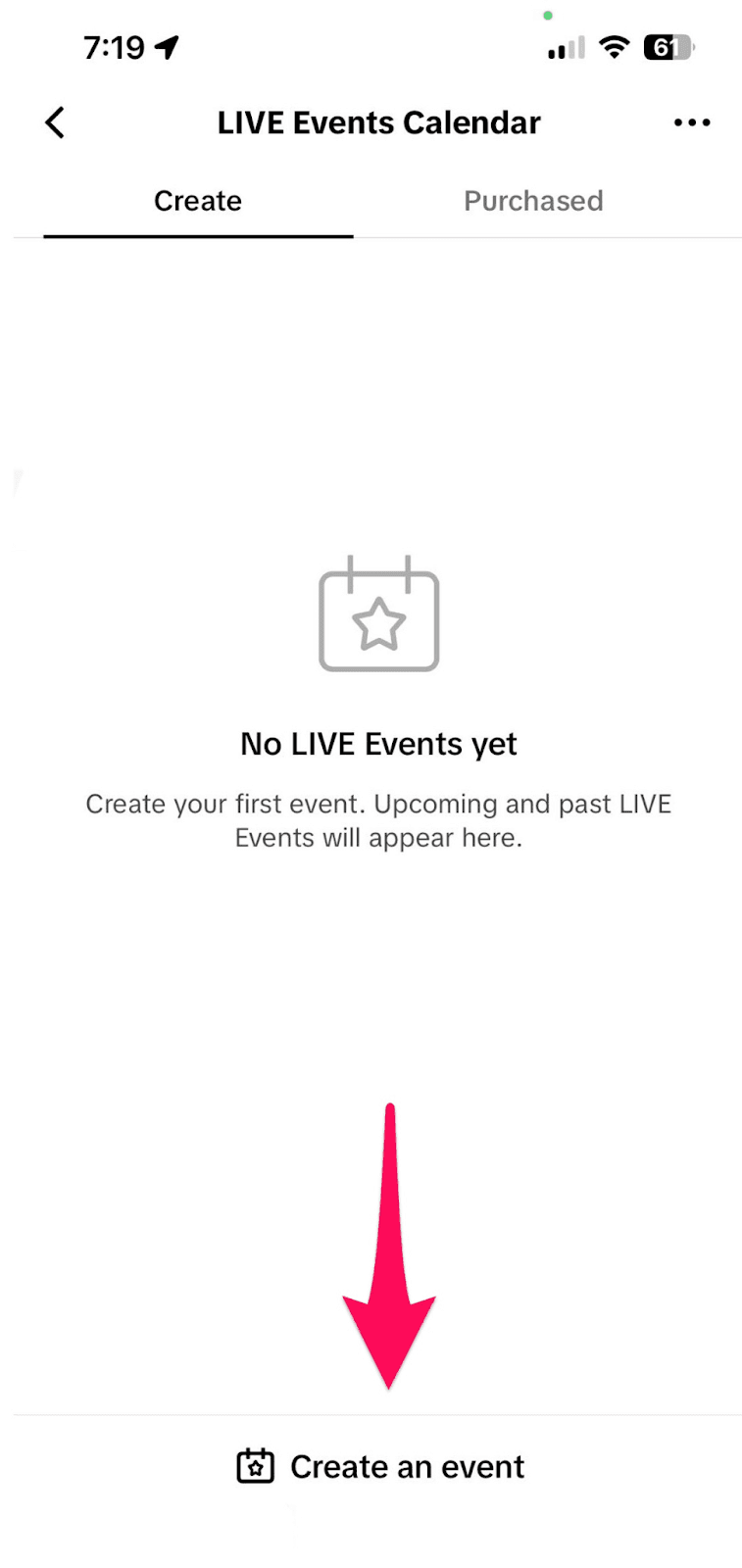
Head to LIVE Center in your TikTok app or desktop LIVE Console and set your session details (date, time, description).
Pro Tip: Events must be scheduled 2+ hours in advance on mobile, but can be launched immediately via desktop.
✅ Promote Your LIVE
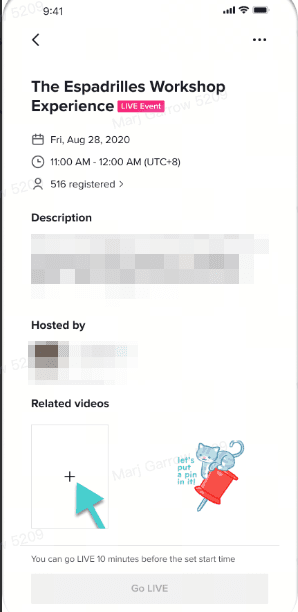
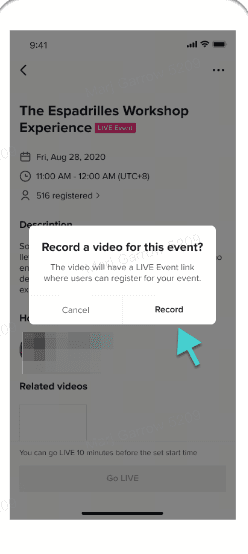
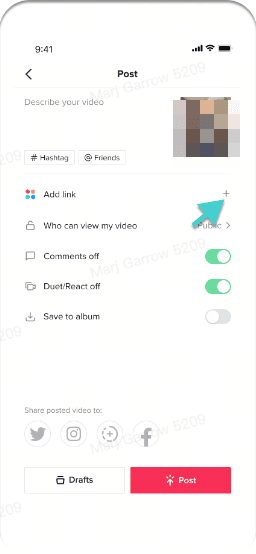
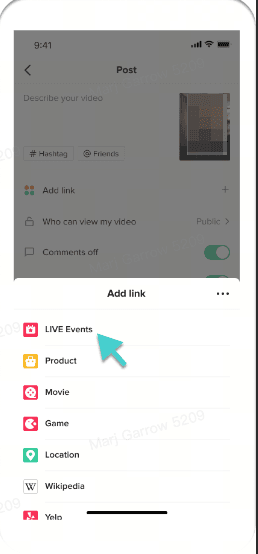
Make noise. TikTok lets you add your LIVE Event link to promo videos so viewers can RSVP. Push this out 2–3 days ahead via TikTok and off-platform channels (email, Instagram, WhatsApp).
✅ Prepare Your Product Set
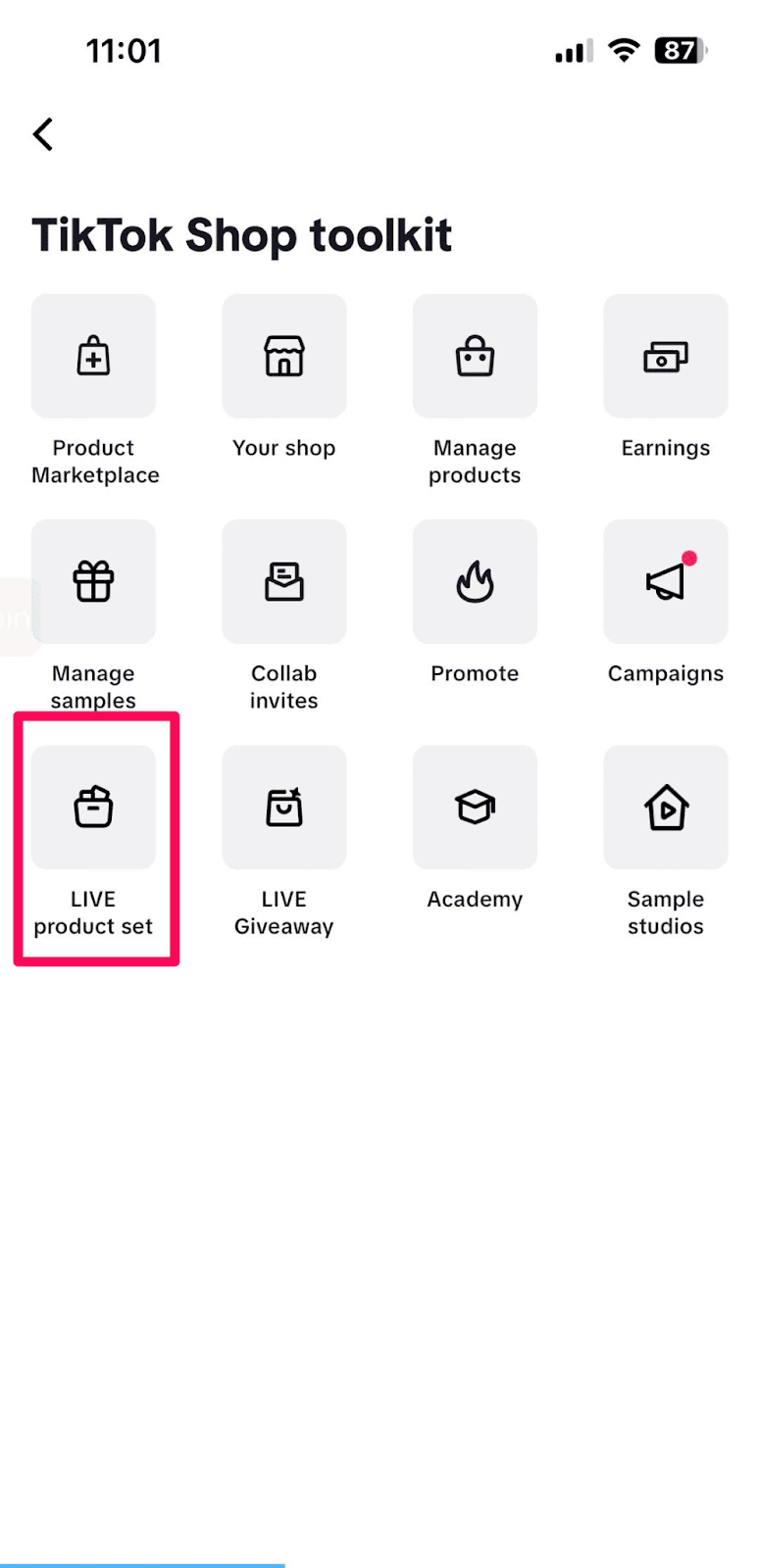
Create a LIVE product set with up to 100 featured items — this way, you won’t fumble for links during the event. You can add from your TikTok Shop, collabs, marketplace, and more.
✅ Plan Giveaways & Flash Sales
Boost engagement by scheduling a LIVE Giveaway or Flash Sale:
Select prize items, number of winners, and how users participate (comment-to-enter, etc.)
Schedule countdown timers and limit per-user purchase quantity
✅ Add Moderators
Assign up to 20 moderators (mobile) or 30 (desktop) to help manage comments, mute/block users, and pin products. They’ll keep your stream smooth while you focus on selling.
Going LIVE: Maximize the Moment
When it’s showtime, timing, visibility, and energy are everything. Here's how to keep control and momentum:
🎥 Start Your LIVE
You can start your session within 10 minutes of your scheduled time. Tap Go LIVE on mobile, or trigger it through LIVE Console (for team-based setups).
📌 Pin Products Strategically
Tap the shopping bag icon and pin featured products at key moments. Remind users to check it often — as new viewers join, they’ll need a cue to explore your offers.
🎁 Launch Giveaways & Flash Sales
Use scheduled LIVE Giveaways and Flash Sales to create urgency:
Pin Flash Sale items for visibility
Rotate LIVE Billboards to highlight deals or limited-time bundles
Keep countdowns visible to drive quick decisions
At Zorilla, we often help brands script these moments into their LIVE content to keep the pace tight and focused on conversions.
After the Stream: Don’t Just Move On — Optimize
A successful LIVE doesn’t end when the camera shuts off. Use TikTok’s tools to recap, analyze, and prep for the next win.
🔁 Post Highlights
Use LIVE Highlights to clip and post your best-selling moments. These clips turn into evergreen, shoppable content that promotes your future events.
📊 Analyze Performance
Dive into your LIVE Dashboard (via Creator Center or LIVE Console) to see:
GMV, orders, and sales per product
Viewer trends and engagement peaks
Comment sentiment and giveaway participation
Ad performance, if you ran TikTok ads
Access basic or advanced views, and even download your data for offline reporting.
Zorilla’s Take: Treat Every LIVE as a Campaign
At Zorilla Marketing, we believe that TikTok LIVE isn’t a gimmick — it’s a sales channel. We help brands plan full-funnel LIVE campaigns that combine:
Strategic product selection
Creative LIVE storytelling
Influencer integration
Data-backed optimization
Whether you need help setting up your first LIVE or scaling your next Flash Sale series, we’re here to help you turn viewers into buyers — and buyers into repeat fans.
Ready to Plan a Winning TikTok LIVE?
Don’t go live unprepared. From scheduling to scripting, Zorilla can help you maximize every moment.
👉 Reach out to us today and let's make your next LIVE session your best yet.
Also read:
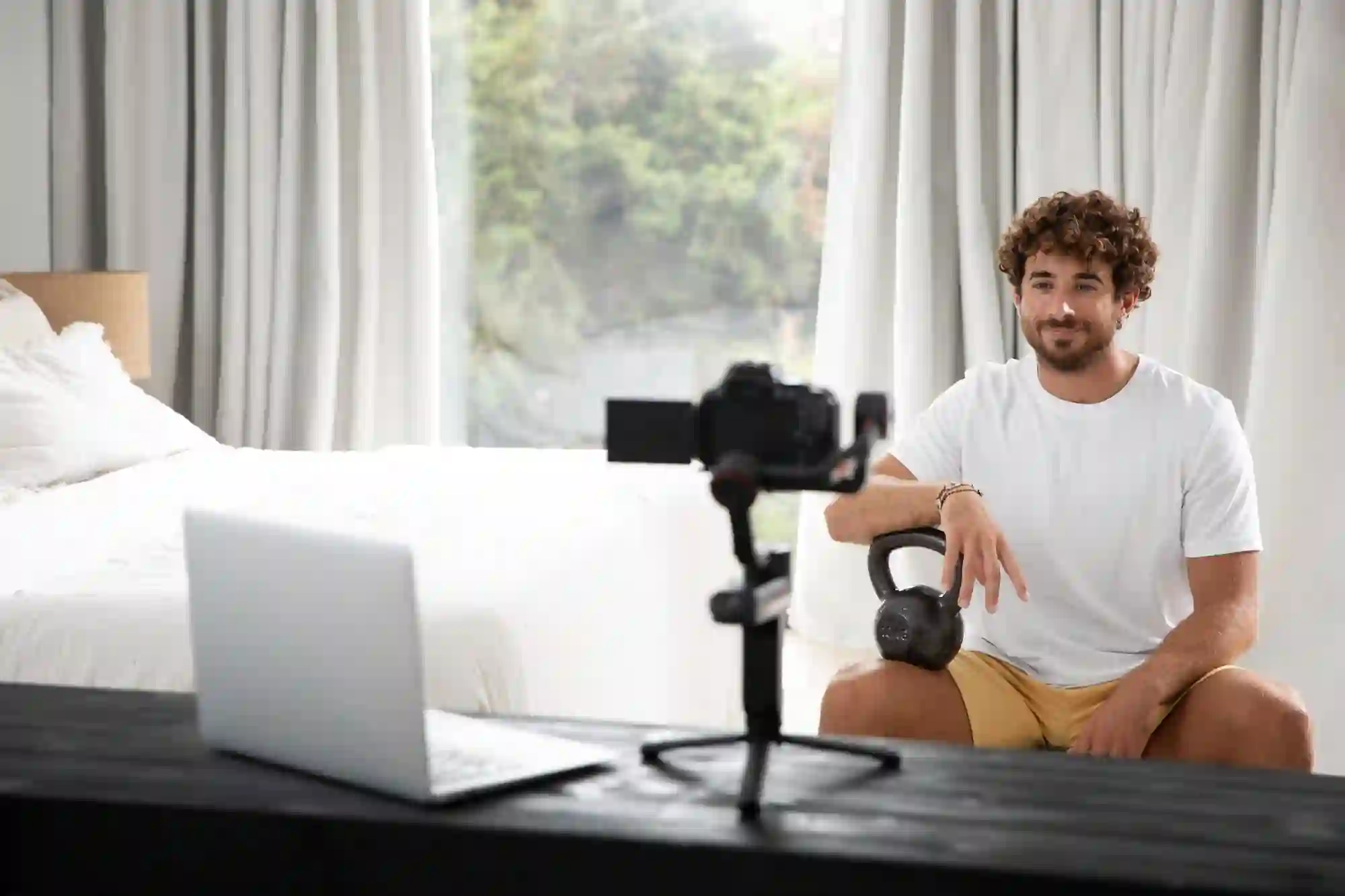
Plan, promote, and convert smarter on TikTok LIVE. Learn expert strategies with Zorilla Marketing LLP to boost sales and audience engagement.
Mastering TikTok LIVE Events: How to Plan, Promote & Convert Like a Pro
TikTok LIVE isn’t just a flashy add-on to your content strategy — it’s a powerful e-commerce engine. But like any great sales moment, it works best with a plan.
If you’ve been treating LIVE shopping as a last-minute hustle, it’s time to rethink your approach. With TikTok LIVE Events, sellers and creators can turn one-off streams into well-timed, high-converting campaigns.
Here’s everything you need to know to go from “winging it” to “winning it” — and how Zorilla Marketing LLP helps brands streamline every step of the process.
Why Plan a TikTok LIVE Event?
When you schedule a LIVE Event instead of going live on impulse, three big things happen:
🗓️ You create a plan — with product selection, team prep, and strategic timing.
📢 You can promote ahead of time — driving more viewers to your session.
🛒 You can integrate key sales tools like Giveaways, Flash Sales, and Billboards directly into your setup.
Whether you're an emerging creator or a growing DTC brand, LIVE Events let you work smarter, not harder.
Your Pre-LIVE Checklist
Before you hit "Go LIVE," here’s your preparation game plan:
✅ Schedule Your LIVE
Head to LIVE Center in your TikTok app or desktop LIVE Console and set your session details (date, time, description).
Pro Tip: Events must be scheduled 2+ hours in advance on mobile, but can be launched immediately via desktop.
✅ Promote Your LIVE
Make noise. TikTok lets you add your LIVE Event link to promo videos so viewers can RSVP. Push this out 2–3 days ahead via TikTok and off-platform channels (email, Instagram, WhatsApp).
✅ Prepare Your Product Set
Create a LIVE product set with up to 100 featured items — this way, you won’t fumble for links during the event. You can add from your TikTok Shop, collabs, marketplace, and more.
✅ Plan Giveaways & Flash Sales
Boost engagement by scheduling a LIVE Giveaway or Flash Sale:
Select prize items, number of winners, and how users participate (comment-to-enter, etc.)
Schedule countdown timers and limit per-user purchase quantity
✅ Add Moderators
Assign up to 20 moderators (mobile) or 30 (desktop) to help manage comments, mute/block users, and pin products. They’ll keep your stream smooth while you focus on selling.
Going LIVE: Maximize the Moment
When it’s showtime, timing, visibility, and energy are everything. Here's how to keep control and momentum:
🎥 Start Your LIVE
You can start your session within 10 minutes of your scheduled time. Tap Go LIVE on mobile, or trigger it through LIVE Console (for team-based setups).
📌 Pin Products Strategically
Tap the shopping bag icon and pin featured products at key moments. Remind users to check it often — as new viewers join, they’ll need a cue to explore your offers.
🎁 Launch Giveaways & Flash Sales
Use scheduled LIVE Giveaways and Flash Sales to create urgency:
Pin Flash Sale items for visibility
Rotate LIVE Billboards to highlight deals or limited-time bundles
Keep countdowns visible to drive quick decisions
At Zorilla, we often help brands script these moments into their LIVE content to keep the pace tight and focused on conversions.
After the Stream: Don’t Just Move On — Optimize
A successful LIVE doesn’t end when the camera shuts off. Use TikTok’s tools to recap, analyze, and prep for the next win.
🔁 Post Highlights
Use LIVE Highlights to clip and post your best-selling moments. These clips turn into evergreen, shoppable content that promotes your future events.
📊 Analyze Performance
Dive into your LIVE Dashboard (via Creator Center or LIVE Console) to see:
GMV, orders, and sales per product
Viewer trends and engagement peaks
Comment sentiment and giveaway participation
Ad performance, if you ran TikTok ads
Access basic or advanced views, and even download your data for offline reporting.
Zorilla’s Take: Treat Every LIVE as a Campaign
At Zorilla Marketing, we believe that TikTok LIVE isn’t a gimmick — it’s a sales channel. We help brands plan full-funnel LIVE campaigns that combine:
Strategic product selection
Creative LIVE storytelling
Influencer integration
Data-backed optimization
Whether you need help setting up your first LIVE or scaling your next Flash Sale series, we’re here to help you turn viewers into buyers — and buyers into repeat fans.
Ready to Plan a Winning TikTok LIVE?
Don’t go live unprepared. From scheduling to scripting, Zorilla can help you maximize every moment.
👉 Reach out to us today and let's make your next LIVE session your best yet.
Also read:
Other Blogs
Other Blogs
Check our other project Blogs with useful insight and information for your businesses



Other Blogs
Other Blogs
Check our other project Blogs with useful insight and information for your businesses