March 4, 2026
TikTok for Shopify: How Auto-Posting Instagram Content Drives Sales
March 4, 2026
TikTok for Shopify: How Auto-Posting Instagram Content Drives Sales
Learn how Shopify sellers can automatically convert Instagram posts into shoppable TikTok Shop content to drive consistent sales.
TikTok for Shopify: How Auto-Posting Instagram Content Can Drive TikTok Shop Sales
TikTok + Shopify Integration for Sellers
For many brands, Instagram already holds a large library of polished product photos, lifestyle shots, and carousel posts. The challenge is that maintaining another platform like TikTok often requires creating fresh content constantly.
To solve this, TikTok introduced a feature inside the TikTok for Shopify integration that allows sellers to automatically sync Instagram photos and carousels to TikTok Shop as shoppable posts.
Instead of manually reposting content, brands can transform their existing Instagram visuals into TikTok posts that include direct product links or shop links.
For sellers trying to scale efficiently, this feature turns an existing content library into a continuous stream of TikTok Shop content.
Why Repurposing Instagram Content Matters for TikTok Shop Growth
Creating new content daily is one of the biggest challenges for e-commerce teams.
Between product launches, creator campaigns, and operational work, content production often becomes a bottleneck.
Repurposing Instagram posts solves several problems at once:
It keeps your TikTok Shop account active
It increases product visibility
It reduces the need for constant content production
It turns aesthetic product photos into shoppable posts
Most importantly, it allows brands to focus on strategy and creators while automation handles routine posting.
What the Auto-Post Feature Actually Does
The Instagram auto-post feature connects your Instagram account to TikTok Shop through the TikTok for Shopify app.
Once activated, the system automatically:
Pulls photos and captions from Instagram
Converts them into TikTok posts
Adds product or shop anchor links
Publishes them on a schedule
The result is a shoppable TikTok post without requiring manual upload.
Customers can tap the link and go directly to the product page or the TikTok Shop storefront.
Key Benefits for TikTok Shop Sellers
1. Effortless Content Publishing
Many brands already invest heavily in Instagram photography.
This feature allows sellers to reuse that work instead of recreating content for TikTok.
Your Instagram feed essentially becomes a content pipeline for TikTok Shop.
2. Automatic Shoppable Posts
The biggest advantage is that posts are not just copied visually.
They become shoppable TikTok posts.
Each post includes product anchors or shop links, allowing customers to move from content to checkout instantly.
This shortens the buying journey.
3. Consistent Account Activity
TikTok’s algorithm rewards accounts that post consistently.
Auto-posting ensures your account continues publishing even when your team is focused on other marketing tasks.
A steady stream of content increases visibility and engagement.
4. Better Use of Existing Assets
Brands often have months or years of visual content stored on Instagram.
This feature pulls posts from the past 12 months and repurposes them automatically.
Instead of letting older content sit unused, it becomes part of your TikTok sales strategy.
How to Set Up Instagram Auto-Posting
Setting up the feature takes only a few steps.
Step 1: Connect Instagram Through TikTok for Shopify
Inside the TikTok for Shopify app, go to Shop Settings and connect your Instagram account.
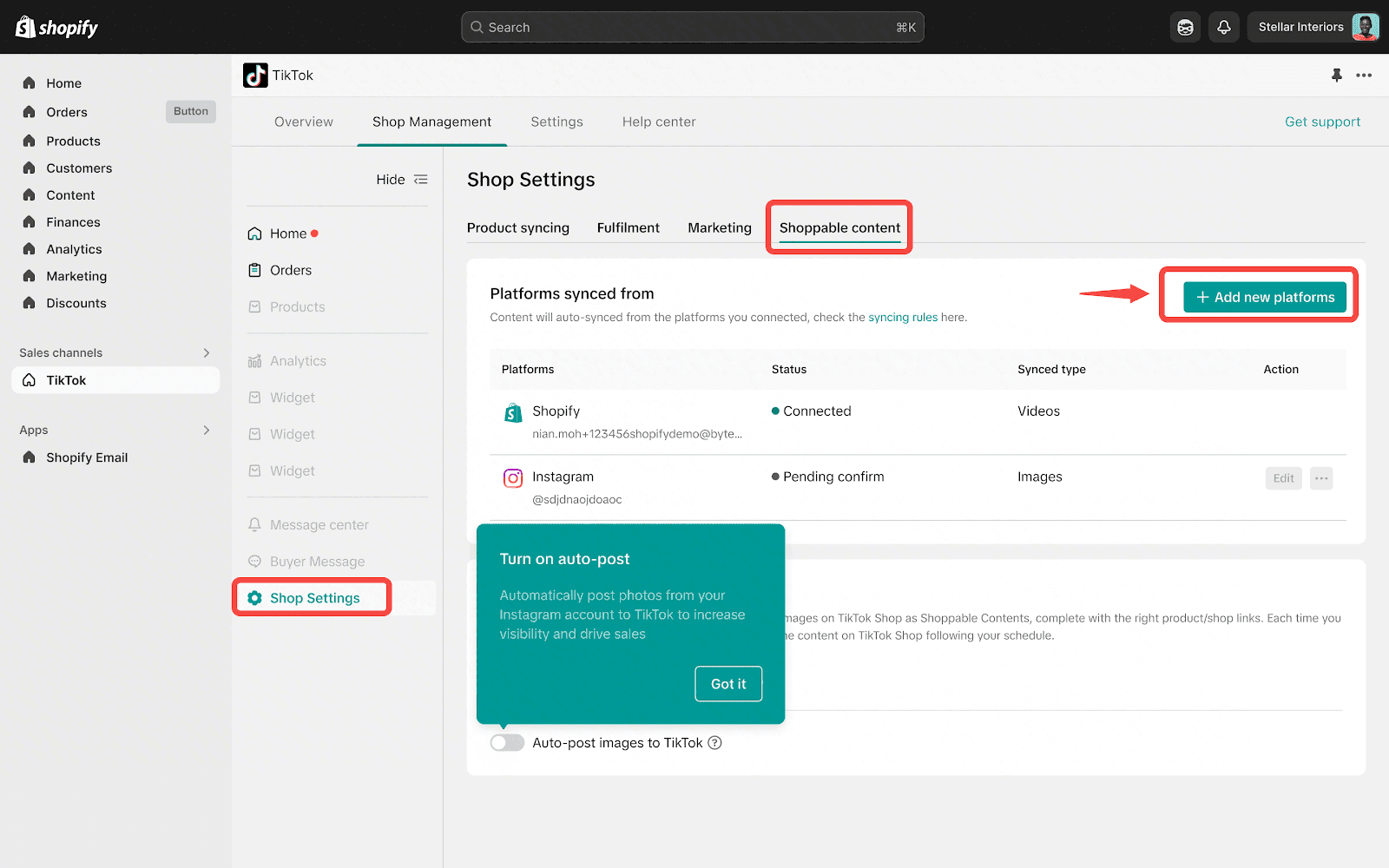
Once submitted, TikTok typically takes around three business days to verify the account.
Step 2: Enable Auto-Posting
After verification, sellers can activate the Auto Post Photos to TikTok option.
From here, you can control:
Whether the feature is active
Daily post limits
Preferred posting times
Step 3: Configure Your Posting Schedule
The system defaults to five posts per day, but sellers can adjust this anywhere from one to twenty posts daily.
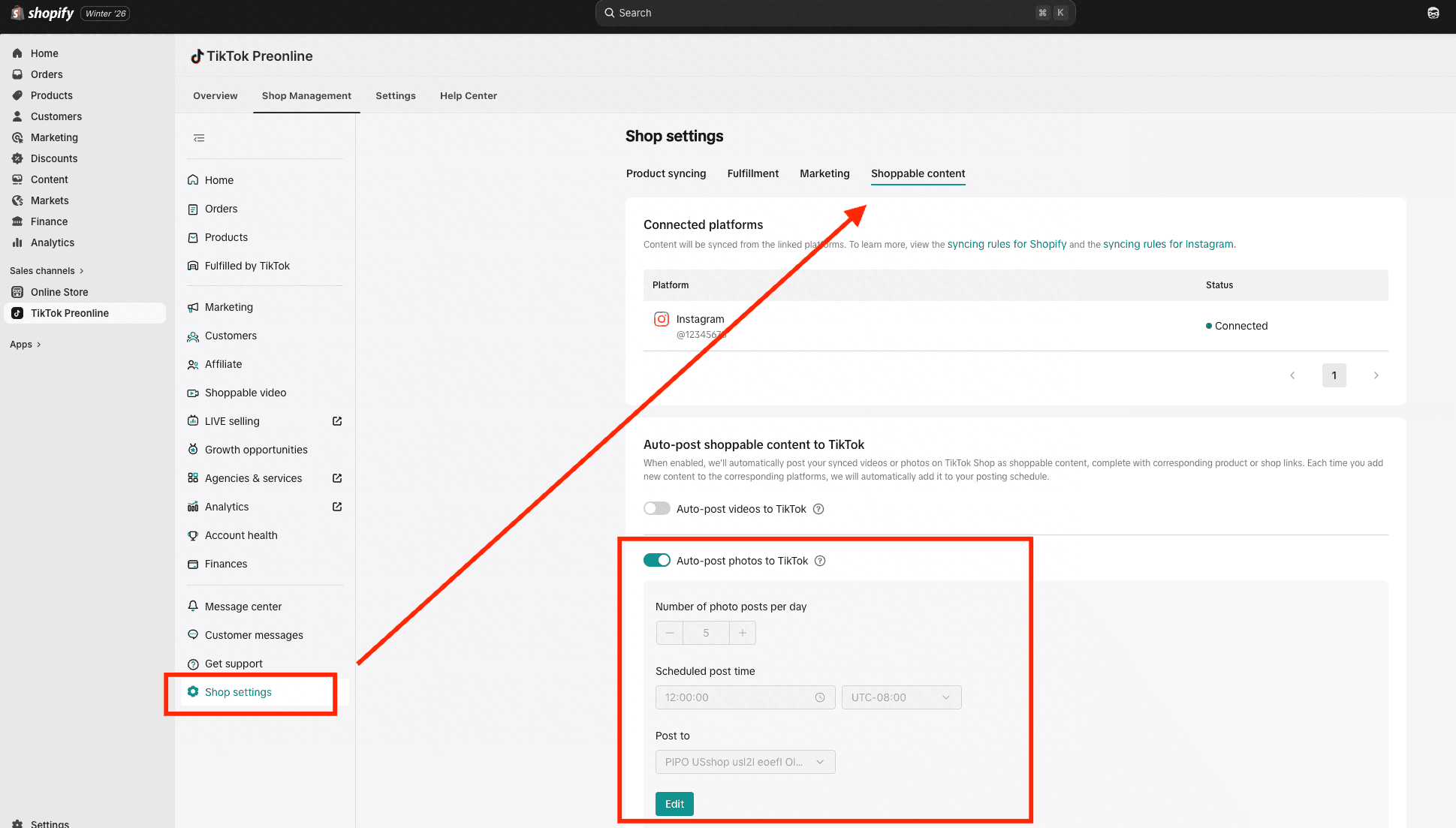
This flexibility helps brands balance consistent posting without overwhelming followers.
Step 4: Manage Synced Content
The “Manage Synced Photos” dashboard allows sellers to review all content pulled from Instagram.
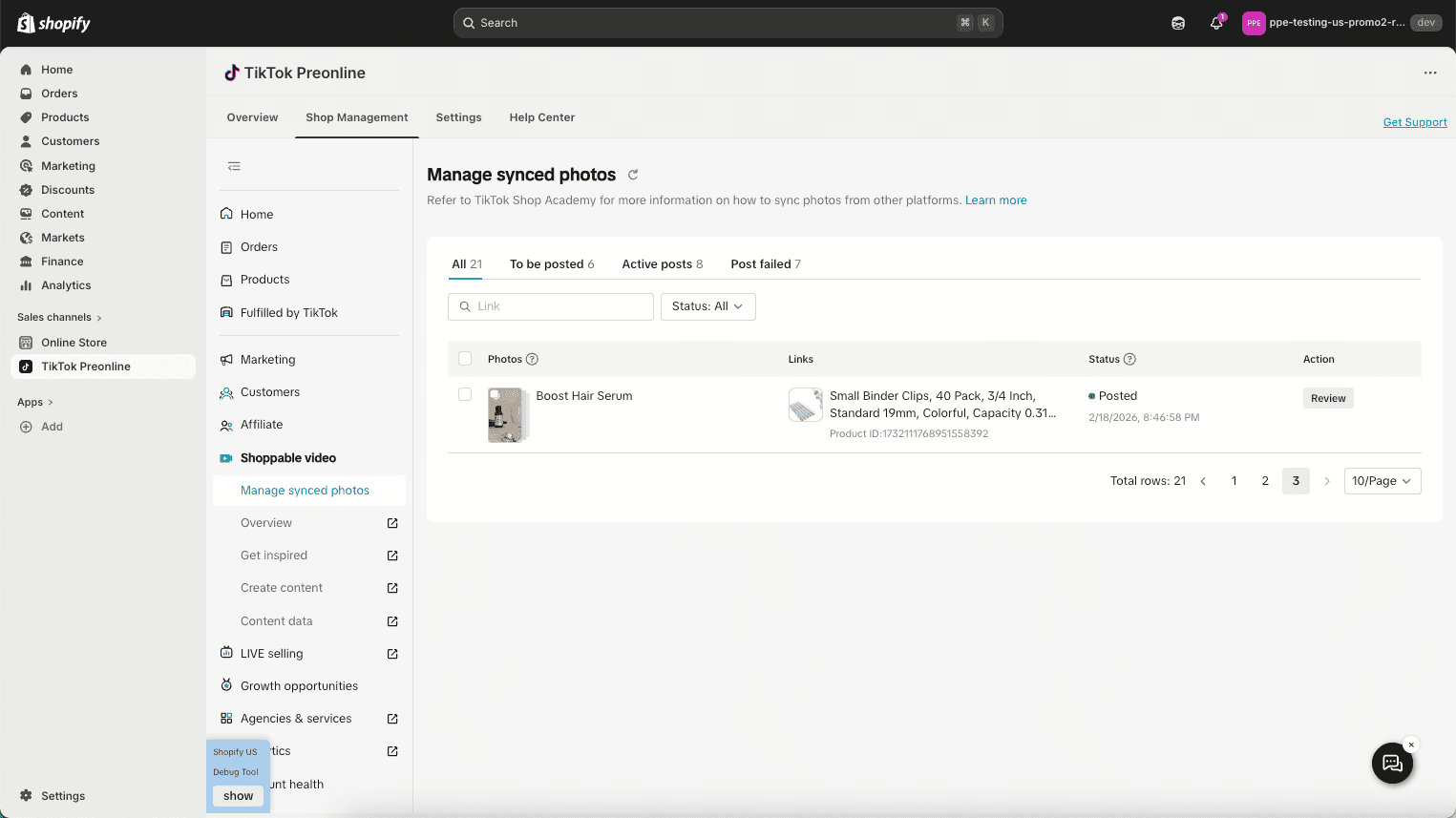
Posts are categorized by status:
Scheduled
Ready to Post
Posted
Failed
From here, sellers can edit captions, adjust hashtags, and modify product links before publishing.
How Product Tagging Works
One of the most important parts of the integration is how product tags are mapped.
When the system pulls an Instagram post, it checks for product tags.
If a product tag exists and the same item is listed in TikTok Shop, the system automatically connects the two.
This creates a product anchor link within the TikTok post.
Product Anchor Links
If the product name is under 30 characters, the product name appears as the clickable link.
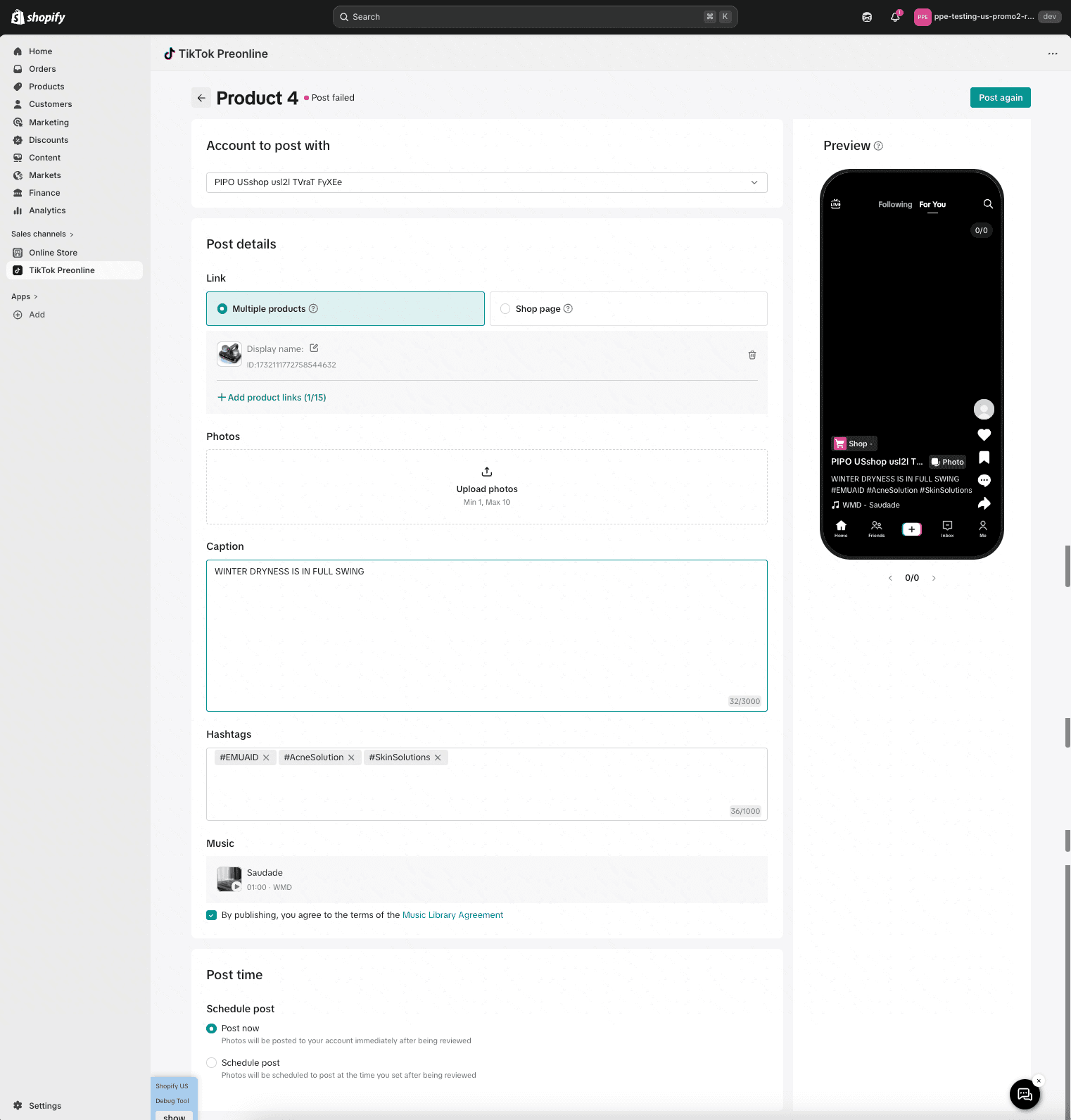
If the name is longer, the link appears as “Buy Now.”
This keeps posts clean while still directing customers to purchase.
Shop Anchor Links
If the Instagram post has no product tags, sellers can attach a shop link instead.
This sends viewers directly to the TikTok Shop storefront.
To use this feature, the TikTok account must be connected to the shop and have at least ten active products listed.
Supported Content Types
Currently, the system supports specific Instagram formats.
Media Type | Supported? | Note |
Single Photos | ✅ Yes | Fully supported. |
Photo Carousels | ✅ Yes | Fully supported. |
Mixed Carousels | ⚠️ Partial | Photos are kept; videos are removed. |
Instagram Video | ❌ No | Coming soon. |
Reels | ❌ No | Coming soon. |
TikTok has indicated that video support may be added in the future.
Tips for Getting the Most Out of Auto-Posting
Automation is helpful, but strategy still matters.
Here are a few ways sellers can improve results.
Curate Your Posting Queue
Even though posts are scheduled automatically, it is worth reviewing the queue regularly.
You can reorder posts to align with:
Product launches
Seasonal promotions
TikTok trends
Creator campaigns
Refine Captions and Hashtags
Auto-synced captions are a starting point, not the final version.
Optimizing hashtags and adjusting captions for TikTok audiences can improve discoverability.
Use Product Collections Strategically
Posts can include up to ten products in a collection link.
This works well for:
Product bundles
Outfit inspiration
Multi-product skincare routines
Seasonal collections
Align Auto-Posts With Creator Campaigns
Repurposed posts work best when paired with creator content.
Creators drive trust and storytelling, while automated posts maintain consistent visibility.
Together they build a stronger conversion funnel.
Where Automation Fits Into a TikTok Shop Growth Strategy
Automation should not replace creator marketing or original TikTok content.
Instead, it acts as the content foundation.
Think of your TikTok Shop content mix like this:
Creator videos driving engagement
Original TikTok content built for trends
Automated Instagram posts providing consistent product visibility
When these three elements work together, brands create both discovery and conversion.
How Zorilla Marketing Helps Brands Scale on TikTok Shop
At Zorilla Marketing, we work with brands building long-term growth inside TikTok Shop.
This includes helping sellers:
Set up TikTok Shop and Shopify integrations
Build creator collaboration programs
Launch influencer-led product campaigns
Optimize shoppable content strategies
Automation tools like Instagram auto-posting are powerful, but they work best when combined with creators and strategic campaigns.
That combination is what turns content into consistent GMV growth.
Final Thoughts
For brands already investing in Instagram, the TikTok for Shopify auto-post feature offers a simple way to extend the value of existing content.
Instead of starting from scratch on TikTok, sellers can transform their Instagram feed into a stream of shoppable posts.
Used correctly, this approach saves time, maintains account activity, and creates more opportunities for customers to discover products.
If you are exploring ways to scale TikTok Shop with the right mix of automation, creators, and performance strategy, Zorilla Marketing can help guide that process.
Book a free strategy call with our team today and let us help you make your Shop Tab presence your strongest sales channel.
Also read :
TikTok for Shopify: How Auto-Posting Instagram Content Can Drive TikTok Shop Sales
TikTok + Shopify Integration for Sellers
For many brands, Instagram already holds a large library of polished product photos, lifestyle shots, and carousel posts. The challenge is that maintaining another platform like TikTok often requires creating fresh content constantly.
To solve this, TikTok introduced a feature inside the TikTok for Shopify integration that allows sellers to automatically sync Instagram photos and carousels to TikTok Shop as shoppable posts.
Instead of manually reposting content, brands can transform their existing Instagram visuals into TikTok posts that include direct product links or shop links.
For sellers trying to scale efficiently, this feature turns an existing content library into a continuous stream of TikTok Shop content.
Why Repurposing Instagram Content Matters for TikTok Shop Growth
Creating new content daily is one of the biggest challenges for e-commerce teams.
Between product launches, creator campaigns, and operational work, content production often becomes a bottleneck.
Repurposing Instagram posts solves several problems at once:
It keeps your TikTok Shop account active
It increases product visibility
It reduces the need for constant content production
It turns aesthetic product photos into shoppable posts
Most importantly, it allows brands to focus on strategy and creators while automation handles routine posting.
What the Auto-Post Feature Actually Does
The Instagram auto-post feature connects your Instagram account to TikTok Shop through the TikTok for Shopify app.
Once activated, the system automatically:
Pulls photos and captions from Instagram
Converts them into TikTok posts
Adds product or shop anchor links
Publishes them on a schedule
The result is a shoppable TikTok post without requiring manual upload.
Customers can tap the link and go directly to the product page or the TikTok Shop storefront.
Key Benefits for TikTok Shop Sellers
1. Effortless Content Publishing
Many brands already invest heavily in Instagram photography.
This feature allows sellers to reuse that work instead of recreating content for TikTok.
Your Instagram feed essentially becomes a content pipeline for TikTok Shop.
2. Automatic Shoppable Posts
The biggest advantage is that posts are not just copied visually.
They become shoppable TikTok posts.
Each post includes product anchors or shop links, allowing customers to move from content to checkout instantly.
This shortens the buying journey.
3. Consistent Account Activity
TikTok’s algorithm rewards accounts that post consistently.
Auto-posting ensures your account continues publishing even when your team is focused on other marketing tasks.
A steady stream of content increases visibility and engagement.
4. Better Use of Existing Assets
Brands often have months or years of visual content stored on Instagram.
This feature pulls posts from the past 12 months and repurposes them automatically.
Instead of letting older content sit unused, it becomes part of your TikTok sales strategy.
How to Set Up Instagram Auto-Posting
Setting up the feature takes only a few steps.
Step 1: Connect Instagram Through TikTok for Shopify
Inside the TikTok for Shopify app, go to Shop Settings and connect your Instagram account.
Once submitted, TikTok typically takes around three business days to verify the account.
Step 2: Enable Auto-Posting
After verification, sellers can activate the Auto Post Photos to TikTok option.
From here, you can control:
Whether the feature is active
Daily post limits
Preferred posting times
Step 3: Configure Your Posting Schedule
The system defaults to five posts per day, but sellers can adjust this anywhere from one to twenty posts daily.
This flexibility helps brands balance consistent posting without overwhelming followers.
Step 4: Manage Synced Content
The “Manage Synced Photos” dashboard allows sellers to review all content pulled from Instagram.
Posts are categorized by status:
Scheduled
Ready to Post
Posted
Failed
From here, sellers can edit captions, adjust hashtags, and modify product links before publishing.
How Product Tagging Works
One of the most important parts of the integration is how product tags are mapped.
When the system pulls an Instagram post, it checks for product tags.
If a product tag exists and the same item is listed in TikTok Shop, the system automatically connects the two.
This creates a product anchor link within the TikTok post.
Product Anchor Links
If the product name is under 30 characters, the product name appears as the clickable link.
If the name is longer, the link appears as “Buy Now.”
This keeps posts clean while still directing customers to purchase.
Shop Anchor Links
If the Instagram post has no product tags, sellers can attach a shop link instead.
This sends viewers directly to the TikTok Shop storefront.
To use this feature, the TikTok account must be connected to the shop and have at least ten active products listed.
Supported Content Types
Currently, the system supports specific Instagram formats.
Media Type | Supported? | Note |
Single Photos | ✅ Yes | Fully supported. |
Photo Carousels | ✅ Yes | Fully supported. |
Mixed Carousels | ⚠️ Partial | Photos are kept; videos are removed. |
Instagram Video | ❌ No | Coming soon. |
Reels | ❌ No | Coming soon. |
TikTok has indicated that video support may be added in the future.
Tips for Getting the Most Out of Auto-Posting
Automation is helpful, but strategy still matters.
Here are a few ways sellers can improve results.
Curate Your Posting Queue
Even though posts are scheduled automatically, it is worth reviewing the queue regularly.
You can reorder posts to align with:
Product launches
Seasonal promotions
TikTok trends
Creator campaigns
Refine Captions and Hashtags
Auto-synced captions are a starting point, not the final version.
Optimizing hashtags and adjusting captions for TikTok audiences can improve discoverability.
Use Product Collections Strategically
Posts can include up to ten products in a collection link.
This works well for:
Product bundles
Outfit inspiration
Multi-product skincare routines
Seasonal collections
Align Auto-Posts With Creator Campaigns
Repurposed posts work best when paired with creator content.
Creators drive trust and storytelling, while automated posts maintain consistent visibility.
Together they build a stronger conversion funnel.
Where Automation Fits Into a TikTok Shop Growth Strategy
Automation should not replace creator marketing or original TikTok content.
Instead, it acts as the content foundation.
Think of your TikTok Shop content mix like this:
Creator videos driving engagement
Original TikTok content built for trends
Automated Instagram posts providing consistent product visibility
When these three elements work together, brands create both discovery and conversion.
How Zorilla Marketing Helps Brands Scale on TikTok Shop
At Zorilla Marketing, we work with brands building long-term growth inside TikTok Shop.
This includes helping sellers:
Set up TikTok Shop and Shopify integrations
Build creator collaboration programs
Launch influencer-led product campaigns
Optimize shoppable content strategies
Automation tools like Instagram auto-posting are powerful, but they work best when combined with creators and strategic campaigns.
That combination is what turns content into consistent GMV growth.
Final Thoughts
For brands already investing in Instagram, the TikTok for Shopify auto-post feature offers a simple way to extend the value of existing content.
Instead of starting from scratch on TikTok, sellers can transform their Instagram feed into a stream of shoppable posts.
Used correctly, this approach saves time, maintains account activity, and creates more opportunities for customers to discover products.
If you are exploring ways to scale TikTok Shop with the right mix of automation, creators, and performance strategy, Zorilla Marketing can help guide that process.
Book a free strategy call with our team today and let us help you make your Shop Tab presence your strongest sales channel.
Also read :


Learn how Shopify sellers can automatically convert Instagram posts into shoppable TikTok Shop content to drive consistent sales.
TikTok for Shopify: How Auto-Posting Instagram Content Can Drive TikTok Shop Sales
TikTok + Shopify Integration for Sellers
For many brands, Instagram already holds a large library of polished product photos, lifestyle shots, and carousel posts. The challenge is that maintaining another platform like TikTok often requires creating fresh content constantly.
To solve this, TikTok introduced a feature inside the TikTok for Shopify integration that allows sellers to automatically sync Instagram photos and carousels to TikTok Shop as shoppable posts.
Instead of manually reposting content, brands can transform their existing Instagram visuals into TikTok posts that include direct product links or shop links.
For sellers trying to scale efficiently, this feature turns an existing content library into a continuous stream of TikTok Shop content.
Why Repurposing Instagram Content Matters for TikTok Shop Growth
Creating new content daily is one of the biggest challenges for e-commerce teams.
Between product launches, creator campaigns, and operational work, content production often becomes a bottleneck.
Repurposing Instagram posts solves several problems at once:
It keeps your TikTok Shop account active
It increases product visibility
It reduces the need for constant content production
It turns aesthetic product photos into shoppable posts
Most importantly, it allows brands to focus on strategy and creators while automation handles routine posting.
What the Auto-Post Feature Actually Does
The Instagram auto-post feature connects your Instagram account to TikTok Shop through the TikTok for Shopify app.
Once activated, the system automatically:
Pulls photos and captions from Instagram
Converts them into TikTok posts
Adds product or shop anchor links
Publishes them on a schedule
The result is a shoppable TikTok post without requiring manual upload.
Customers can tap the link and go directly to the product page or the TikTok Shop storefront.
Key Benefits for TikTok Shop Sellers
1. Effortless Content Publishing
Many brands already invest heavily in Instagram photography.
This feature allows sellers to reuse that work instead of recreating content for TikTok.
Your Instagram feed essentially becomes a content pipeline for TikTok Shop.
2. Automatic Shoppable Posts
The biggest advantage is that posts are not just copied visually.
They become shoppable TikTok posts.
Each post includes product anchors or shop links, allowing customers to move from content to checkout instantly.
This shortens the buying journey.
3. Consistent Account Activity
TikTok’s algorithm rewards accounts that post consistently.
Auto-posting ensures your account continues publishing even when your team is focused on other marketing tasks.
A steady stream of content increases visibility and engagement.
4. Better Use of Existing Assets
Brands often have months or years of visual content stored on Instagram.
This feature pulls posts from the past 12 months and repurposes them automatically.
Instead of letting older content sit unused, it becomes part of your TikTok sales strategy.
How to Set Up Instagram Auto-Posting
Setting up the feature takes only a few steps.
Step 1: Connect Instagram Through TikTok for Shopify
Inside the TikTok for Shopify app, go to Shop Settings and connect your Instagram account.
Once submitted, TikTok typically takes around three business days to verify the account.
Step 2: Enable Auto-Posting
After verification, sellers can activate the Auto Post Photos to TikTok option.
From here, you can control:
Whether the feature is active
Daily post limits
Preferred posting times
Step 3: Configure Your Posting Schedule
The system defaults to five posts per day, but sellers can adjust this anywhere from one to twenty posts daily.
This flexibility helps brands balance consistent posting without overwhelming followers.
Step 4: Manage Synced Content
The “Manage Synced Photos” dashboard allows sellers to review all content pulled from Instagram.
Posts are categorized by status:
Scheduled
Ready to Post
Posted
Failed
From here, sellers can edit captions, adjust hashtags, and modify product links before publishing.
How Product Tagging Works
One of the most important parts of the integration is how product tags are mapped.
When the system pulls an Instagram post, it checks for product tags.
If a product tag exists and the same item is listed in TikTok Shop, the system automatically connects the two.
This creates a product anchor link within the TikTok post.
Product Anchor Links
If the product name is under 30 characters, the product name appears as the clickable link.
If the name is longer, the link appears as “Buy Now.”
This keeps posts clean while still directing customers to purchase.
Shop Anchor Links
If the Instagram post has no product tags, sellers can attach a shop link instead.
This sends viewers directly to the TikTok Shop storefront.
To use this feature, the TikTok account must be connected to the shop and have at least ten active products listed.
Supported Content Types
Currently, the system supports specific Instagram formats.
Media Type | Supported? | Note |
Single Photos | ✅ Yes | Fully supported. |
Photo Carousels | ✅ Yes | Fully supported. |
Mixed Carousels | ⚠️ Partial | Photos are kept; videos are removed. |
Instagram Video | ❌ No | Coming soon. |
Reels | ❌ No | Coming soon. |
TikTok has indicated that video support may be added in the future.
Tips for Getting the Most Out of Auto-Posting
Automation is helpful, but strategy still matters.
Here are a few ways sellers can improve results.
Curate Your Posting Queue
Even though posts are scheduled automatically, it is worth reviewing the queue regularly.
You can reorder posts to align with:
Product launches
Seasonal promotions
TikTok trends
Creator campaigns
Refine Captions and Hashtags
Auto-synced captions are a starting point, not the final version.
Optimizing hashtags and adjusting captions for TikTok audiences can improve discoverability.
Use Product Collections Strategically
Posts can include up to ten products in a collection link.
This works well for:
Product bundles
Outfit inspiration
Multi-product skincare routines
Seasonal collections
Align Auto-Posts With Creator Campaigns
Repurposed posts work best when paired with creator content.
Creators drive trust and storytelling, while automated posts maintain consistent visibility.
Together they build a stronger conversion funnel.
Where Automation Fits Into a TikTok Shop Growth Strategy
Automation should not replace creator marketing or original TikTok content.
Instead, it acts as the content foundation.
Think of your TikTok Shop content mix like this:
Creator videos driving engagement
Original TikTok content built for trends
Automated Instagram posts providing consistent product visibility
When these three elements work together, brands create both discovery and conversion.
How Zorilla Marketing Helps Brands Scale on TikTok Shop
At Zorilla Marketing, we work with brands building long-term growth inside TikTok Shop.
This includes helping sellers:
Set up TikTok Shop and Shopify integrations
Build creator collaboration programs
Launch influencer-led product campaigns
Optimize shoppable content strategies
Automation tools like Instagram auto-posting are powerful, but they work best when combined with creators and strategic campaigns.
That combination is what turns content into consistent GMV growth.
Final Thoughts
For brands already investing in Instagram, the TikTok for Shopify auto-post feature offers a simple way to extend the value of existing content.
Instead of starting from scratch on TikTok, sellers can transform their Instagram feed into a stream of shoppable posts.
Used correctly, this approach saves time, maintains account activity, and creates more opportunities for customers to discover products.
If you are exploring ways to scale TikTok Shop with the right mix of automation, creators, and performance strategy, Zorilla Marketing can help guide that process.
Book a free strategy call with our team today and let us help you make your Shop Tab presence your strongest sales channel.
Also read :
Other Blogs
Other Blogs
Check our other project Blogs with useful insight and information for your businesses



Other Blogs
Other Blogs
Check our other project Blogs with useful insight and information for your businesses