
October 17, 2025
TikTok LIVE Giveaways: Boost Engagement & Drive Sales
October 17, 2025
TikTok LIVE Giveaways: Boost Engagement & Drive Sales
Learn how TikTok Shop LIVE Giveaways can increase engagement, attract new viewers, and boost sales. Step-by-step setup and best practices included.
TikTok Shop LIVE Giveaways: The Ultimate Engagement Booster for Sellers & Creators
Want to supercharge engagement and boost product visibility during your TikTok Shop livestreams? LIVE Giveaways are the feature you’ve been waiting for.
Whether you’re a seller or creator, LIVE Giveaways let you offer real-time prizes during your TikTok LIVE to incentivize participation, drive comments, and attract new viewers. The best part? Winners are automatically selected by TikTok, and sellers handle fulfillment.
Here’s everything you need to know to launch a successful LIVE Giveaway.
What Is a LIVE Giveaway on TikTok Shop?
A LIVE Giveaway is a livestream feature that allows you to gift products to your audience during your TikTok Shop session:
🎁 Sellers provide the giveaway items
🔄 Creators run the giveaway live
✅ Winners are selected automatically by TikTok
📦 Sellers handle prize fulfillment and shipping
Why Use LIVE Giveaways?
LIVE Giveaways add real value to your TikTok Shop strategy:
✅ Boost LIVE Engagement – Encourage viewers to stay and interact, especially when commenting is required to enter.
✅ Drive More Traffic & Sales – Attract new users, amplify reach, and bring attention to your products.
✅ Gamify the Experience – Countdowns, comment tasks, and live participation make your stream interactive and fun.
Who Can Use It?
LIVE Giveaways are available to:
✅ Official TikTok Shop sellers
✅ TikTok Shop Marketing accounts
✅ TikTok creators
How to Set Up a LIVE Giveaway
🛒 Step 1: Seller Adds the Giveaway Item
Via Seller Center:
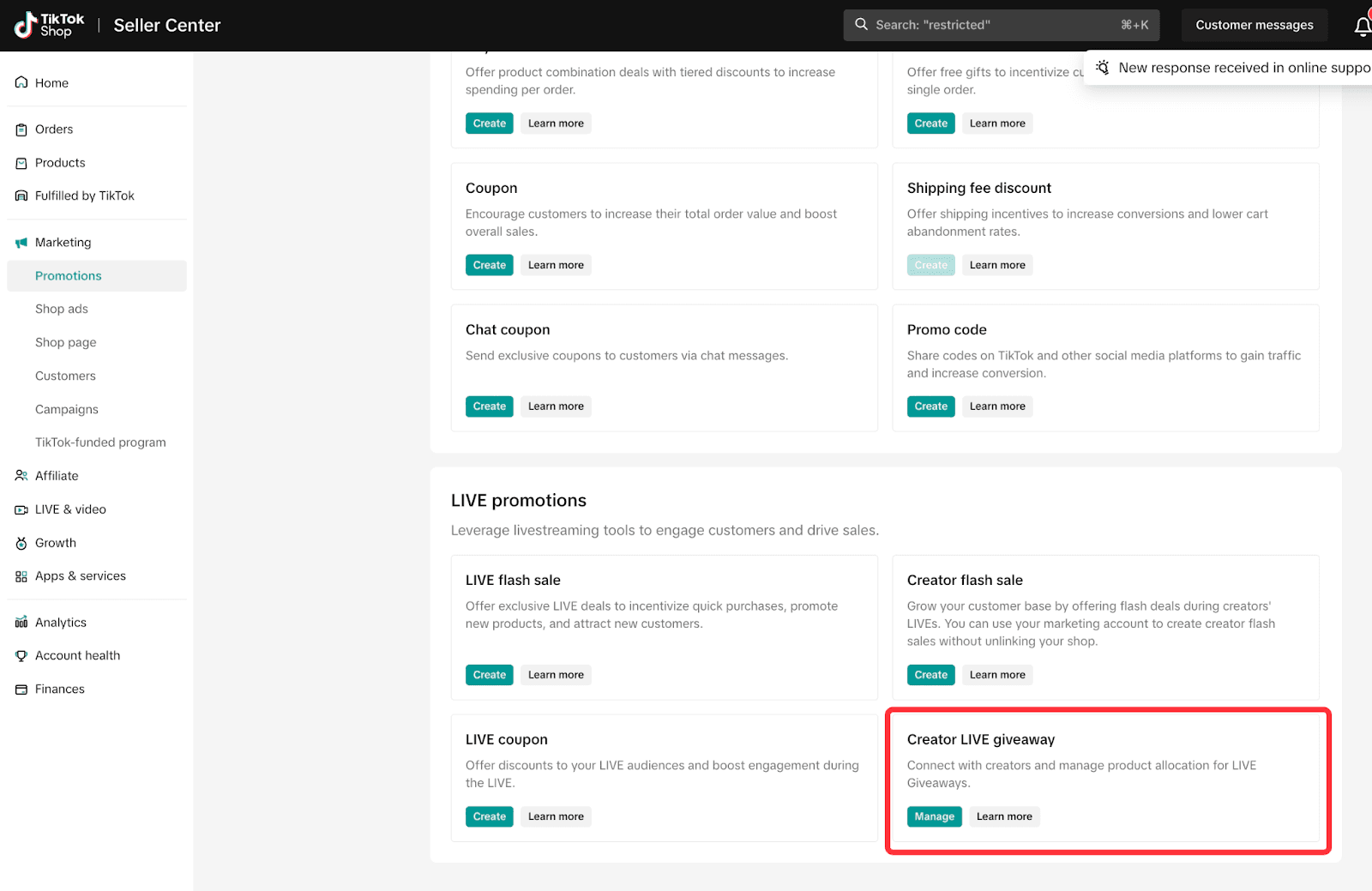
Go to Marketing > Promotions > LIVE Giveaway
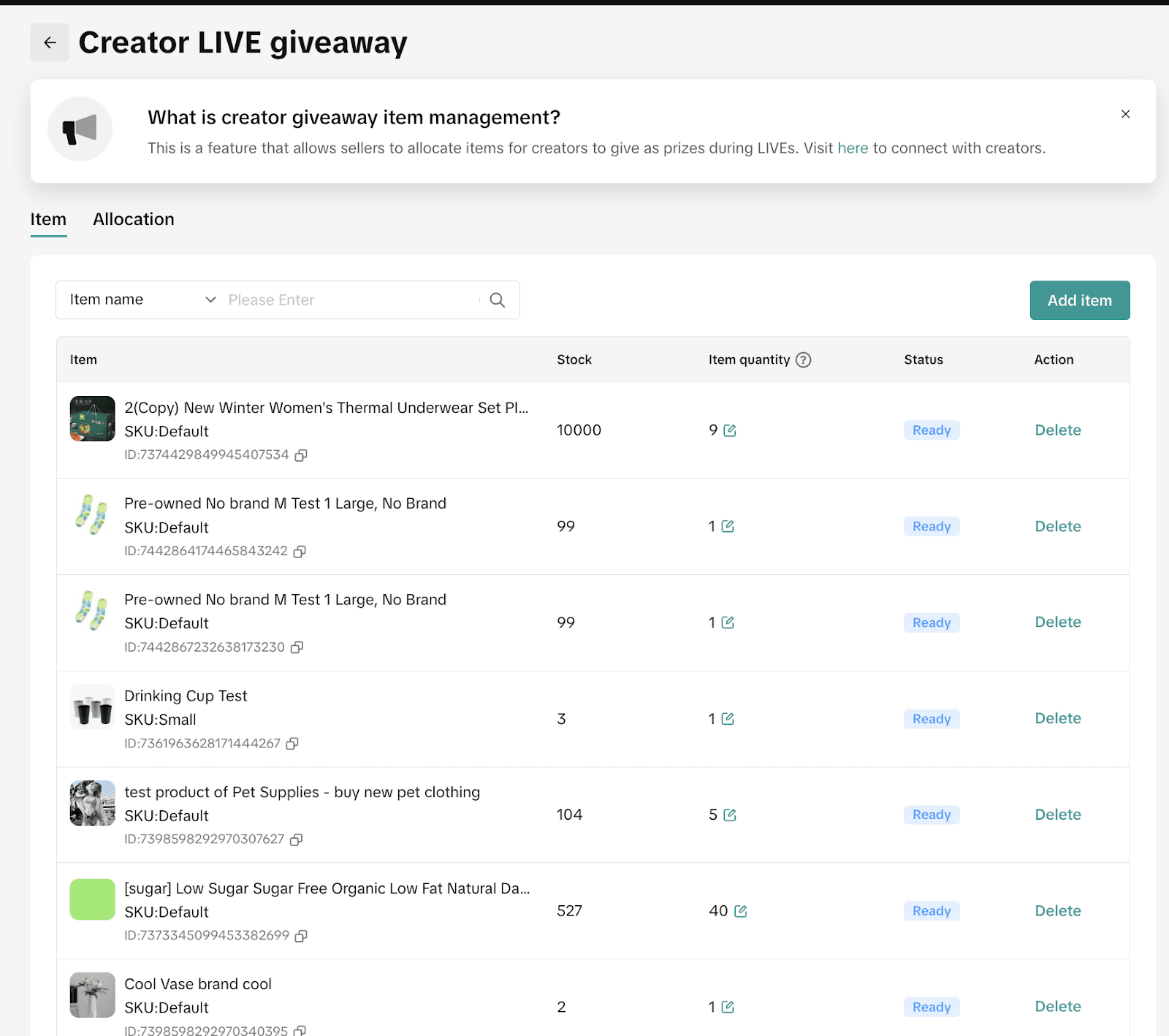
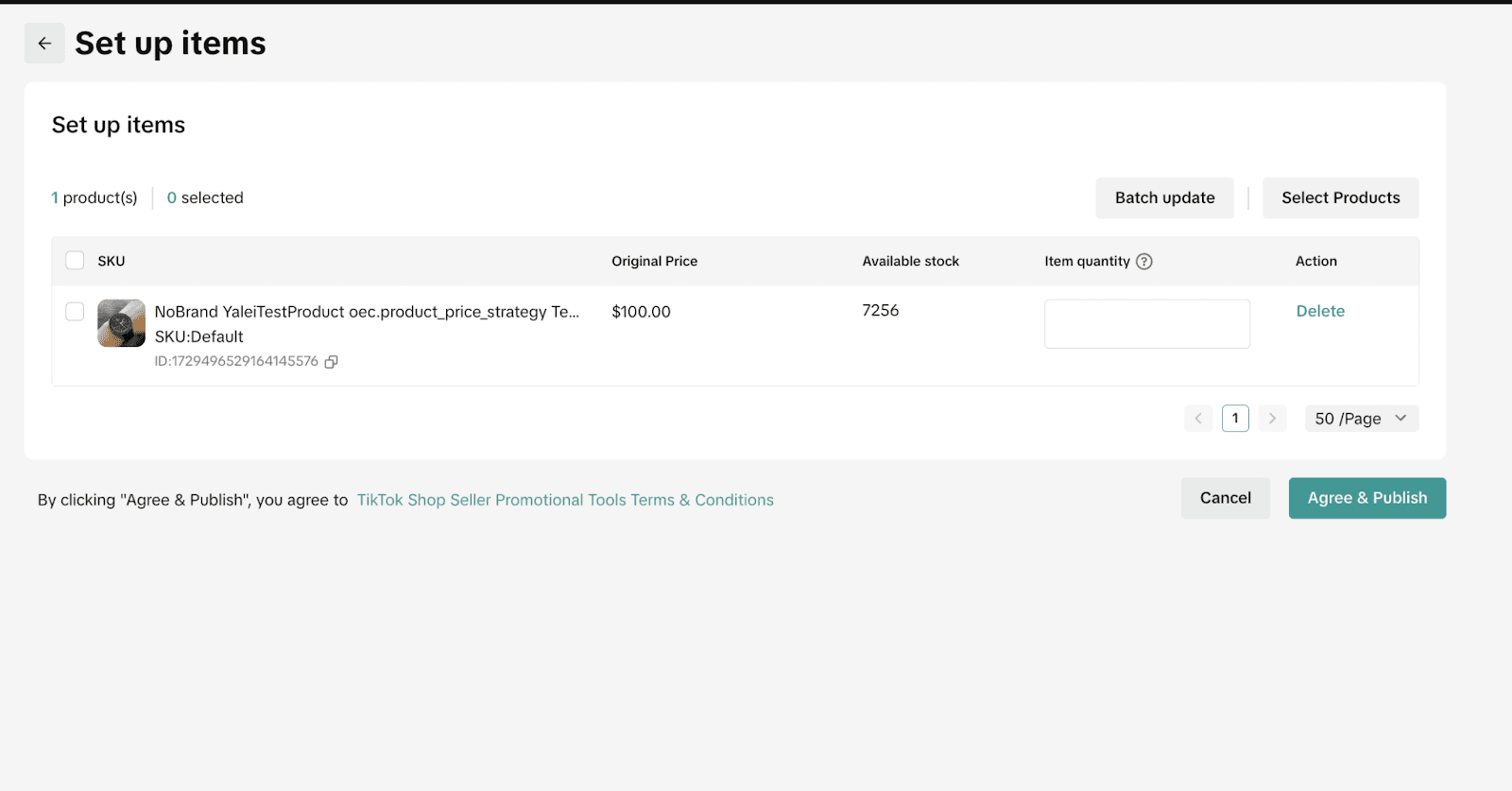
Click Add Item, select the product and quantity
Click Publish to make it available for the creator to use
🔔 Sellers must coordinate with the creator beforehand to establish a prize collaboration.
📲 Step 2: Creators Set Up the Giveaway (TikTok App or Desktop)
Before or During a LIVE:
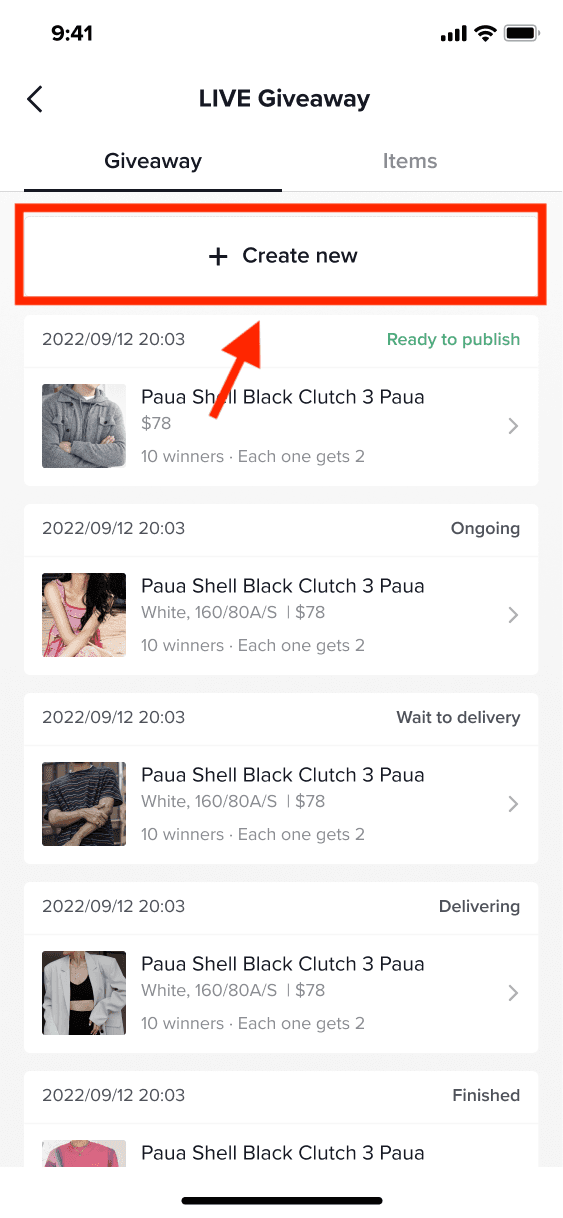
Go to the LIVE Giveaway section from TikTok Shop or during a LIVE
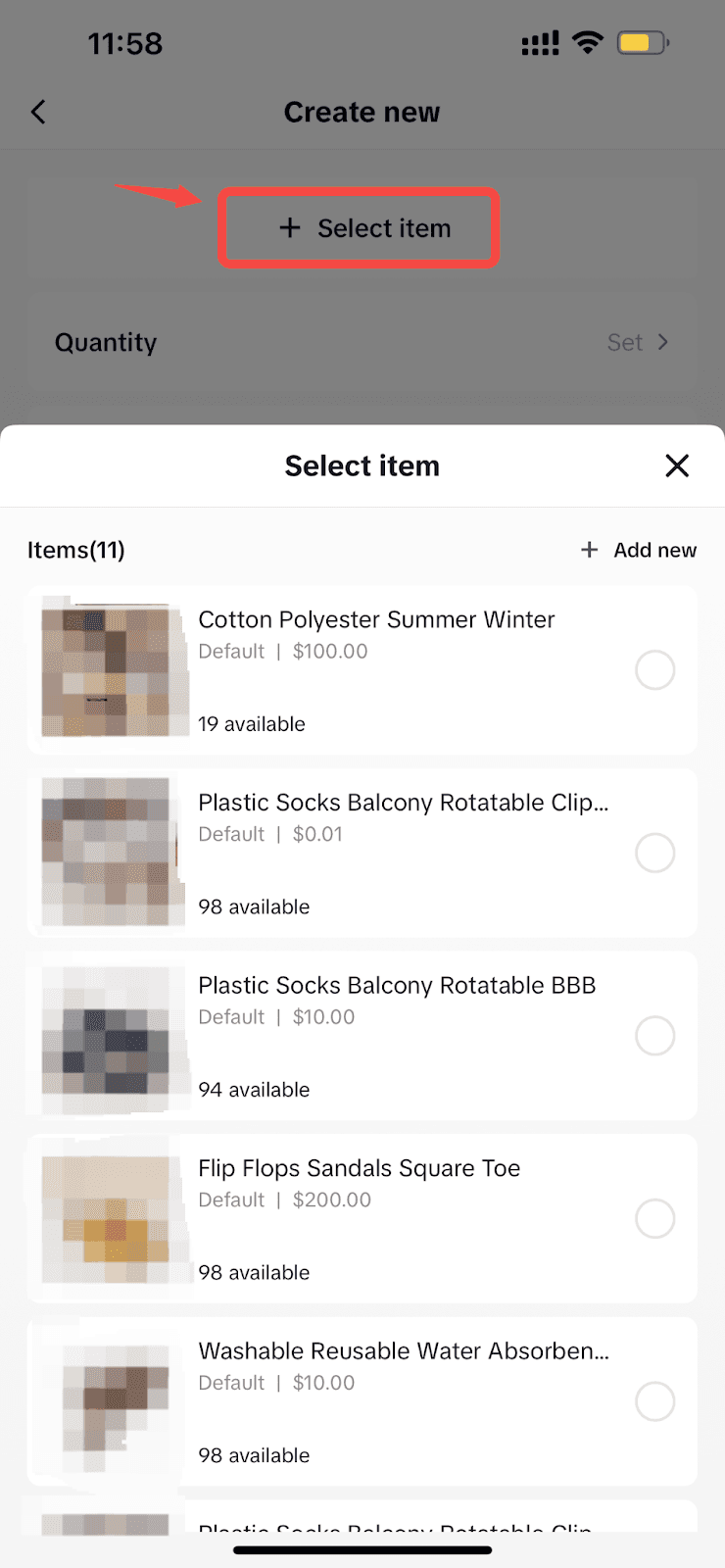
Tap Create New Giveaway
Choose the prize(s) from available items
Set:
🎯 Number of winners
🎁 Quantity per winner
💬 Entry rules (comment required or none)
⏰ Countdown (5, 10, or 15 mins)
💡 Pro Tip: Use "Comment" as a requirement to boost real-time engagement. You can even specify a required keyword for entry.
Managing Your Giveaway (During or After):
✏️ Edit/Delete an active or scheduled giveaway in the Giveaway tab
🚀 Launch Giveaway by clicking Publish once you're live
📦 Track Fulfillment after the giveaway ends (winner list, shipping status, etc.)
⚠️ Only one giveaway can be active at a time. Wait for the countdown to finish before launching the next one.
LIVE Giveaway via LIVE Manager (Desktop):
For sellers or creators who manage LIVEs on desktop via LIVE Manager, the process is similar:
Go to Livestreams > LIVE Giveaway
Click Create New Giveaway
Add items, define winner quantity, entry rules, and countdown
Launch and monitor during the stream
All actions (Edit, Delete, Publish, Track) can also be managed here.
How Prize Fulfillment Works
After the giveaway ends:
👥 Winners Are Notified via:
Pop-up in the app
TikTok Shop inbox
Push notification
📝 Step 1: Winners Must Share Shipping Info
Winners click Share Address
They must submit info within 48 hours, or the prize is forfeited
Seller covers all shipping costs
🚚 Step 2: Track Delivery
Winners can go to Profile > Your Orders > Giveaway Items to track shipment status
Key Notes & Best Practices
📦 Sellers should ship prizes within 24–48 hours
💬 Comments for entry must comply with TikTok Shop's [Community Guidelines]
❌ Emojis are not supported in entry comment requirements
⏱️ You can run multiple giveaways per LIVE, but only one at a time
FAQs
Q: Who can participate in my LIVE Giveaway?
A: U.S. TikTok users with the latest app version can view and enter giveaways hosted by U.S.-based creators.
Q: Can I change the prize or rules mid-GIVEAWAY?
A: You can edit or delete a giveaway before launching it, but not after it's live.
Q: Can winners track their prizes?
A: Yes — via the Giveaway Items tab under "Your Orders" in the TikTok app.
Final Thoughts:
Use Giveaways to Turn Viewers into Buyers
LIVE Giveaways are more than just a fun gimmick — they’re a proven tool to drive engagement, gather comments, increase visibility, and close more sales during your TikTok Shop livestreams.
Need help running high-performing TikTok LIVE campaigns with giveaways, product sets, or highlights? Zorilla Marketing can help you craft, manage, and optimize every moment of your TikTok Shop journey.
Also read:


Learn how TikTok Shop LIVE Giveaways can increase engagement, attract new viewers, and boost sales. Step-by-step setup and best practices included.
TikTok Shop LIVE Giveaways: The Ultimate Engagement Booster for Sellers & Creators
Want to supercharge engagement and boost product visibility during your TikTok Shop livestreams? LIVE Giveaways are the feature you’ve been waiting for.
Whether you’re a seller or creator, LIVE Giveaways let you offer real-time prizes during your TikTok LIVE to incentivize participation, drive comments, and attract new viewers. The best part? Winners are automatically selected by TikTok, and sellers handle fulfillment.
Here’s everything you need to know to launch a successful LIVE Giveaway.
What Is a LIVE Giveaway on TikTok Shop?
A LIVE Giveaway is a livestream feature that allows you to gift products to your audience during your TikTok Shop session:
🎁 Sellers provide the giveaway items
🔄 Creators run the giveaway live
✅ Winners are selected automatically by TikTok
📦 Sellers handle prize fulfillment and shipping
Why Use LIVE Giveaways?
LIVE Giveaways add real value to your TikTok Shop strategy:
✅ Boost LIVE Engagement – Encourage viewers to stay and interact, especially when commenting is required to enter.
✅ Drive More Traffic & Sales – Attract new users, amplify reach, and bring attention to your products.
✅ Gamify the Experience – Countdowns, comment tasks, and live participation make your stream interactive and fun.
Who Can Use It?
LIVE Giveaways are available to:
✅ Official TikTok Shop sellers
✅ TikTok Shop Marketing accounts
✅ TikTok creators
How to Set Up a LIVE Giveaway
🛒 Step 1: Seller Adds the Giveaway Item
Via Seller Center:
Go to Marketing > Promotions > LIVE Giveaway
Click Add Item, select the product and quantity
Click Publish to make it available for the creator to use
🔔 Sellers must coordinate with the creator beforehand to establish a prize collaboration.
📲 Step 2: Creators Set Up the Giveaway (TikTok App or Desktop)
Before or During a LIVE:
Go to the LIVE Giveaway section from TikTok Shop or during a LIVE
Tap Create New Giveaway
Choose the prize(s) from available items
Set:
🎯 Number of winners
🎁 Quantity per winner
💬 Entry rules (comment required or none)
⏰ Countdown (5, 10, or 15 mins)
💡 Pro Tip: Use "Comment" as a requirement to boost real-time engagement. You can even specify a required keyword for entry.
Managing Your Giveaway (During or After):
✏️ Edit/Delete an active or scheduled giveaway in the Giveaway tab
🚀 Launch Giveaway by clicking Publish once you're live
📦 Track Fulfillment after the giveaway ends (winner list, shipping status, etc.)
⚠️ Only one giveaway can be active at a time. Wait for the countdown to finish before launching the next one.
LIVE Giveaway via LIVE Manager (Desktop):
For sellers or creators who manage LIVEs on desktop via LIVE Manager, the process is similar:
Go to Livestreams > LIVE Giveaway
Click Create New Giveaway
Add items, define winner quantity, entry rules, and countdown
Launch and monitor during the stream
All actions (Edit, Delete, Publish, Track) can also be managed here.
How Prize Fulfillment Works
After the giveaway ends:
👥 Winners Are Notified via:
Pop-up in the app
TikTok Shop inbox
Push notification
📝 Step 1: Winners Must Share Shipping Info
Winners click Share Address
They must submit info within 48 hours, or the prize is forfeited
Seller covers all shipping costs
🚚 Step 2: Track Delivery
Winners can go to Profile > Your Orders > Giveaway Items to track shipment status
Key Notes & Best Practices
📦 Sellers should ship prizes within 24–48 hours
💬 Comments for entry must comply with TikTok Shop's [Community Guidelines]
❌ Emojis are not supported in entry comment requirements
⏱️ You can run multiple giveaways per LIVE, but only one at a time
FAQs
Q: Who can participate in my LIVE Giveaway?
A: U.S. TikTok users with the latest app version can view and enter giveaways hosted by U.S.-based creators.
Q: Can I change the prize or rules mid-GIVEAWAY?
A: You can edit or delete a giveaway before launching it, but not after it's live.
Q: Can winners track their prizes?
A: Yes — via the Giveaway Items tab under "Your Orders" in the TikTok app.
Final Thoughts:
Use Giveaways to Turn Viewers into Buyers
LIVE Giveaways are more than just a fun gimmick — they’re a proven tool to drive engagement, gather comments, increase visibility, and close more sales during your TikTok Shop livestreams.
Need help running high-performing TikTok LIVE campaigns with giveaways, product sets, or highlights? Zorilla Marketing can help you craft, manage, and optimize every moment of your TikTok Shop journey.
Also read:
Other Blogs
Other Blogs
Check our other project Blogs with useful insight and information for your businesses



Other Blogs
Other Blogs
Check our other project Blogs with useful insight and information for your businesses