
November 5, 2025
TikTok Partner Campaigns Guide for Agencies & Creators
November 5, 2025
TikTok Partner Campaigns Guide for Agencies & Creators
Learn how agencies, sellers, and creators use TikTok Partner Campaigns to boost sales, manage commissions, and grow affiliate success efficiently.
Partner Campaigns Guide: Agencies, Sellers & Creators
Overview
Partner Campaigns allow agencies to create campaigns linking Sellers and Creators. Sellers register products and set total commission rates. Agencies then set the split commission for Creators and themselves, share product links with Creators for promotion, and manage commission splitting online.
Benefits
Agencies: New revenue stream via commission collection from Sellers.
Sellers: Outsource campaign creation and Creator selection to agencies.
Creators: More affiliate earning opportunities from agency-curated product lists, without needing to be agency-managed.
Recent Updates (Feb 2024)
Edit Partner Campaign details
Easier Product List creation and commission setup
Add, duplicate, delete, and search Product Lists
Bookmark/filter products
More performance data: shipping status, content made with samples
Onboarding Requirements
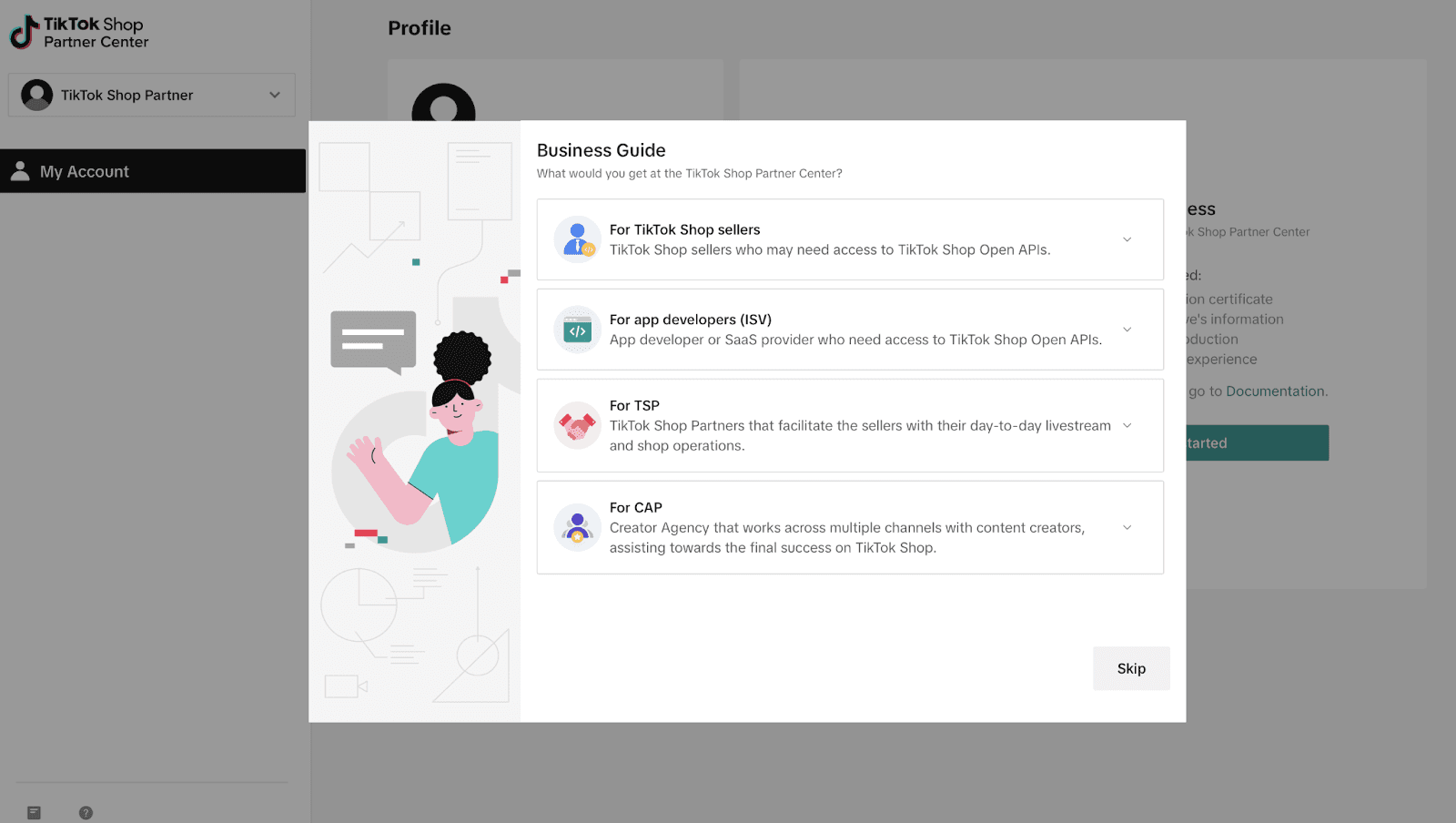
Sign up for TikTok Shop Partner Center; select Content Management category.
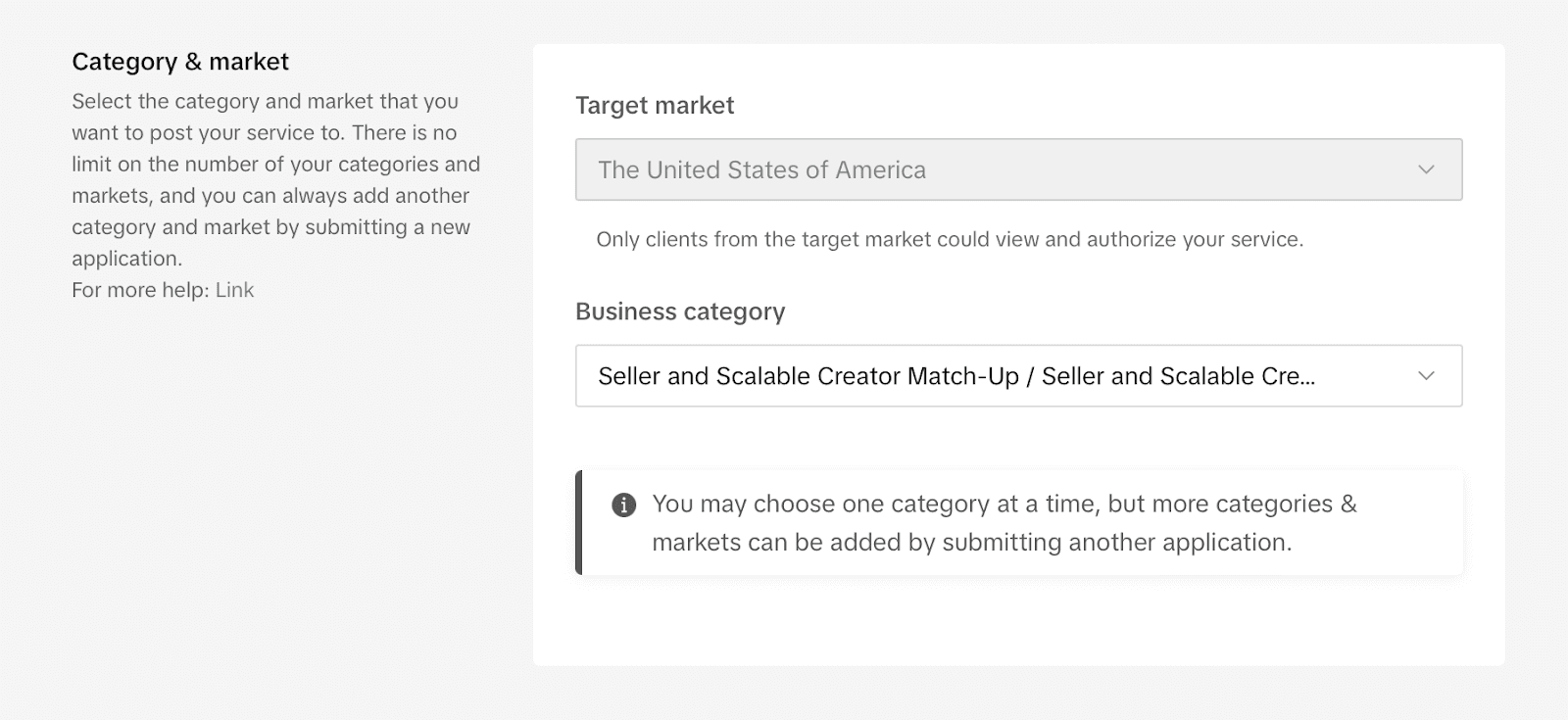
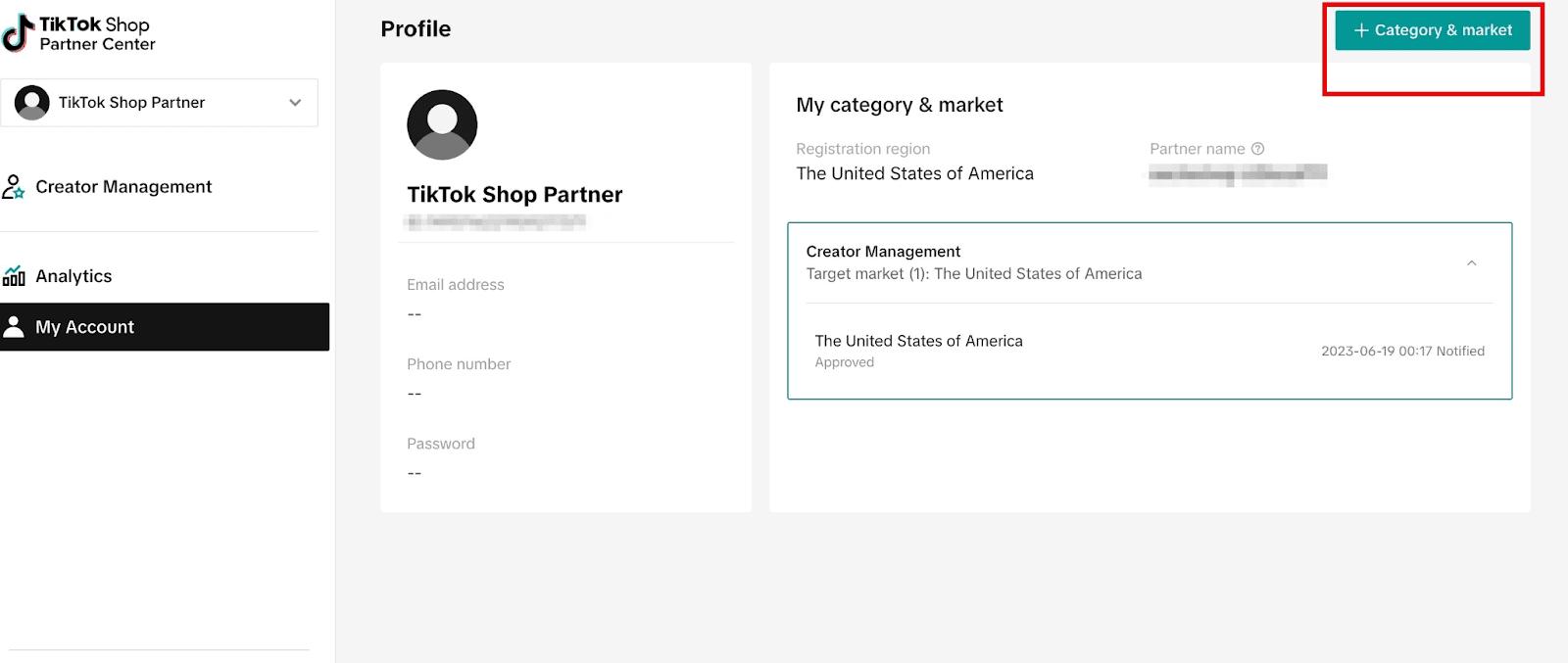
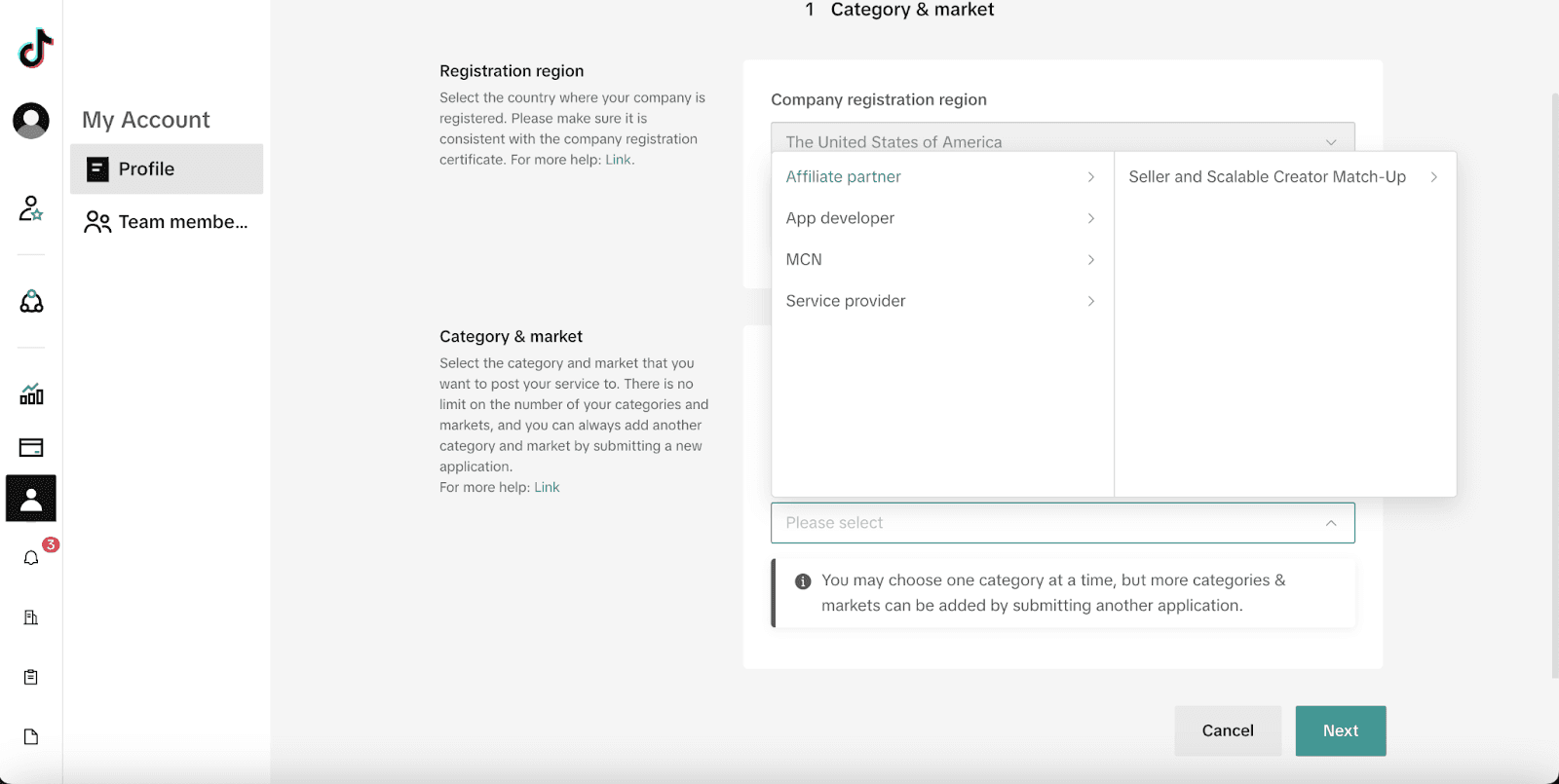
In Partner Center, add Affiliate partner > Seller and Scalable Creator Match-Up category.
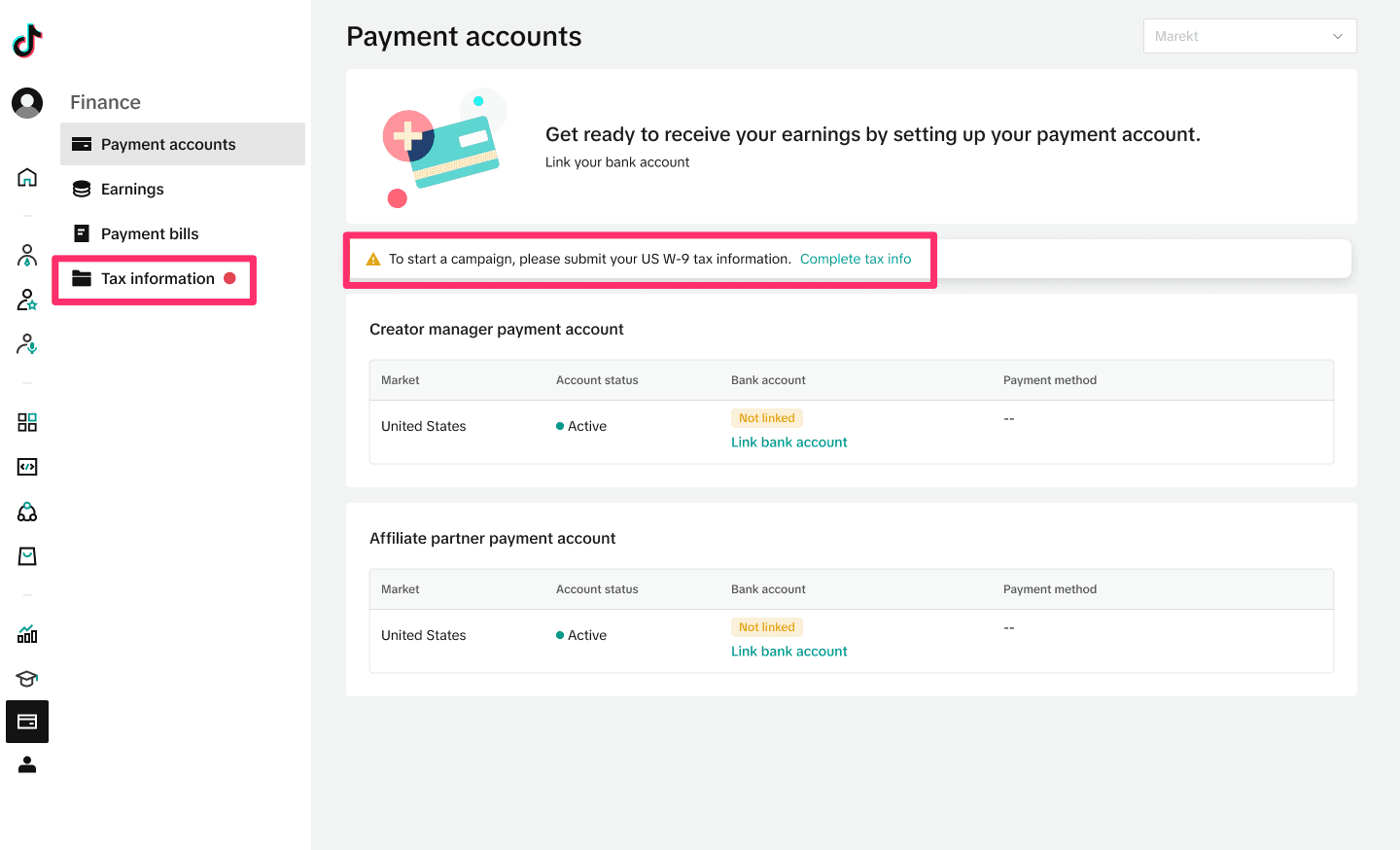
Submit US W-9 tax info in Finance > Payment accounts.
Link bank account once tax info is approved.
Setting up Campaigns
Go to Partner Campaigns page; click Create Campaign (after onboarding completed).
Fill in campaign info: Target market, details, Seller info, commission requirements, contact info.
Set registration & campaign periods (start dates must match).
Choose open or select Sellers (up to 100 Shop Codes).
Submit and then publish the campaign with toggle switch.
Approving/Rejecting Seller Products
Review registered products under Campaign details: product info, prices, commission rates.
Approve or reject product registrations (cannot change Seller’s commission after approval).
Export approved product links to share with Creators—set Creator commission ≤ total campaign commission.
Bookmark products and filter/bookmarked products.
Create product lists (up to 100 products each) with custom commissions split between Creator and agency.
Copy and share product list links with Creators for showcase addition.
Manage product lists: view, add, duplicate, delete (max 1000 lists).
Track rejected and pending registrations, approve or reject as needed.
Tracking Campaign Performance
View overall and product-level metrics (commission rates, creators collaborating, paid orders, estimated commissions).
Filter products by posted content status.
See collaboration progress: creator details, logistics, content created (videos, LIVE).
Seller Experience
Sellers access campaigns via Partner Campaign tab.
Filter, search, register for campaigns and view registered products.
Track product status: Pending, Approved/Ongoing, Rejected, Closed.
Cancel approved collaborations (agency approval required).
Export order data and view campaign performance metrics.
Creator Experience
Creators add products via campaign link in TikTok Shop by pasting URLs.
Accept terms to add products or product lists to showcase.
See commission rates offered by agencies (not Sellers).
Get notified if campaign commission is lower than existing commission.
Track affiliate orders linked to agency-led campaigns.
If no products found, campaign may be empty or products removed.
FAQ Highlights
Agency & Creator commissions: Agency collects only from Seller, not from Creator (no double dipping).
Cross-agency management: Agency still gets commission from Seller; Creator-agency split is per existing agreements.
Seller visibility: Sellers see only product-level data, not Creator-specific performance.
Editing campaigns: Edit campaign details and shop codes in Campaign details page; changes take 30 minutes to apply and cannot be edited during that window.
Also read:

Learn how agencies, sellers, and creators use TikTok Partner Campaigns to boost sales, manage commissions, and grow affiliate success efficiently.
Partner Campaigns Guide: Agencies, Sellers & Creators
Overview
Partner Campaigns allow agencies to create campaigns linking Sellers and Creators. Sellers register products and set total commission rates. Agencies then set the split commission for Creators and themselves, share product links with Creators for promotion, and manage commission splitting online.
Benefits
Agencies: New revenue stream via commission collection from Sellers.
Sellers: Outsource campaign creation and Creator selection to agencies.
Creators: More affiliate earning opportunities from agency-curated product lists, without needing to be agency-managed.
Recent Updates (Feb 2024)
Edit Partner Campaign details
Easier Product List creation and commission setup
Add, duplicate, delete, and search Product Lists
Bookmark/filter products
More performance data: shipping status, content made with samples
Onboarding Requirements
Sign up for TikTok Shop Partner Center; select Content Management category.
In Partner Center, add Affiliate partner > Seller and Scalable Creator Match-Up category.
Submit US W-9 tax info in Finance > Payment accounts.
Link bank account once tax info is approved.
Setting up Campaigns
Go to Partner Campaigns page; click Create Campaign (after onboarding completed).
Fill in campaign info: Target market, details, Seller info, commission requirements, contact info.
Set registration & campaign periods (start dates must match).
Choose open or select Sellers (up to 100 Shop Codes).
Submit and then publish the campaign with toggle switch.
Approving/Rejecting Seller Products
Review registered products under Campaign details: product info, prices, commission rates.
Approve or reject product registrations (cannot change Seller’s commission after approval).
Export approved product links to share with Creators—set Creator commission ≤ total campaign commission.
Bookmark products and filter/bookmarked products.
Create product lists (up to 100 products each) with custom commissions split between Creator and agency.
Copy and share product list links with Creators for showcase addition.
Manage product lists: view, add, duplicate, delete (max 1000 lists).
Track rejected and pending registrations, approve or reject as needed.
Tracking Campaign Performance
View overall and product-level metrics (commission rates, creators collaborating, paid orders, estimated commissions).
Filter products by posted content status.
See collaboration progress: creator details, logistics, content created (videos, LIVE).
Seller Experience
Sellers access campaigns via Partner Campaign tab.
Filter, search, register for campaigns and view registered products.
Track product status: Pending, Approved/Ongoing, Rejected, Closed.
Cancel approved collaborations (agency approval required).
Export order data and view campaign performance metrics.
Creator Experience
Creators add products via campaign link in TikTok Shop by pasting URLs.
Accept terms to add products or product lists to showcase.
See commission rates offered by agencies (not Sellers).
Get notified if campaign commission is lower than existing commission.
Track affiliate orders linked to agency-led campaigns.
If no products found, campaign may be empty or products removed.
FAQ Highlights
Agency & Creator commissions: Agency collects only from Seller, not from Creator (no double dipping).
Cross-agency management: Agency still gets commission from Seller; Creator-agency split is per existing agreements.
Seller visibility: Sellers see only product-level data, not Creator-specific performance.
Editing campaigns: Edit campaign details and shop codes in Campaign details page; changes take 30 minutes to apply and cannot be edited during that window.
Also read:
Other Blogs
Other Blogs
Check our other project Blogs with useful insight and information for your businesses



Other Blogs
Other Blogs
Check our other project Blogs with useful insight and information for your businesses