
November 5, 2025
Creator Partner Access to TikTok Live Manager
November 5, 2025
Creator Partner Access to TikTok Live Manager
Learn how Creator Partner Access helps TikTok Shop creators manage livestreams efficiently with Zorilla’s expert support and pro-level guidance.
How Creator Partner Access to TikTok Live Manager Works (And Why It Matters)
If you're a creator on TikTok Shop, chances are you've already discovered the power of livestream selling. But managing those streams effectively — from giveaways to product pins — often requires support. That’s where Creator Partner Access (CAP) to Live Manager comes in.
This feature gives your trusted partner agency the ability to assist with your livestreams directly — so you can focus on engaging your audience while they handle the backend.
Let’s break down how it works, what your partner can (and can’t) do, and how to stay in control as a creator.
🔑 What is Creator Partner Access to Live Manager?
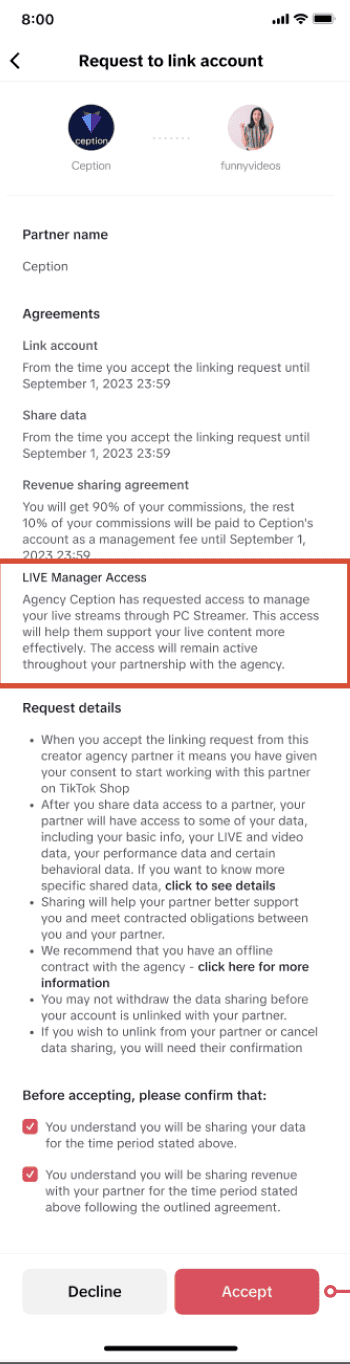
Live Manager (https://shop.tiktok.com/streamer) is TikTok’s centralized tool for managing livestreams on TikTok Shop.
When a Creator Partner (CAP) is granted access, they can assist you in planning, organizing, and optimizing your livestreams — including setting up events, deploying flash sales, managing your shopping bag, and more.
But here’s the key: you remain in control. Access only begins once you approve it.
🛠️ What Can a Partner Do in Live Manager?
Once granted access, your CAP can help with a range of pre-live, during-live, and post-live tasks:
Before the Livestream
Set up LIVE Events
Schedule product sets, giveaways, and promotions
Organize your Showcase
Prepare your Shopping Bag (add/pin products, arrange items)
Configure livestream Campaigns
During the Livestream
Join your stream as LIVE staff
Run flash sales or giveaways
Use Billboard to highlight key info or product drops
Manage LIVE chat settings (mute/block/filter comments)
Monitor real-time data via LIVE Dashboard and Data Compass
⚠️ Note: Only the creator can start a livestream. Partners can join once you go live.
✉️ How to Approve Live Manager Access
To receive support, your CAP must send an access request via their backend system.
You’ll find it in:
TikTok Shop EC Center → System Notification
Cooperation Management tab
There are two types of requests:
Live Manager access only
Linking + Live Manager access
You can Accept or Decline the request.
What Happens If You Decline?
If you’re already linked with the agency: Only the Live Manager request is rejected; your partnership stays intact.
If the request includes both linking & Live Manager access: Declining will remove the entire linking relationship.
Once accepted, the partner gains access only for the duration of your linking period.
🔒 You’re in Control
Live Start: Only you (the creator) can start a live.
Transparency: You’ll get notifications anytime your partner:
Schedules a new LIVE
Joins your livestream as staff
Invisible to Viewers: The audience won’t see whether an action (like pinning a product) was done by you or your partner.
Cancel Access Anytime: If you want to keep the partnership but remove Live Manager access, unlink first, then re-link without granting Live Manager permissions.
👥 Common Questions Creators Ask
Can I stay linked to an agency but remove Live Manager access?
Yes. Unlink first, then ask the agency to resend a linking request without the Live Manager access box checked.
Will I be notified when an agency joins or edits my LIVE event?
Yes. All partner activity is shared via system notifications in your Partnerships and Account Updates.
Can viewers tell if my agency is managing my livestream?
No. All activity appears as if it’s from your account, so your brand presence remains seamless.
How Zorilla Marketing Supports Livestream Success
Zorilla helps creators unlock TikTok Shop growth by managing the full funnel from affiliate campaigns to livestream operations. As a trusted partner, we ensure your Live Manager experience is smooth, strategic, and always creator-first.
Need help with your next live event or unsure how to grant access safely? We’ve got you.
Ready to Go Live Smarter?
If you're looking to level up your livestreams with pro-level support — without giving up creative control — Creator Partner Access is the way to go.
Let Zorilla Marketing help you build, manage, and monetize your LIVE experience. Reach out to us today to get started.
Also read:
How Creator Partner Access to TikTok Live Manager Works (And Why It Matters)
If you're a creator on TikTok Shop, chances are you've already discovered the power of livestream selling. But managing those streams effectively — from giveaways to product pins — often requires support. That’s where Creator Partner Access (CAP) to Live Manager comes in.
This feature gives your trusted partner agency the ability to assist with your livestreams directly — so you can focus on engaging your audience while they handle the backend.
Let’s break down how it works, what your partner can (and can’t) do, and how to stay in control as a creator.
🔑 What is Creator Partner Access to Live Manager?
Live Manager (https://shop.tiktok.com/streamer) is TikTok’s centralized tool for managing livestreams on TikTok Shop.
When a Creator Partner (CAP) is granted access, they can assist you in planning, organizing, and optimizing your livestreams — including setting up events, deploying flash sales, managing your shopping bag, and more.
But here’s the key: you remain in control. Access only begins once you approve it.
🛠️ What Can a Partner Do in Live Manager?
Once granted access, your CAP can help with a range of pre-live, during-live, and post-live tasks:
Before the Livestream
Set up LIVE Events
Schedule product sets, giveaways, and promotions
Organize your Showcase
Prepare your Shopping Bag (add/pin products, arrange items)
Configure livestream Campaigns
During the Livestream
Join your stream as LIVE staff
Run flash sales or giveaways
Use Billboard to highlight key info or product drops
Manage LIVE chat settings (mute/block/filter comments)
Monitor real-time data via LIVE Dashboard and Data Compass
⚠️ Note: Only the creator can start a livestream. Partners can join once you go live.
✉️ How to Approve Live Manager Access
To receive support, your CAP must send an access request via their backend system.
You’ll find it in:
TikTok Shop EC Center → System Notification
Cooperation Management tab
There are two types of requests:
Live Manager access only
Linking + Live Manager access
You can Accept or Decline the request.
What Happens If You Decline?
If you’re already linked with the agency: Only the Live Manager request is rejected; your partnership stays intact.
If the request includes both linking & Live Manager access: Declining will remove the entire linking relationship.
Once accepted, the partner gains access only for the duration of your linking period.
🔒 You’re in Control
Live Start: Only you (the creator) can start a live.
Transparency: You’ll get notifications anytime your partner:
Schedules a new LIVE
Joins your livestream as staff
Invisible to Viewers: The audience won’t see whether an action (like pinning a product) was done by you or your partner.
Cancel Access Anytime: If you want to keep the partnership but remove Live Manager access, unlink first, then re-link without granting Live Manager permissions.
👥 Common Questions Creators Ask
Can I stay linked to an agency but remove Live Manager access?
Yes. Unlink first, then ask the agency to resend a linking request without the Live Manager access box checked.
Will I be notified when an agency joins or edits my LIVE event?
Yes. All partner activity is shared via system notifications in your Partnerships and Account Updates.
Can viewers tell if my agency is managing my livestream?
No. All activity appears as if it’s from your account, so your brand presence remains seamless.
How Zorilla Marketing Supports Livestream Success
Zorilla helps creators unlock TikTok Shop growth by managing the full funnel from affiliate campaigns to livestream operations. As a trusted partner, we ensure your Live Manager experience is smooth, strategic, and always creator-first.
Need help with your next live event or unsure how to grant access safely? We’ve got you.
Ready to Go Live Smarter?
If you're looking to level up your livestreams with pro-level support — without giving up creative control — Creator Partner Access is the way to go.
Let Zorilla Marketing help you build, manage, and monetize your LIVE experience. Reach out to us today to get started.
Also read:
Learn how Creator Partner Access helps TikTok Shop creators manage livestreams efficiently with Zorilla’s expert support and pro-level guidance.
How Creator Partner Access to TikTok Live Manager Works (And Why It Matters)
If you're a creator on TikTok Shop, chances are you've already discovered the power of livestream selling. But managing those streams effectively — from giveaways to product pins — often requires support. That’s where Creator Partner Access (CAP) to Live Manager comes in.
This feature gives your trusted partner agency the ability to assist with your livestreams directly — so you can focus on engaging your audience while they handle the backend.
Let’s break down how it works, what your partner can (and can’t) do, and how to stay in control as a creator.
🔑 What is Creator Partner Access to Live Manager?
Live Manager (https://shop.tiktok.com/streamer) is TikTok’s centralized tool for managing livestreams on TikTok Shop.
When a Creator Partner (CAP) is granted access, they can assist you in planning, organizing, and optimizing your livestreams — including setting up events, deploying flash sales, managing your shopping bag, and more.
But here’s the key: you remain in control. Access only begins once you approve it.
🛠️ What Can a Partner Do in Live Manager?
Once granted access, your CAP can help with a range of pre-live, during-live, and post-live tasks:
Before the Livestream
Set up LIVE Events
Schedule product sets, giveaways, and promotions
Organize your Showcase
Prepare your Shopping Bag (add/pin products, arrange items)
Configure livestream Campaigns
During the Livestream
Join your stream as LIVE staff
Run flash sales or giveaways
Use Billboard to highlight key info or product drops
Manage LIVE chat settings (mute/block/filter comments)
Monitor real-time data via LIVE Dashboard and Data Compass
⚠️ Note: Only the creator can start a livestream. Partners can join once you go live.
✉️ How to Approve Live Manager Access
To receive support, your CAP must send an access request via their backend system.
You’ll find it in:
TikTok Shop EC Center → System Notification
Cooperation Management tab
There are two types of requests:
Live Manager access only
Linking + Live Manager access
You can Accept or Decline the request.
What Happens If You Decline?
If you’re already linked with the agency: Only the Live Manager request is rejected; your partnership stays intact.
If the request includes both linking & Live Manager access: Declining will remove the entire linking relationship.
Once accepted, the partner gains access only for the duration of your linking period.
🔒 You’re in Control
Live Start: Only you (the creator) can start a live.
Transparency: You’ll get notifications anytime your partner:
Schedules a new LIVE
Joins your livestream as staff
Invisible to Viewers: The audience won’t see whether an action (like pinning a product) was done by you or your partner.
Cancel Access Anytime: If you want to keep the partnership but remove Live Manager access, unlink first, then re-link without granting Live Manager permissions.
👥 Common Questions Creators Ask
Can I stay linked to an agency but remove Live Manager access?
Yes. Unlink first, then ask the agency to resend a linking request without the Live Manager access box checked.
Will I be notified when an agency joins or edits my LIVE event?
Yes. All partner activity is shared via system notifications in your Partnerships and Account Updates.
Can viewers tell if my agency is managing my livestream?
No. All activity appears as if it’s from your account, so your brand presence remains seamless.
How Zorilla Marketing Supports Livestream Success
Zorilla helps creators unlock TikTok Shop growth by managing the full funnel from affiliate campaigns to livestream operations. As a trusted partner, we ensure your Live Manager experience is smooth, strategic, and always creator-first.
Need help with your next live event or unsure how to grant access safely? We’ve got you.
Ready to Go Live Smarter?
If you're looking to level up your livestreams with pro-level support — without giving up creative control — Creator Partner Access is the way to go.
Let Zorilla Marketing help you build, manage, and monetize your LIVE experience. Reach out to us today to get started.
Also read:
Other Blogs
Other Blogs
Check our other project Blogs with useful insight and information for your businesses



Other Blogs
Other Blogs
Check our other project Blogs with useful insight and information for your businesses