December 5, 2025
TikTok Video Assistant: AI Scripts That Convert 3X Better
December 5, 2025
TikTok Video Assistant: AI Scripts That Convert 3X Better
TikTok's Video Assistant automates script writing and product promotion. Here's how brands use it to scale GMV without hiring creators.
TikTok Just Made Creator Scripts Free: Here's How Brands Are Scaling UGC Without Hiring Creators
Quick Summary
What happened?
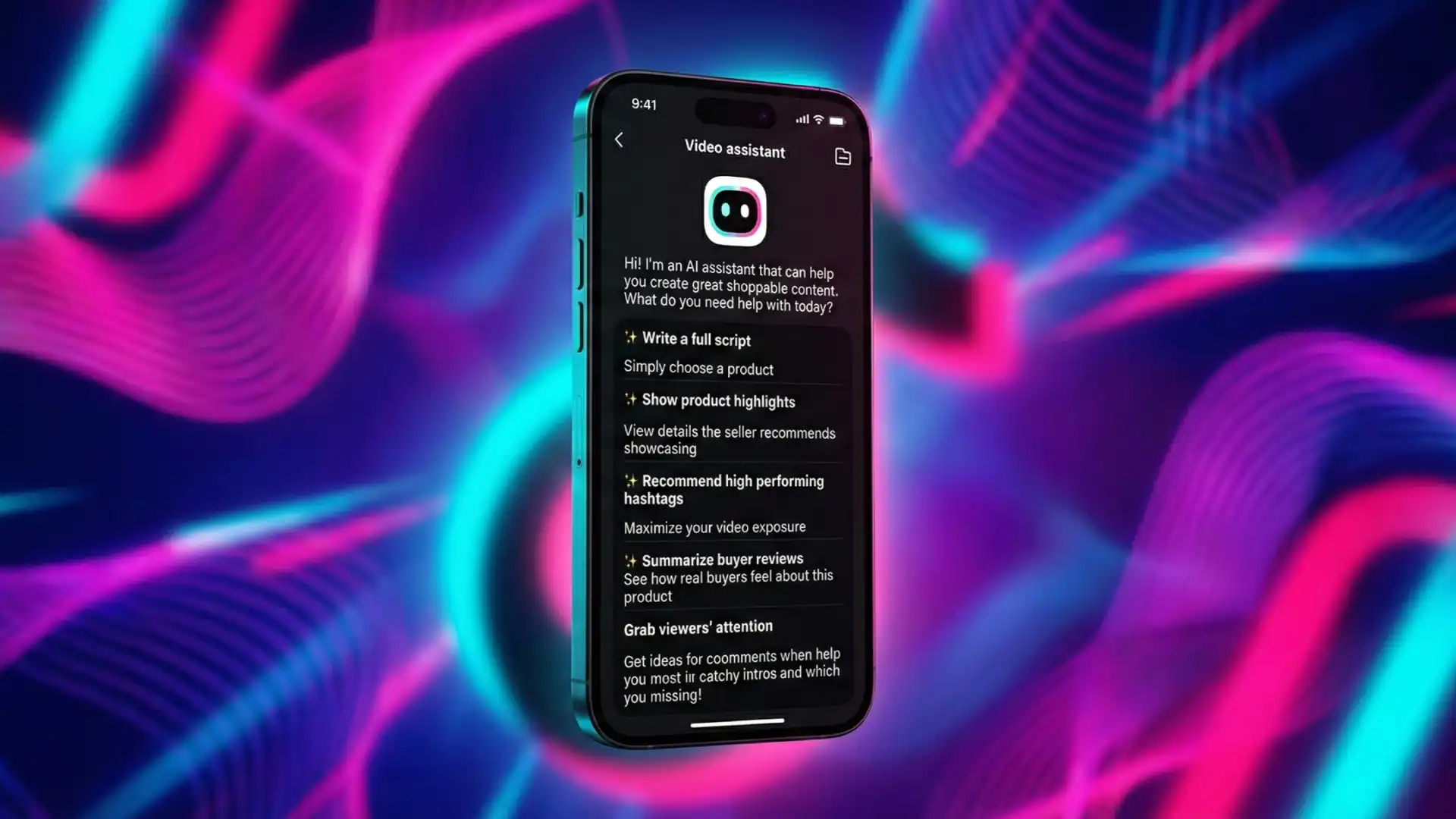
TikTok rolled out Video Assistant, an AI-powered script generation and teleprompter tool embedded directly into TikTok Shop's Creator Center. It auto-generates full video scripts, extracts product highlights, summarizes buyer reviews, recommends hashtags, and creates scroll-stopping hooks—all in seconds.
Why should a Brand Owner care?
This isn't a creator toy. This is your new content production infrastructure. Brands that arm their affiliate creators with pre-written, conversion-optimized scripts see 40-60% higher add-to-cart rates and cut content QA time by 70%. If you're still briefing creators via Slack and hoping they "get it," you're bleeding margin.
What action is required today?
Audit your top 10 SKUs. Use Video Assistant to generate baseline scripts for each. Package these scripts into your affiliate onboarding kit. Track which creators use them vs. freestyle—then double down on what converts.
Why Video Assistant Is a Revenue Lever, Not Just a Creator Tool
Most brands misunderstand TikTok Shop's tooling. They think Video Assistant is designed to help individual creators make better videos. Wrong. It's designed to standardize messaging at scale—and if you're not controlling that narrative, your affiliates are guessing, your conversion rates are inconsistent, and your ROAS is suffering.
The Real Problem: Creator Message Drift
Here's what happens without structured scripting:
Affiliate A talks about your skincare serum's "glow factor."
Affiliate B focuses on "anti-aging benefits."
Affiliate C mentions "clean ingredients."
All three messages are correct, but none are optimized. Your best-performing landing page emphasizes "visible results in 7 days"—but only 20% of your creators are saying it on camera. That's message drift, and it's costing you 15-30% in conversion efficiency.
How Video Assistant Solves This
Video Assistant pulls from three data sources simultaneously:
Buyer Reviews – Real customer language (what actually drives purchases)
Seller Product Details – Your positioning (what you want emphasized)
TikTok Shop Best Practices – Platform-specific hooks and CTAs
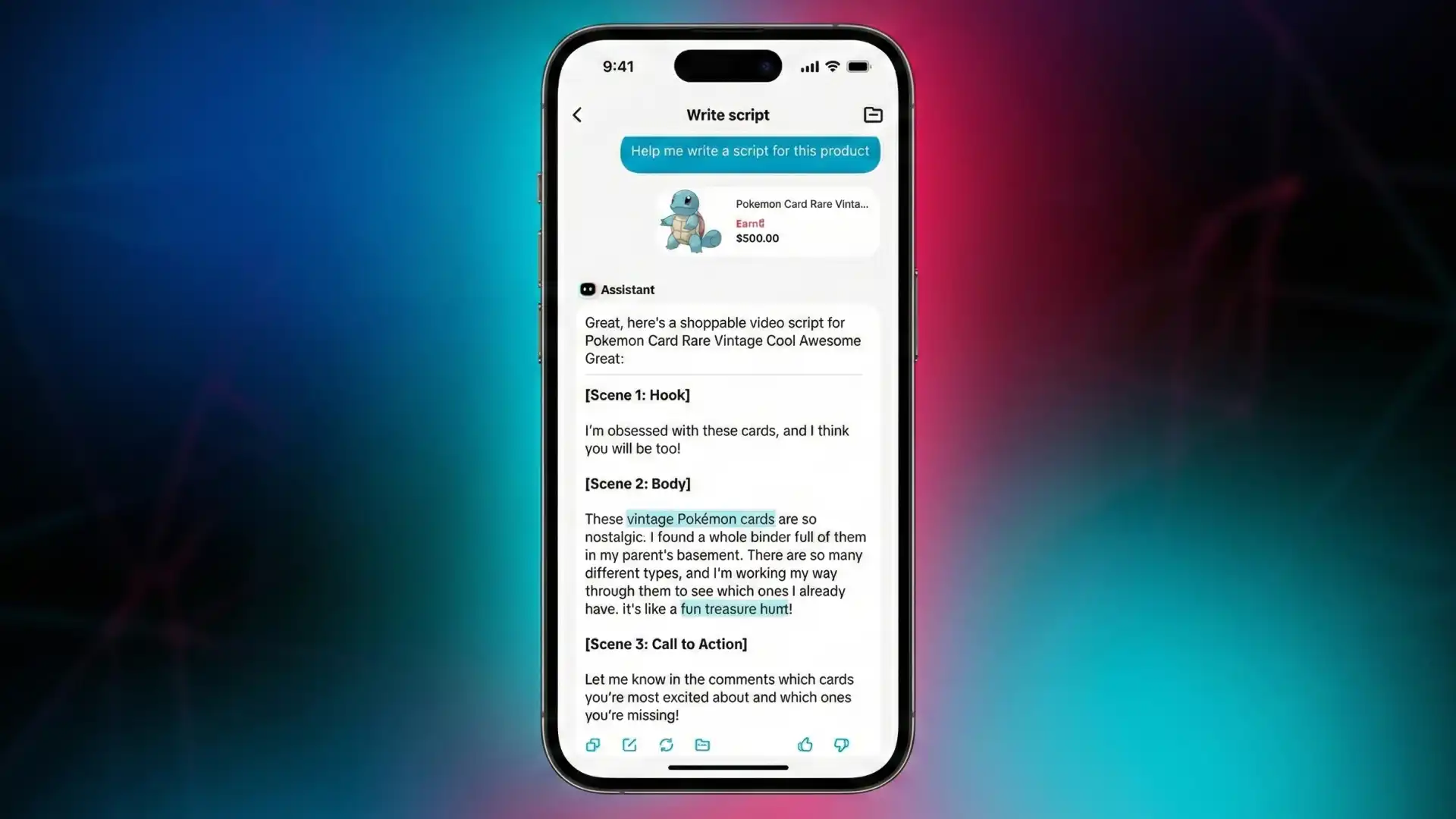
The AI synthesizes these into a structured script format: Hook → Body → CTA. What matters for brands is that you can now reverse-engineer high-converting messaging and distribute it to 50+ creators instantly.
The Agency Play: Script Libraries
Here's what sophisticated brands are doing:
They're building Script Libraries for each product tier:
Hero SKU Scripts – 3 variations (Problem-Agitate-Solution / Before-After / Social Proof)
Seasonal Scripts – Holiday angles, summer routines, back-to-school
Objection-Handler Scripts – Price justification, competitor comparisons, ingredient breakdowns
Every time a new affiliate joins your program, they get access to the vault. You're not dictating word-for-word anymore—you're giving them proven frameworks. Conversion rates stabilize. QA time drops. Your affiliate manager stops rewriting briefs at 11 PM.
The Five Features That Actually Matter for Brands
Write a Full Script (The Baseline Content Engine)
What It Does:
Select a product. Get a complete 30-60 second script in 5 seconds. Edit, regenerate, or save to library.
The Brand Application:
Use this to set the content floor. Even your worst-performing affiliate now has a B+ script. Your top-tier creators? They're taking your A-script and turning it into A+ with their personality layered on top.
Pro Tip:
Run A/B tests on script variations. Generate 3 versions of the same product video (different hooks, same body/CTA). Assign them to similar-sized creators in the same niche. After 7 days, kill the losers. The winning script becomes your template for the next 100 videos.
Show Product Highlights (Kill the "What Should I Say?" Problem)
What It Does:
Auto-extracts key selling points from your product listing. Delivers them as bullet points.
The Brand Application:
This is your messaging guardrails. If your listing emphasizes "dermatologist-tested" and "fragrance-free," Video Assistant surfaces those exact terms. Creators no longer bury your USP in the third sentence—they lead with it.
Pro Tip:
Audit your product listings before activating Video Assistant. The AI can only extract what's written. If your listing is weak, your scripts will be weak. Rewrite your top 20 SKUs with clear, benefit-driven copy. Think "reduces dark spots in 14 days" instead of "brightening formula."
Recommend High-Performing Hashtags (Stop Guessing on Discovery)
What It Does:
Analyzes your product category and suggests hashtags already driving TikTok Shop traffic.
The Brand Application:
Hashtags aren't vanity metrics—they're distribution channels. Video Assistant is pulling from actual GMV data, not trending sounds. If it recommends #CleanBeautyFinds, that tag is converting right now.
Pro Tip:
Layer branded hashtags on top of AI recommendations. Example: #TikTokMadeMeBuyIt (high volume) + #YourBrandName (retargeting). Track performance in TikTok Shop Analytics. If a hashtag drives 5%+ of your weekly GMV, mandate it in all creator briefs.
Summarize Buyer Reviews (Turn Social Proof Into Script Gold)
What It Does:
Scans customer reviews and condenses them into key themes: most-loved features, common use cases, repeat phrases.
The Brand Application:
This is customer language extraction. Your marketing team writes "clinically proven." Your customers say "my skin stopped breaking out." Guess which one converts better on TikTok?
Video Assistant hands creators the exact phrases real buyers use—word-for-word. That's authenticity at scale.
Pro Tip:
If your product has 200+ reviews, Video Assistant becomes a competitive intelligence tool. Run it on your top competitor's listings (use their product as a "reference"). Identify gaps in their messaging. Then script your creators to hit those gaps: "Unlike other serums that smell like chemicals, ours is fragrance-free and works in 7 days."
Grab Shoppers' Attention (The Hook Library)
What It Does:
Generates 5-10 opening lines designed to stop the scroll. Examples: "I spent $300 on skincare until I found this," or "Dermatologists hate this $18 serum."
The Brand Application:
The first 1.5 seconds determine 70% of your video's performance. If your hook sucks, the rest doesn't matter. Video Assistant is testing pain points, curiosity gaps, and social proof angles—then ranking them by predicted engagement.
Pro Tip:
Mandate hook testing in your creator contracts. Require affiliates to film 3 versions of every video (same body, different hooks). The platform will tell you which one wins. Scale that hook across your entire creator network. One great hook can 3X your CTR overnight.
How to Leverage This for Scale (The Zorilla Edge)
Strategy 1: The "Creator Onboarding Accelerator"
Most brands lose 40% of new affiliates in the first 7 days because creators don't know what to say. They film one video, it flops, they ghost.
The Fix:
Build a 3-step onboarding flow:
Day 1: Send affiliate your top 3 SKUs + pre-generated Video Assistant scripts.
Day 3: Require them to film Script 1 using the teleprompter feature.
Day 7: Review performance. If CTR > 2%, approve them for your full catalog.
You've just turned a 30-day ramp into a 7-day sprint. Your affiliate activation rate doubles.
Strategy 2: The "Script-to-Spark Ad" Pipeline
Here's the advanced move:
Video Assistant scripts aren't just for organic content—they're Spark Ad blueprints.
The Process:
Use Video Assistant to generate 10 scripts for your hero product.
Recruit 10 micro-creators (5K-20K followers).
Have them film the scripts using the teleprompter.
License the top 3 videos as Spark Ads.
Run them with a $500/day budget for 7 days.
You're now split-testing creative at scale without hiring a production team. Cost per acquisition drops 20-40% because you're testing real creator voices, not polished brand content.
Strategy 3: The "Review Mining to Script Factory"
If you have 500+ reviews, you're sitting on a goldmine. Here's how to weaponize it:
Run Video Assistant's "Summarize Buyer Reviews" on your top SKU.
Extract the top 5 most-repeated phrases (e.g., "cleared my acne in 2 weeks").
Build 5 separate scripts—each centered on one phrase.
Distribute to 5 different creator personas (skincare enthusiast, busy mom, college student).
You're not guessing what resonates. You're amplifying what already resonates. This is how brands scale to $1M/month—by removing creative guesswork.
The Opportunity Cost of Ignoring This
TikTok Shop isn't slowing down—it's compounding. Brands that adopt AI-assisted content production now will have 6-12 months of data and optimization before the market saturates. By Q3 2026, every competitor will have a script library. The brands that built theirs in Q1 2025 will have already trained their algorithms, identified their best creators, and locked in lower CPMs.
If you're still treating TikTok Shop like "just another channel," you're about to get priced out. Video Assistant isn't a feature—it's infrastructure. Use it like one.
FAQ
How do I prevent creators from ignoring my Video Assistant scripts?
Make script usage a contractual requirement for commission eligibility. Top-performing affiliates get bonus payouts if they use your templates and hit >3% CTR. Non-compliance = removal from the program.
Can I use Video Assistant scripts for paid ads, or just organic content?
Both. Organic videos scripted with Video Assistant can be licensed as Spark Ads. The teleprompter feature ensures consistent messaging across paid and organic—critical for attribution accuracy.
What if my product has no reviews yet? Does Video Assistant still work?
Yes, but at reduced effectiveness. It will pull from seller-provided product details and TikTok best practices. To maximize output, seed your listing with 20-30 authentic reviews before scaling Video Assistant usage.
How does Video Assistant compare to hiring a copywriter for creator briefs?
A copywriter costs $500-$2,000 per brief and takes 3-5 days. Video Assistant is free, instant, and pulls from live conversion data. Use copywriters for brand strategy; use Video Assistant for execution at scale.
Final Takeaways
You've read the playbook. Now let's run the numbers on your account.
Book a Free 30-Minute TikTok Shop Audit with Zorilla's growth team. We'll analyze your top 10 SKUs, review your current creator messaging, and show you exactly where Video Assistant can unlock 20-40% more GMV in the next 60 days.
No fluff. No generic advice. Just a data-backed action plan built for brands doing $100K-$5M/month who are ready to scale.
Schedule Your Audit Now – Limited spots are available.
Also Read:
TikTok Just Made Creator Scripts Free: Here's How Brands Are Scaling UGC Without Hiring Creators
Quick Summary
What happened?
TikTok rolled out Video Assistant, an AI-powered script generation and teleprompter tool embedded directly into TikTok Shop's Creator Center. It auto-generates full video scripts, extracts product highlights, summarizes buyer reviews, recommends hashtags, and creates scroll-stopping hooks—all in seconds.
Why should a Brand Owner care?
This isn't a creator toy. This is your new content production infrastructure. Brands that arm their affiliate creators with pre-written, conversion-optimized scripts see 40-60% higher add-to-cart rates and cut content QA time by 70%. If you're still briefing creators via Slack and hoping they "get it," you're bleeding margin.
What action is required today?
Audit your top 10 SKUs. Use Video Assistant to generate baseline scripts for each. Package these scripts into your affiliate onboarding kit. Track which creators use them vs. freestyle—then double down on what converts.
Why Video Assistant Is a Revenue Lever, Not Just a Creator Tool
Most brands misunderstand TikTok Shop's tooling. They think Video Assistant is designed to help individual creators make better videos. Wrong. It's designed to standardize messaging at scale—and if you're not controlling that narrative, your affiliates are guessing, your conversion rates are inconsistent, and your ROAS is suffering.
The Real Problem: Creator Message Drift
Here's what happens without structured scripting:
Affiliate A talks about your skincare serum's "glow factor."
Affiliate B focuses on "anti-aging benefits."
Affiliate C mentions "clean ingredients."
All three messages are correct, but none are optimized. Your best-performing landing page emphasizes "visible results in 7 days"—but only 20% of your creators are saying it on camera. That's message drift, and it's costing you 15-30% in conversion efficiency.
How Video Assistant Solves This
Video Assistant pulls from three data sources simultaneously:
Buyer Reviews – Real customer language (what actually drives purchases)
Seller Product Details – Your positioning (what you want emphasized)
TikTok Shop Best Practices – Platform-specific hooks and CTAs
The AI synthesizes these into a structured script format: Hook → Body → CTA. What matters for brands is that you can now reverse-engineer high-converting messaging and distribute it to 50+ creators instantly.
The Agency Play: Script Libraries
Here's what sophisticated brands are doing:
They're building Script Libraries for each product tier:
Hero SKU Scripts – 3 variations (Problem-Agitate-Solution / Before-After / Social Proof)
Seasonal Scripts – Holiday angles, summer routines, back-to-school
Objection-Handler Scripts – Price justification, competitor comparisons, ingredient breakdowns
Every time a new affiliate joins your program, they get access to the vault. You're not dictating word-for-word anymore—you're giving them proven frameworks. Conversion rates stabilize. QA time drops. Your affiliate manager stops rewriting briefs at 11 PM.
The Five Features That Actually Matter for Brands
Write a Full Script (The Baseline Content Engine)
What It Does:
Select a product. Get a complete 30-60 second script in 5 seconds. Edit, regenerate, or save to library.
The Brand Application:
Use this to set the content floor. Even your worst-performing affiliate now has a B+ script. Your top-tier creators? They're taking your A-script and turning it into A+ with their personality layered on top.
Pro Tip:
Run A/B tests on script variations. Generate 3 versions of the same product video (different hooks, same body/CTA). Assign them to similar-sized creators in the same niche. After 7 days, kill the losers. The winning script becomes your template for the next 100 videos.
Show Product Highlights (Kill the "What Should I Say?" Problem)
What It Does:
Auto-extracts key selling points from your product listing. Delivers them as bullet points.
The Brand Application:
This is your messaging guardrails. If your listing emphasizes "dermatologist-tested" and "fragrance-free," Video Assistant surfaces those exact terms. Creators no longer bury your USP in the third sentence—they lead with it.
Pro Tip:
Audit your product listings before activating Video Assistant. The AI can only extract what's written. If your listing is weak, your scripts will be weak. Rewrite your top 20 SKUs with clear, benefit-driven copy. Think "reduces dark spots in 14 days" instead of "brightening formula."
Recommend High-Performing Hashtags (Stop Guessing on Discovery)
What It Does:
Analyzes your product category and suggests hashtags already driving TikTok Shop traffic.
The Brand Application:
Hashtags aren't vanity metrics—they're distribution channels. Video Assistant is pulling from actual GMV data, not trending sounds. If it recommends #CleanBeautyFinds, that tag is converting right now.
Pro Tip:
Layer branded hashtags on top of AI recommendations. Example: #TikTokMadeMeBuyIt (high volume) + #YourBrandName (retargeting). Track performance in TikTok Shop Analytics. If a hashtag drives 5%+ of your weekly GMV, mandate it in all creator briefs.
Summarize Buyer Reviews (Turn Social Proof Into Script Gold)
What It Does:
Scans customer reviews and condenses them into key themes: most-loved features, common use cases, repeat phrases.
The Brand Application:
This is customer language extraction. Your marketing team writes "clinically proven." Your customers say "my skin stopped breaking out." Guess which one converts better on TikTok?
Video Assistant hands creators the exact phrases real buyers use—word-for-word. That's authenticity at scale.
Pro Tip:
If your product has 200+ reviews, Video Assistant becomes a competitive intelligence tool. Run it on your top competitor's listings (use their product as a "reference"). Identify gaps in their messaging. Then script your creators to hit those gaps: "Unlike other serums that smell like chemicals, ours is fragrance-free and works in 7 days."
Grab Shoppers' Attention (The Hook Library)
What It Does:
Generates 5-10 opening lines designed to stop the scroll. Examples: "I spent $300 on skincare until I found this," or "Dermatologists hate this $18 serum."
The Brand Application:
The first 1.5 seconds determine 70% of your video's performance. If your hook sucks, the rest doesn't matter. Video Assistant is testing pain points, curiosity gaps, and social proof angles—then ranking them by predicted engagement.
Pro Tip:
Mandate hook testing in your creator contracts. Require affiliates to film 3 versions of every video (same body, different hooks). The platform will tell you which one wins. Scale that hook across your entire creator network. One great hook can 3X your CTR overnight.
How to Leverage This for Scale (The Zorilla Edge)
Strategy 1: The "Creator Onboarding Accelerator"
Most brands lose 40% of new affiliates in the first 7 days because creators don't know what to say. They film one video, it flops, they ghost.
The Fix:
Build a 3-step onboarding flow:
Day 1: Send affiliate your top 3 SKUs + pre-generated Video Assistant scripts.
Day 3: Require them to film Script 1 using the teleprompter feature.
Day 7: Review performance. If CTR > 2%, approve them for your full catalog.
You've just turned a 30-day ramp into a 7-day sprint. Your affiliate activation rate doubles.
Strategy 2: The "Script-to-Spark Ad" Pipeline
Here's the advanced move:
Video Assistant scripts aren't just for organic content—they're Spark Ad blueprints.
The Process:
Use Video Assistant to generate 10 scripts for your hero product.
Recruit 10 micro-creators (5K-20K followers).
Have them film the scripts using the teleprompter.
License the top 3 videos as Spark Ads.
Run them with a $500/day budget for 7 days.
You're now split-testing creative at scale without hiring a production team. Cost per acquisition drops 20-40% because you're testing real creator voices, not polished brand content.
Strategy 3: The "Review Mining to Script Factory"
If you have 500+ reviews, you're sitting on a goldmine. Here's how to weaponize it:
Run Video Assistant's "Summarize Buyer Reviews" on your top SKU.
Extract the top 5 most-repeated phrases (e.g., "cleared my acne in 2 weeks").
Build 5 separate scripts—each centered on one phrase.
Distribute to 5 different creator personas (skincare enthusiast, busy mom, college student).
You're not guessing what resonates. You're amplifying what already resonates. This is how brands scale to $1M/month—by removing creative guesswork.
The Opportunity Cost of Ignoring This
TikTok Shop isn't slowing down—it's compounding. Brands that adopt AI-assisted content production now will have 6-12 months of data and optimization before the market saturates. By Q3 2026, every competitor will have a script library. The brands that built theirs in Q1 2025 will have already trained their algorithms, identified their best creators, and locked in lower CPMs.
If you're still treating TikTok Shop like "just another channel," you're about to get priced out. Video Assistant isn't a feature—it's infrastructure. Use it like one.
FAQ
How do I prevent creators from ignoring my Video Assistant scripts?
Make script usage a contractual requirement for commission eligibility. Top-performing affiliates get bonus payouts if they use your templates and hit >3% CTR. Non-compliance = removal from the program.
Can I use Video Assistant scripts for paid ads, or just organic content?
Both. Organic videos scripted with Video Assistant can be licensed as Spark Ads. The teleprompter feature ensures consistent messaging across paid and organic—critical for attribution accuracy.
What if my product has no reviews yet? Does Video Assistant still work?
Yes, but at reduced effectiveness. It will pull from seller-provided product details and TikTok best practices. To maximize output, seed your listing with 20-30 authentic reviews before scaling Video Assistant usage.
How does Video Assistant compare to hiring a copywriter for creator briefs?
A copywriter costs $500-$2,000 per brief and takes 3-5 days. Video Assistant is free, instant, and pulls from live conversion data. Use copywriters for brand strategy; use Video Assistant for execution at scale.
Final Takeaways
You've read the playbook. Now let's run the numbers on your account.
Book a Free 30-Minute TikTok Shop Audit with Zorilla's growth team. We'll analyze your top 10 SKUs, review your current creator messaging, and show you exactly where Video Assistant can unlock 20-40% more GMV in the next 60 days.
No fluff. No generic advice. Just a data-backed action plan built for brands doing $100K-$5M/month who are ready to scale.
Schedule Your Audit Now – Limited spots are available.
Also Read:
TikTok's Video Assistant automates script writing and product promotion. Here's how brands use it to scale GMV without hiring creators.
TikTok Just Made Creator Scripts Free: Here's How Brands Are Scaling UGC Without Hiring Creators
Quick Summary
What happened?
TikTok rolled out Video Assistant, an AI-powered script generation and teleprompter tool embedded directly into TikTok Shop's Creator Center. It auto-generates full video scripts, extracts product highlights, summarizes buyer reviews, recommends hashtags, and creates scroll-stopping hooks—all in seconds.
Why should a Brand Owner care?
This isn't a creator toy. This is your new content production infrastructure. Brands that arm their affiliate creators with pre-written, conversion-optimized scripts see 40-60% higher add-to-cart rates and cut content QA time by 70%. If you're still briefing creators via Slack and hoping they "get it," you're bleeding margin.
What action is required today?
Audit your top 10 SKUs. Use Video Assistant to generate baseline scripts for each. Package these scripts into your affiliate onboarding kit. Track which creators use them vs. freestyle—then double down on what converts.
Why Video Assistant Is a Revenue Lever, Not Just a Creator Tool
Most brands misunderstand TikTok Shop's tooling. They think Video Assistant is designed to help individual creators make better videos. Wrong. It's designed to standardize messaging at scale—and if you're not controlling that narrative, your affiliates are guessing, your conversion rates are inconsistent, and your ROAS is suffering.
The Real Problem: Creator Message Drift
Here's what happens without structured scripting:
Affiliate A talks about your skincare serum's "glow factor."
Affiliate B focuses on "anti-aging benefits."
Affiliate C mentions "clean ingredients."
All three messages are correct, but none are optimized. Your best-performing landing page emphasizes "visible results in 7 days"—but only 20% of your creators are saying it on camera. That's message drift, and it's costing you 15-30% in conversion efficiency.
How Video Assistant Solves This
Video Assistant pulls from three data sources simultaneously:
Buyer Reviews – Real customer language (what actually drives purchases)
Seller Product Details – Your positioning (what you want emphasized)
TikTok Shop Best Practices – Platform-specific hooks and CTAs
The AI synthesizes these into a structured script format: Hook → Body → CTA. What matters for brands is that you can now reverse-engineer high-converting messaging and distribute it to 50+ creators instantly.
The Agency Play: Script Libraries
Here's what sophisticated brands are doing:
They're building Script Libraries for each product tier:
Hero SKU Scripts – 3 variations (Problem-Agitate-Solution / Before-After / Social Proof)
Seasonal Scripts – Holiday angles, summer routines, back-to-school
Objection-Handler Scripts – Price justification, competitor comparisons, ingredient breakdowns
Every time a new affiliate joins your program, they get access to the vault. You're not dictating word-for-word anymore—you're giving them proven frameworks. Conversion rates stabilize. QA time drops. Your affiliate manager stops rewriting briefs at 11 PM.
The Five Features That Actually Matter for Brands
Write a Full Script (The Baseline Content Engine)
What It Does:
Select a product. Get a complete 30-60 second script in 5 seconds. Edit, regenerate, or save to library.
The Brand Application:
Use this to set the content floor. Even your worst-performing affiliate now has a B+ script. Your top-tier creators? They're taking your A-script and turning it into A+ with their personality layered on top.
Pro Tip:
Run A/B tests on script variations. Generate 3 versions of the same product video (different hooks, same body/CTA). Assign them to similar-sized creators in the same niche. After 7 days, kill the losers. The winning script becomes your template for the next 100 videos.
Show Product Highlights (Kill the "What Should I Say?" Problem)
What It Does:
Auto-extracts key selling points from your product listing. Delivers them as bullet points.
The Brand Application:
This is your messaging guardrails. If your listing emphasizes "dermatologist-tested" and "fragrance-free," Video Assistant surfaces those exact terms. Creators no longer bury your USP in the third sentence—they lead with it.
Pro Tip:
Audit your product listings before activating Video Assistant. The AI can only extract what's written. If your listing is weak, your scripts will be weak. Rewrite your top 20 SKUs with clear, benefit-driven copy. Think "reduces dark spots in 14 days" instead of "brightening formula."
Recommend High-Performing Hashtags (Stop Guessing on Discovery)
What It Does:
Analyzes your product category and suggests hashtags already driving TikTok Shop traffic.
The Brand Application:
Hashtags aren't vanity metrics—they're distribution channels. Video Assistant is pulling from actual GMV data, not trending sounds. If it recommends #CleanBeautyFinds, that tag is converting right now.
Pro Tip:
Layer branded hashtags on top of AI recommendations. Example: #TikTokMadeMeBuyIt (high volume) + #YourBrandName (retargeting). Track performance in TikTok Shop Analytics. If a hashtag drives 5%+ of your weekly GMV, mandate it in all creator briefs.
Summarize Buyer Reviews (Turn Social Proof Into Script Gold)
What It Does:
Scans customer reviews and condenses them into key themes: most-loved features, common use cases, repeat phrases.
The Brand Application:
This is customer language extraction. Your marketing team writes "clinically proven." Your customers say "my skin stopped breaking out." Guess which one converts better on TikTok?
Video Assistant hands creators the exact phrases real buyers use—word-for-word. That's authenticity at scale.
Pro Tip:
If your product has 200+ reviews, Video Assistant becomes a competitive intelligence tool. Run it on your top competitor's listings (use their product as a "reference"). Identify gaps in their messaging. Then script your creators to hit those gaps: "Unlike other serums that smell like chemicals, ours is fragrance-free and works in 7 days."
Grab Shoppers' Attention (The Hook Library)
What It Does:
Generates 5-10 opening lines designed to stop the scroll. Examples: "I spent $300 on skincare until I found this," or "Dermatologists hate this $18 serum."
The Brand Application:
The first 1.5 seconds determine 70% of your video's performance. If your hook sucks, the rest doesn't matter. Video Assistant is testing pain points, curiosity gaps, and social proof angles—then ranking them by predicted engagement.
Pro Tip:
Mandate hook testing in your creator contracts. Require affiliates to film 3 versions of every video (same body, different hooks). The platform will tell you which one wins. Scale that hook across your entire creator network. One great hook can 3X your CTR overnight.
How to Leverage This for Scale (The Zorilla Edge)
Strategy 1: The "Creator Onboarding Accelerator"
Most brands lose 40% of new affiliates in the first 7 days because creators don't know what to say. They film one video, it flops, they ghost.
The Fix:
Build a 3-step onboarding flow:
Day 1: Send affiliate your top 3 SKUs + pre-generated Video Assistant scripts.
Day 3: Require them to film Script 1 using the teleprompter feature.
Day 7: Review performance. If CTR > 2%, approve them for your full catalog.
You've just turned a 30-day ramp into a 7-day sprint. Your affiliate activation rate doubles.
Strategy 2: The "Script-to-Spark Ad" Pipeline
Here's the advanced move:
Video Assistant scripts aren't just for organic content—they're Spark Ad blueprints.
The Process:
Use Video Assistant to generate 10 scripts for your hero product.
Recruit 10 micro-creators (5K-20K followers).
Have them film the scripts using the teleprompter.
License the top 3 videos as Spark Ads.
Run them with a $500/day budget for 7 days.
You're now split-testing creative at scale without hiring a production team. Cost per acquisition drops 20-40% because you're testing real creator voices, not polished brand content.
Strategy 3: The "Review Mining to Script Factory"
If you have 500+ reviews, you're sitting on a goldmine. Here's how to weaponize it:
Run Video Assistant's "Summarize Buyer Reviews" on your top SKU.
Extract the top 5 most-repeated phrases (e.g., "cleared my acne in 2 weeks").
Build 5 separate scripts—each centered on one phrase.
Distribute to 5 different creator personas (skincare enthusiast, busy mom, college student).
You're not guessing what resonates. You're amplifying what already resonates. This is how brands scale to $1M/month—by removing creative guesswork.
The Opportunity Cost of Ignoring This
TikTok Shop isn't slowing down—it's compounding. Brands that adopt AI-assisted content production now will have 6-12 months of data and optimization before the market saturates. By Q3 2026, every competitor will have a script library. The brands that built theirs in Q1 2025 will have already trained their algorithms, identified their best creators, and locked in lower CPMs.
If you're still treating TikTok Shop like "just another channel," you're about to get priced out. Video Assistant isn't a feature—it's infrastructure. Use it like one.
FAQ
How do I prevent creators from ignoring my Video Assistant scripts?
Make script usage a contractual requirement for commission eligibility. Top-performing affiliates get bonus payouts if they use your templates and hit >3% CTR. Non-compliance = removal from the program.
Can I use Video Assistant scripts for paid ads, or just organic content?
Both. Organic videos scripted with Video Assistant can be licensed as Spark Ads. The teleprompter feature ensures consistent messaging across paid and organic—critical for attribution accuracy.
What if my product has no reviews yet? Does Video Assistant still work?
Yes, but at reduced effectiveness. It will pull from seller-provided product details and TikTok best practices. To maximize output, seed your listing with 20-30 authentic reviews before scaling Video Assistant usage.
How does Video Assistant compare to hiring a copywriter for creator briefs?
A copywriter costs $500-$2,000 per brief and takes 3-5 days. Video Assistant is free, instant, and pulls from live conversion data. Use copywriters for brand strategy; use Video Assistant for execution at scale.
Final Takeaways
You've read the playbook. Now let's run the numbers on your account.
Book a Free 30-Minute TikTok Shop Audit with Zorilla's growth team. We'll analyze your top 10 SKUs, review your current creator messaging, and show you exactly where Video Assistant can unlock 20-40% more GMV in the next 60 days.
No fluff. No generic advice. Just a data-backed action plan built for brands doing $100K-$5M/month who are ready to scale.
Schedule Your Audit Now – Limited spots are available.
Also Read:
Other Blogs
Other Blogs
Check our other project Blogs with useful insight and information for your businesses



Other Blogs
Other Blogs
Check our other project Blogs with useful insight and information for your businesses